LANCOM GS-1224
쮿 Chapter 4: Operation of Web- based Management
50
EN
Default: No Limit
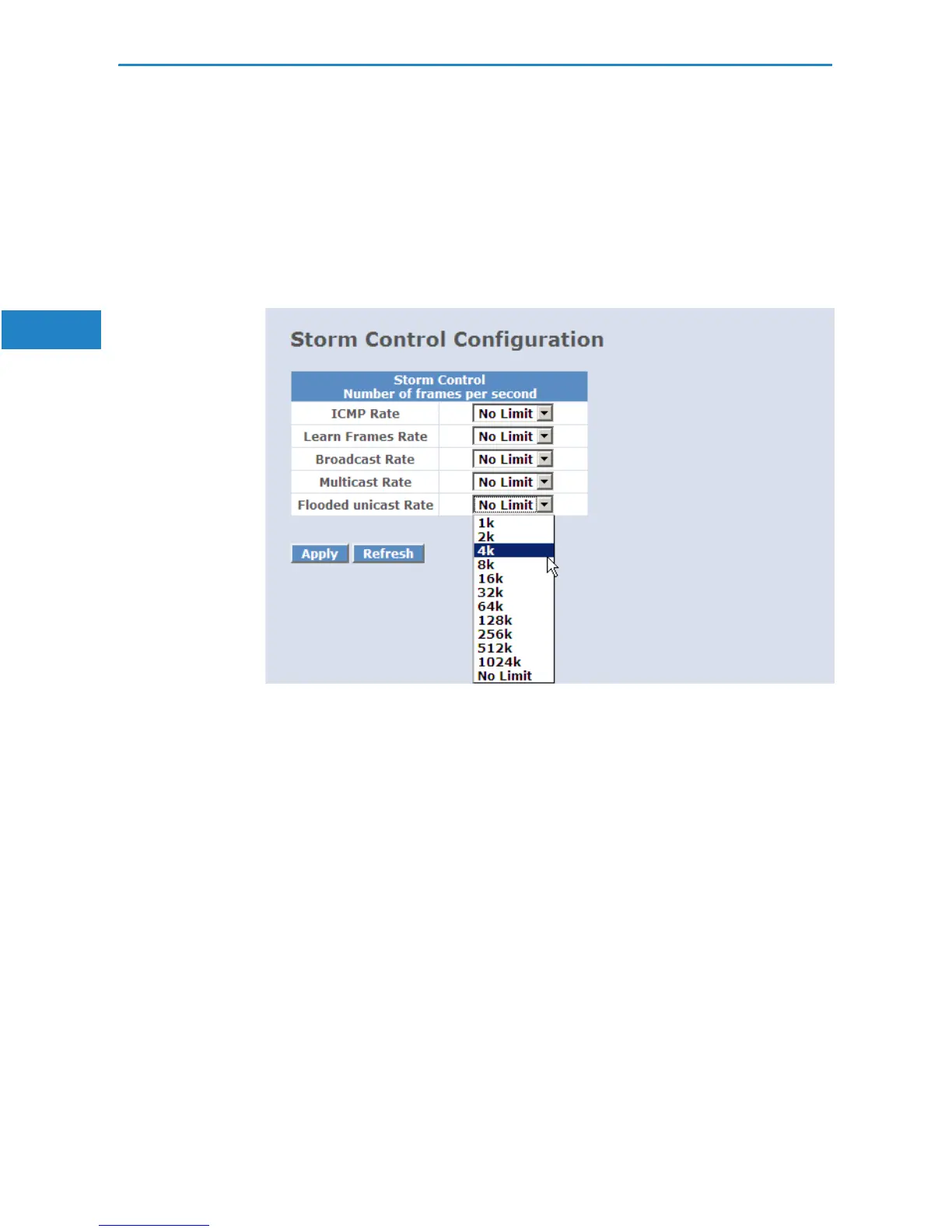
4.2.14 Storm Control
Storm Control is used to block unnecessary multicast and broadcast frames
that reduce switch's performance. When the function is enabled and values of
storm control are exceeded, multicast and broadcast frames will be dropped.
Parameter:
쮿 ICMP Rate:
Enables the ICMP Storm capability. The setting range is 1k-1024k per
second. If the amount of ICMP packets reachs this value, ICMP packets
will be dropped.
Default: No Limit
쮿 Learn Frames Rate:
To enable the Learn Frames Storm capability. User can use drop-down
menu to select number of frames. The setting range is 1k~1024k per
second.
Default: No Limit
쮿 Broadcast Rate:
To enable the Broadcast Storm capability. User can use drop-down menu
to select number of frames. The setting range is 1k~1024k per second.
Default: No Limit


 To Next Page