NCA-4020 User Manual
15
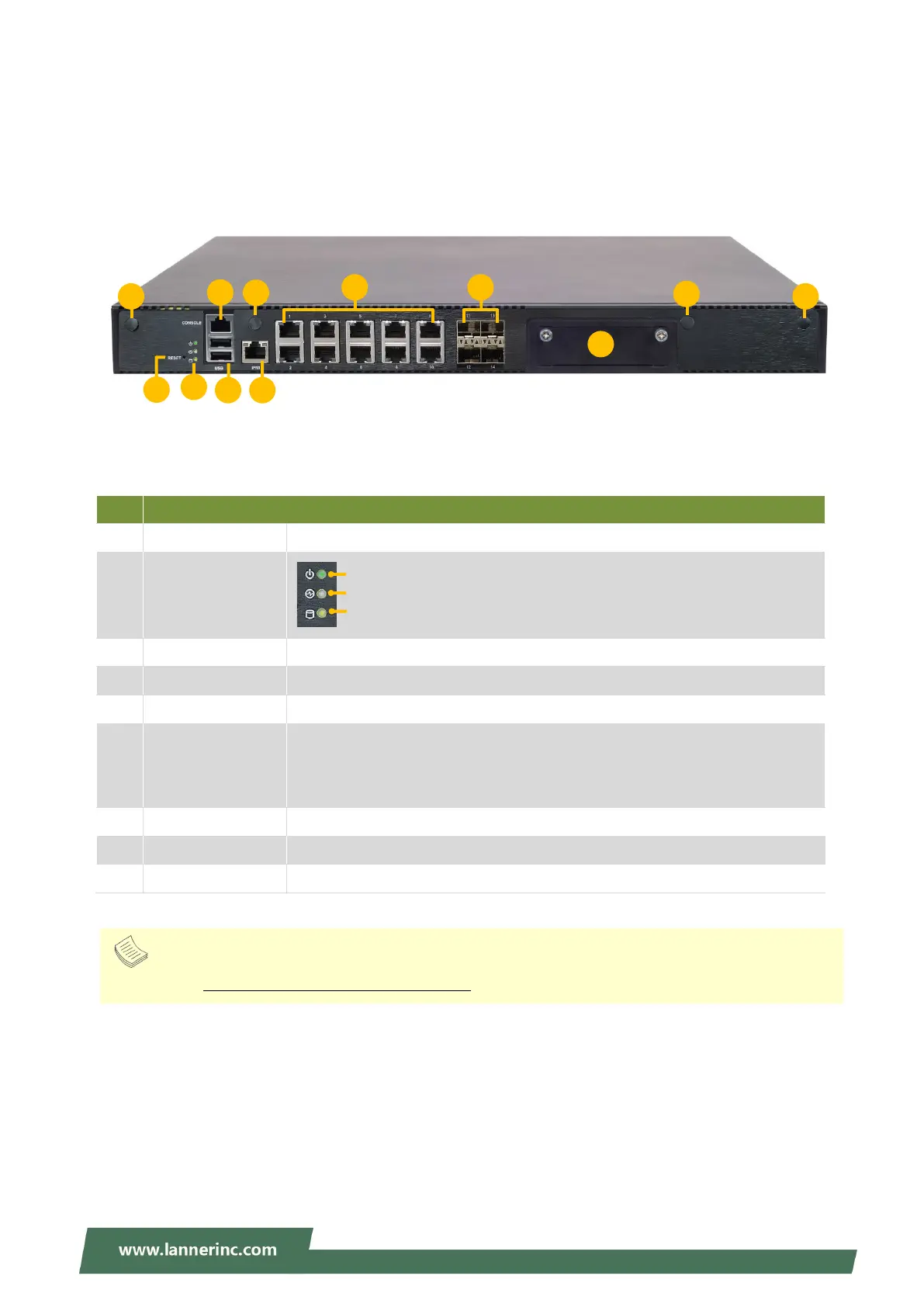
Front Panel
No. Description
F1 Reset Button For software reset
F2 LED Indicators
F3 Console Port 1x RJ45 console port
F4 USB Ports 2x USB 2.0 port
F5 LOM Port 1x IPMI port
F6 RJ45 Port
10x 1G RJ45 port with LED
SKU A/B: LAN3~10 are PoE Ports
SKU C/D: LAN3~6 are PoE Ports
F7 SFP+ Port 4x 10G SFP+ port with LED
F8 SIM Slot 3x Nano SIM Connector
F9 Antenna Port 4x Reserved antenna port for Wi-Fi / LTE module
System Status
HDD Activity
1 3 5 7 9
2
4 6 8 10
Note
Please refer to Appendix A: LED Indicator Explanations for descriptions of the LED Indicators



 To Next Page