41
2
Hardware Installation
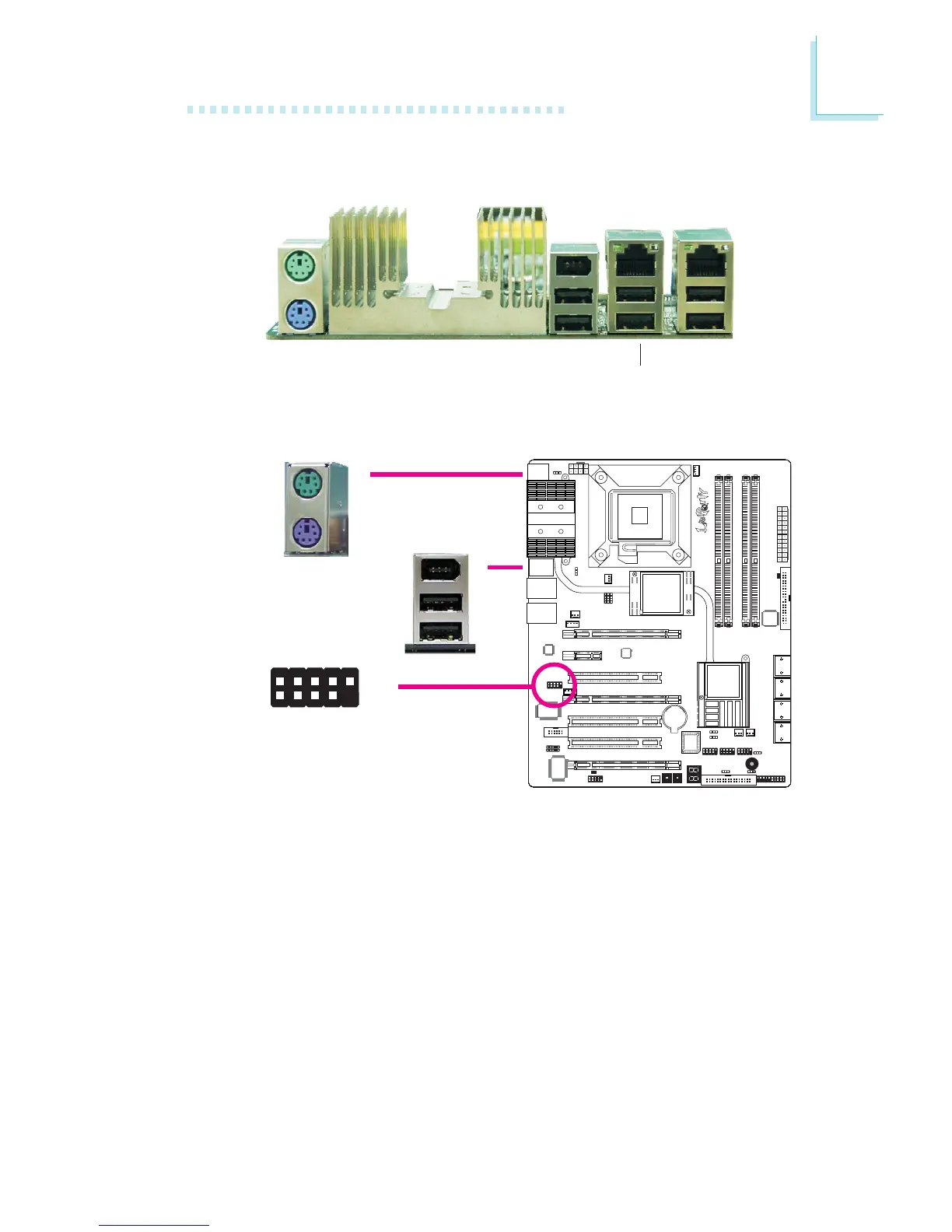
PS/2 Mouse and PS/2 Keyboard Ports
These ports are used to connect a PS/2 mouse and a PS/2 key-
board.
IEEE 1394 Ports
The IEEE 1394-0 port is used to connect audio/video devices or
storage peripherals. The 10-pin connector allows you to connect an
additional 1394 port. Your 1394 port may come mounted on a
card-edge bracket. Install the card-edge bracket to an available slot
at the rear of the system chassis then connect the 1394 port cable
to this connector.
PS/2 Ports and IEEE 1394 Ports
W
1394-0
W
PS/2 Mouse
PS/2 KB
Rear Panel I/O Ports
PS/2
Mouse
PS/2
K/B
1394-0
USB 10-11
USB 8-9
USB 6-7
LAN 2LAN 1
1394-1
W
+12V (fused)
1
TPA+
Ground
TPB+
+12V (fused)
Key
TPA-
Ground
TPB-
Ground
2
10
9


 To Next Page