EasyManua.ls Logo

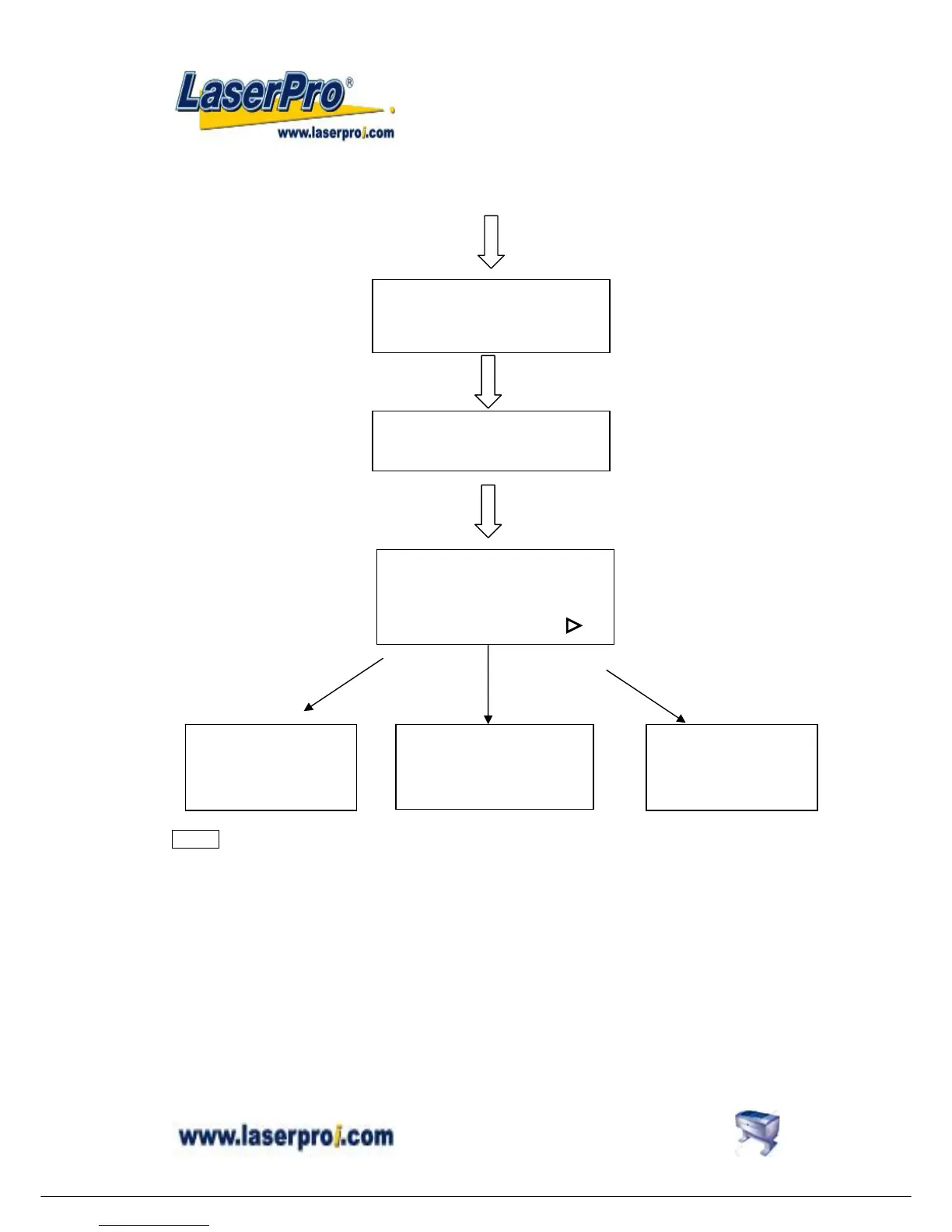
LaserPro Mercury - File Mode Selection

LaserPro Mercury
71 pages
Print Icon
To Next Page IconTo Next Page
To Previous Page IconTo Previous Page
Loading...
M
M
M
E
E
E
R
R
R
C
C
C
U
U
U
R
R
R
Y
Y
Y
U
U
U
S
S
S
E
E
E
R
R
R
M
M
M
A
A
A
N
N
N
U
U
U
A
A
A
L
L
L
22
Am I in Multiple File mode or Single File mode now?
Power ON
NOTE:
1. ** means default or current setting.
2. AUTO FOCUS and all other function keys should be operated under
STOP condition.
3. NEXT FILE and DELETE keys are invalid under Single file mode.
Single / 1 File
Ok: ENTER
Change: or
LaserPro MERCURY
Firmware V x. xx
Copyright 200x
Initializing
Please wait
Set memory buffer?
Yes: ENTER
End operation: ESC
Z init/AF position?
Table moves down about
50mm.
Press FUNCTION key.
Press ENTER key
Multiple /100 Files **
Ok: ENTER
Change: or
Single /No Repeat
Ok: ENTER
Change: or

Other manuals for LaserPro Mercury

Related product manuals