59
the Distance setting to determine the maximum distance the laser can “leap-frog” from one
image to another.
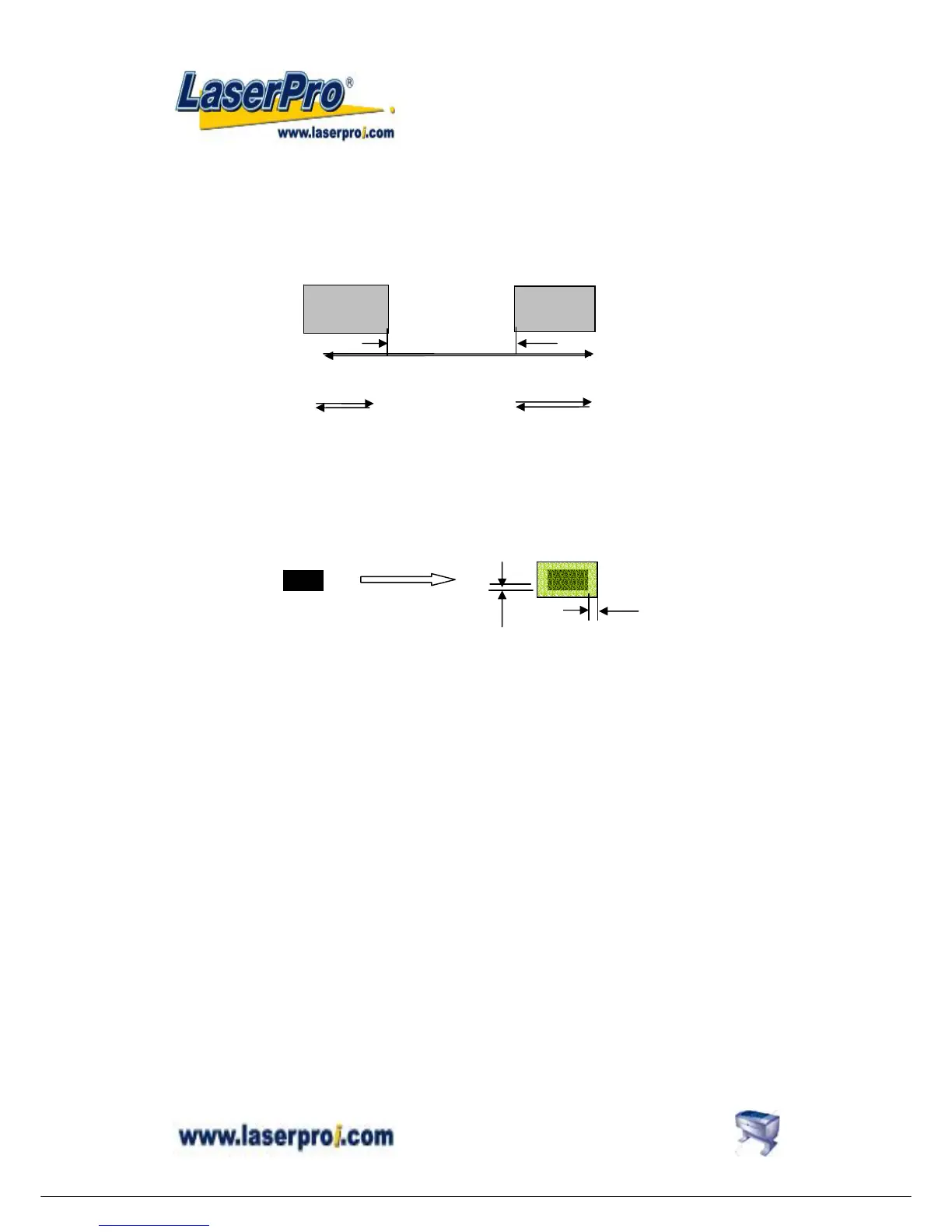
As below, suppose the “Distance” you specified is D and the distance between graph A & B is
X. If you chose the function “Cluster” and X > D, the output movement will be route b. If you
don’t chose “Cluster” or even you chose “Cluster” and X ≤ D, the output movement will be
route a.
C-6 Border
You can add border at image edge for a better output of the stamp image. You must select
“Image Invert” under stamp mode when using border. As for the figure below, you can specify
the border X and Y. If you chose the “Cluster” and want to have border, the border X and Y
must be less than the “Distance” D you specified.
D. Paper Settings
These settings are included in Mercury driver Properties → Paper. They are used to adjust
several output settings.
D-1 Paper Size
As described in Paper and Layout Settings, ensure that the paper size is no greater than the
working table area.
D-2 Unit
You can choose the unit measurement either with metric or imperial inch.
route a
route b
A
B
X
origin
Add border
X
Y


 To Next Page