Proline Low-temperature Thermostats
YACE0072 / 21.08.07 Starting up 31
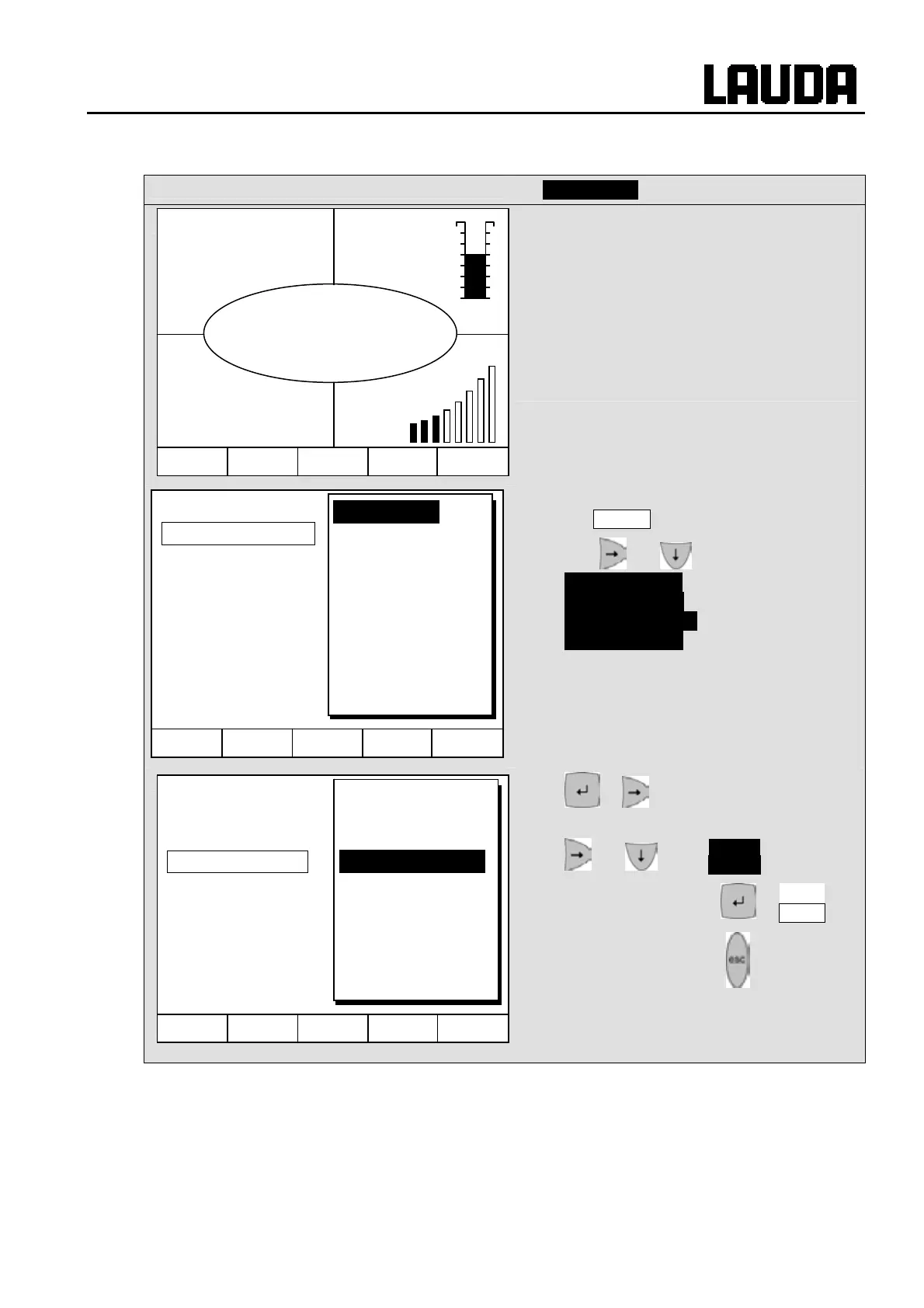
7.4.2 Changing window information (Command Console)
Command
Display data
You can adapt the information displayed by
your Command Console to your
requirements. For example, if you have not
connected any temperature probe, you can
exchange it in the standard setting of the
normal window for the maximum temperature
T
max
(safety cut-off).
This is how it is done:
− Open the unit parameter menu via the soft
key Menu .
− With and change from
Settings Æ
Display Data Æ
Standard Window Æ .
Edit
− or takes you to the illustrated
window.
− and marks T max as illustrated.
− Confirm selection with or End ,
− or quit the window with without any
changes being made.
Hel
Menu Screen T
set
T
fix
T
int
°C
25.01
T
set
°C
25.00
Level
4
T
ext
°C
25.02
Pump
3
Hel
Menu End T
set
T
fix
Edit
Default
Basic Window
Standard Window
Super Window
Hel
Menu End T
set
T
fix
T internal
T external
Setpoint
T max
Pump step
Set value
Level
Control variable
Date/time
Center
Up left
Up right
Down left
Down right



 To Next Page