LAUNCH X-431 V+ User’s Manual — Knowledge of X-431 V+
10
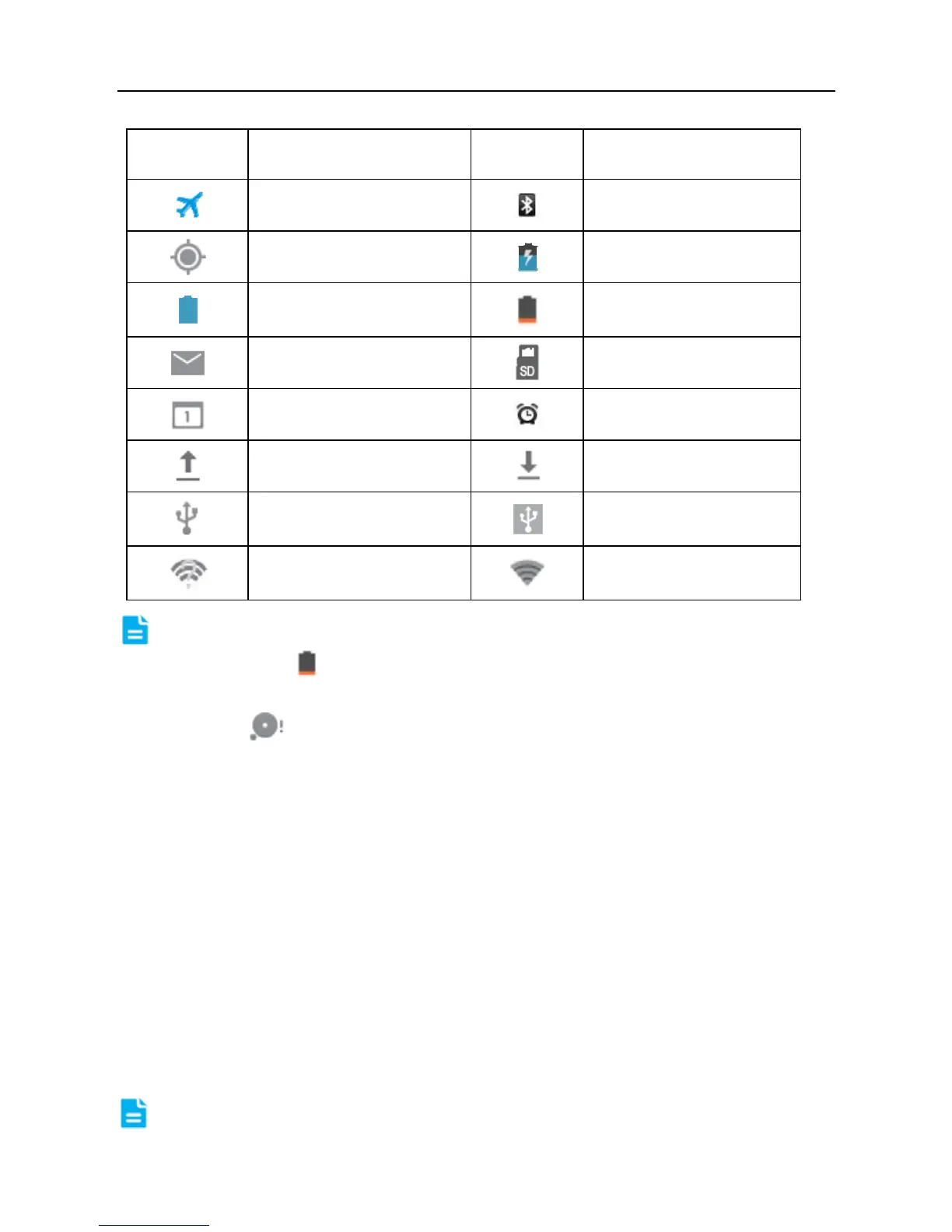
Indicators Definitions Indicators
Definitions
Airplane mode
Bluetooth is on
Positioning GPS
Charging
Battery is fully
charged
Low battery
New mail
Preparing SD card
To do list is set
Alarm has been set.
uploading
downloading
Connected to a PC
USB bound is
activated
Available Wi-Fi is
detected
Connected to Wi-Fi
Notes:
> When the
icon appears on the status bar, please charge it
immediately.
> If this
icon appears, please clear or delete some applications.
Insufficient memory may cause the installation failure of applications or data
can not be saved.
2.8 Notice bar
The notice bar is used to display some activities, such as new message, to do
list and running tasks. You can also open the notice bar to view the reminder or
activity notification.
2.9 Customize your desktop
2.9.1 Move items on the desktop
1. Hold and press the item to be moved until it is shaken.
2. Drag and drop it to the target location.
Note: Drag the icon to the margin of the screen and keep it still, the system



 To Next Page