LAUNCH X-431 V+ User’s Manual — Others
42
5.2 Browser
5.2.1 Open browser
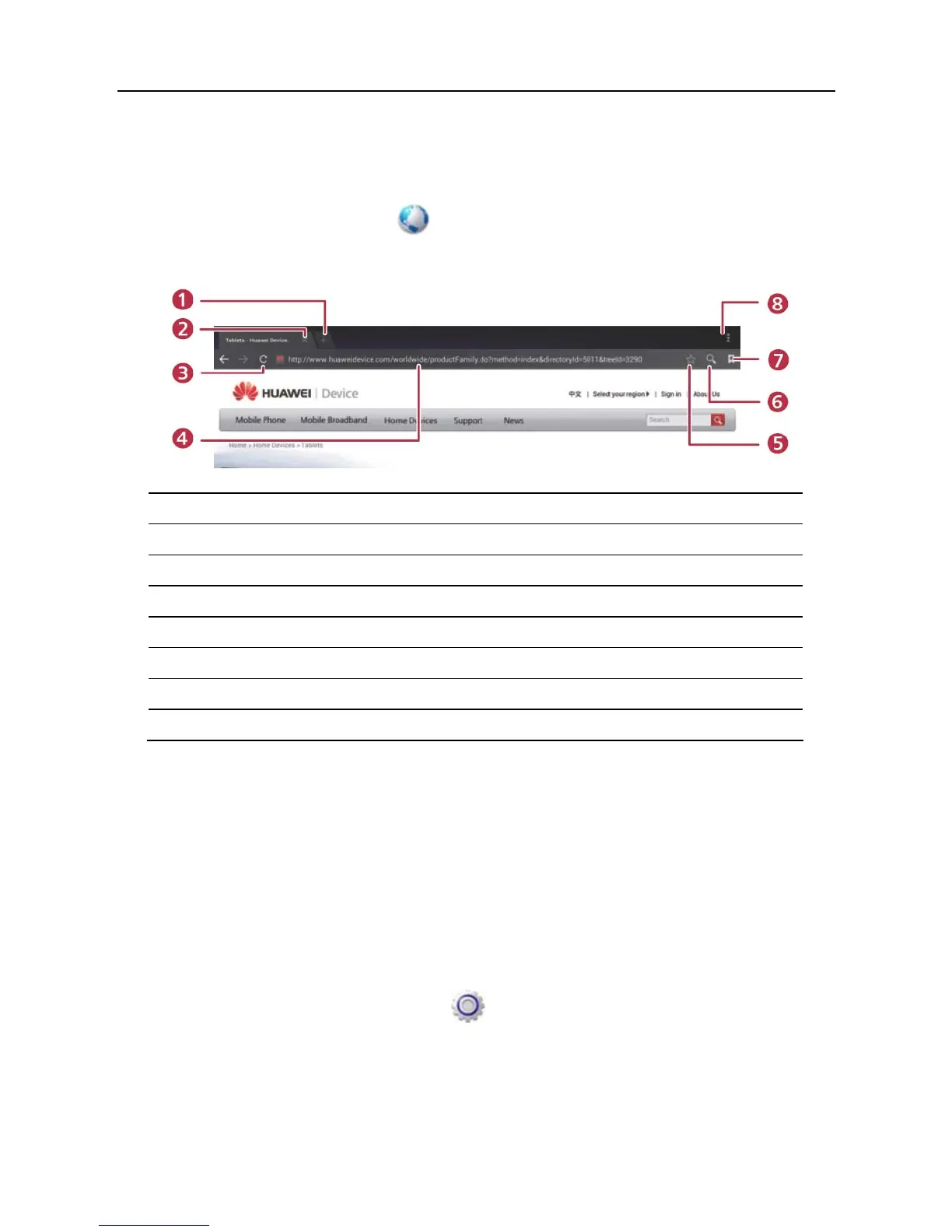
Enter main menu screen, tap to launch the browser. You can choose the
desired homepage or input the website address to browse.
1 Create a new tab.
2 Close the current page.
3 Refresh the current page.
4 Input a web address.
5 Add the current page as bookmark.
6 Open search bar.
7 Open bookmark list.
8 View more options.
5.2.2 Download files
Files, pictures, and applications can be downloaded from the website in browser.
For example:
Tap and press a picture, then choose “Save image” from pop-up menu to
download it.
To download a link, tap and press it, and then choose “Save link”.
To protect your X-431 V+ and personal data, please download applications from
trusted sources. To configure it, tap
> All > Security, and then deselect the
box next to Unknown sources.
5.2.3 Manage bookmarks
You can set the favorite website as bookmark for your quick access.



 To Next Page