18
LAUNCH
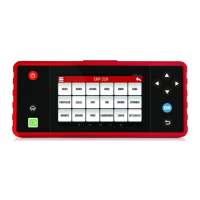
dierent items are marked in dierent colors.
On-Screen Buttons:
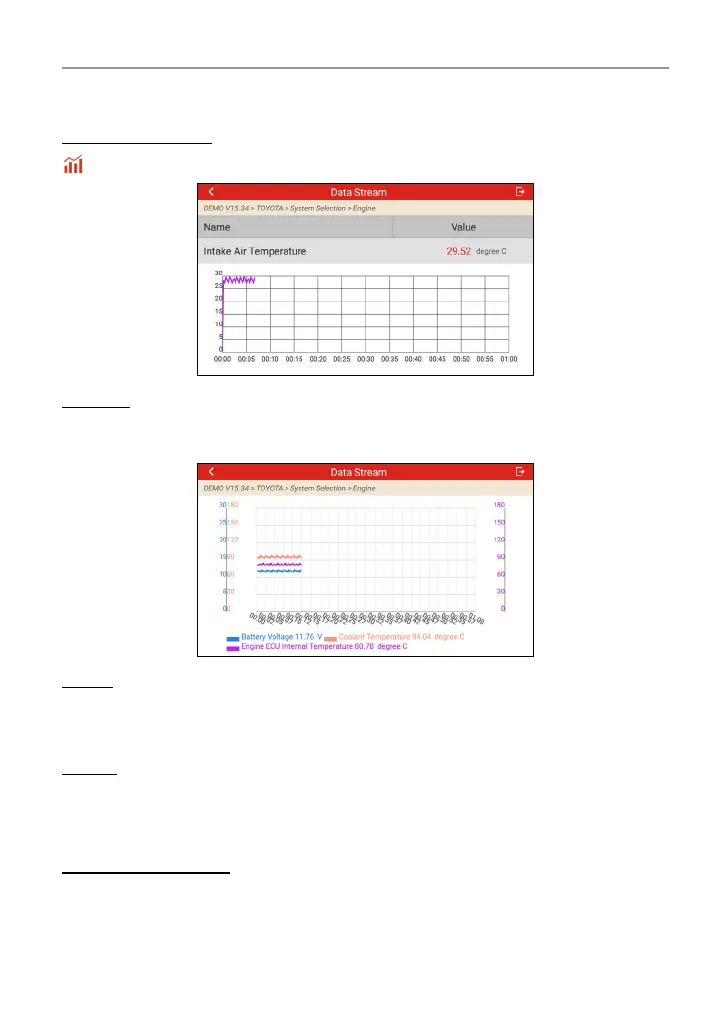
: Tap it to view the waveform graph of the current data stream item.
Combine: Tap it, a pull-down list of the data stream items appears on the screen.
Select the necessary items (Max. 4 items can be selected at the same time) and
the screen will display the waveforms corresponding to these items immediately.
Report: Tap to save the current data as a diagnostic report. All diagnostic reports
can be accessed from Settings -> Data -> Diagnostic Report. The tool logs the
Date of Report (the date and time at which the report was created) and assigns
a unique Report #.
Record: Tap to record and save Live Data. Recorded Live Data can serve as
valuable information to help you in troubleshooting and diagnosing vehicle
problems. All diagnostic records can be access from Settings -> Data ->
Diagnostic Record.
D. Special Functions
It oers coding, reset, relearn and more service functions, to help vehicles get
back to functional status after repair or replacement. Available tests vary by
vehicle manufacturer, model, and year.




 To Next Page