21
LAUNCH
5. Upgrade
This function allows you to update the diagnostic app and software. All software
is updated periodically. It is recommended to update and install the latest
software version for the best service, functions and experience.
1). Use and update of the diagnostic software pre-installed on the tool is free of
charge forever. No subscription renewals are required.
2). Use and update of the diagnostic software purchased in the “Mall” is free
of charge for one year. If the free period is due, user needs to renew the
subscription. Refer to Chapter 5.2 for details.
*Note: Make sure the Wi-Fi connection is strong and stable while updating.
5.1 Update Diagnostic Software & App
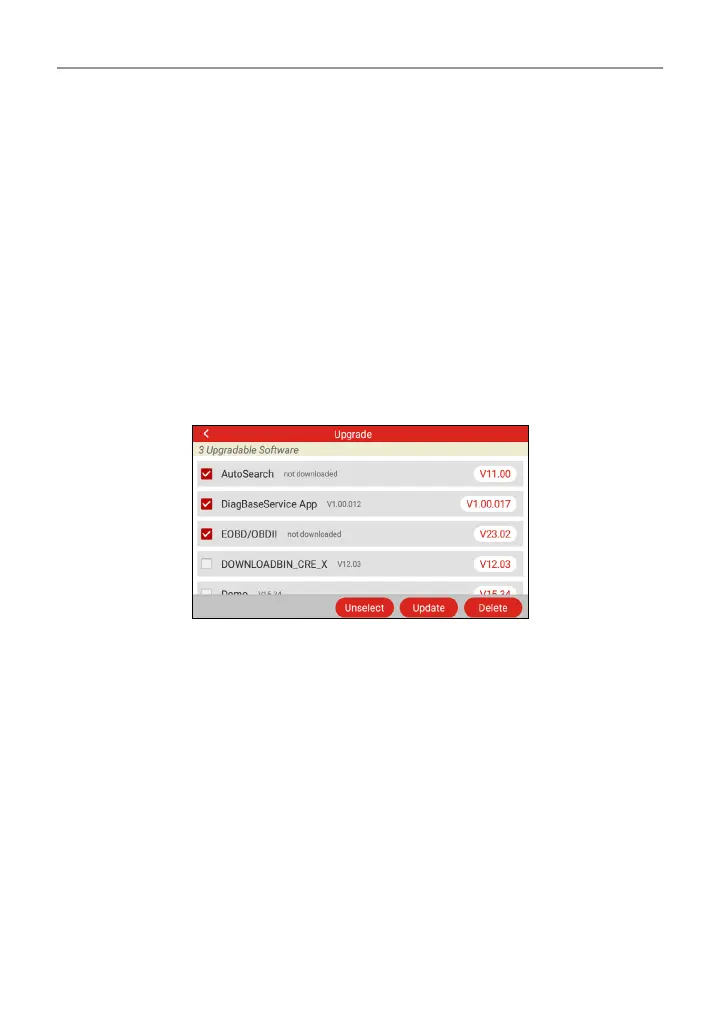
Tap “Upgrade” on the Job menu to enter the update center.
By default, all diagnostic software is selected.
To deselect certain software, tap “Unselect”, and then check the box next to
vehicle model.
Tap “Update” to start downloading. It may take several minutes to nish, please
be patient.
Once download is nished, the software packages will be installed automatically.
5.2 Renew Subscription
Use and update of the software conguration purchased in the “Mall” is free of
charge for one year. If the free period is due, the software of the current version
will be locked. To unlock it, user needs to renew the subscription.
Tap “Upgrade” on the Job menu to enter the update center.
If the free period is due, a prompt message will pop up on the screen. Tap
“Renew” to enter the Mall. Select desired diagnostic software conguration, and




 To Next Page