EasyManua.ls Logo

Leadshine DMA860E - User Manual

Leadshine DMA860E
15 pages
Print Icon
To Next Page IconTo Next Page
Loading...
User Manual
DMA860E
2-Phase Digital Stepper Drive
Hardware Version 2.0
Manual Revision 1.0
Question and Answer IconNeed help?

Do you have a question about the Leadshine DMA860E and is the answer not in the manual?

Summary

Introductions

DMA860 E Features

Key features of the DMA860E digital stepper drive, including control modes and resolutions.

DMA860 E Applications

Industries and types of equipment where the DMA860E stepper drive is suitable.

Specifications

Electrical Specifications

Detailed electrical parameters including output current, supply voltage, and pulse frequency.

Environmental Specifications

Operating and storage environment conditions, including temperature, humidity, and vibration.

Mechanical Specifications

Physical dimensions and mounting recommendations for the DMA860E stepper drive.

Heat Elimination

Recommendations for managing motor and drive heating, including idle current and mounting.

Connection Pin Assignments and LED Indication

P1 Control Connector Details

Pinout and function descriptions for the P1 control signal input connector.

P2 Fault and Brake Output Connector

Details for the P2 connector used for fault and brake output signals.

P3 Motor and Power Supply Connector

Pinout and connection details for power supply and motor phase connections.

P4 Tuning Connector Interface

Information on the RS232 tuning port for parameter modification.

LED Light Indicators

Explanation of the green power LED and red protection LED indications.

Control Signal and Output Signal

Control Signal Connection Methods

How to connect differential or single-ended control signals (pulse, direction, enable).

Fault and Brake Output Connections

Wiring for fault output and brake control using the P2 connector.

Motor Connection

4-Lead Motor Connections

Guide for connecting 4-lead stepper motors, noting speed-torque characteristics.

6-Lead Motor Connections

Configuration options for 6-lead motors: half coil (high speed) and full coil (high torque).

8-Lead Motor Connections

Series and parallel connection methods for 8-lead motors to suit application needs.

Power Supply Selection

Regulated vs. Unregulated Power Supplies

Comparison of power supply types and recommendations for stepper drives.

Power Supply Sharing Guidelines

Instructions for sharing a single power supply among multiple DMA860E drives.

Selecting Optimal Supply Voltage

Guidance on choosing the correct voltage for performance, noise, and reliability.

DIP Switch Configurations

Microstep Resolution Settings

How to set microstep resolution using DIP switches SW5, SW6, SW7, and SW8.

Output Current Settings

Configuring dynamic and idle current using DIP switches SW1, SW2, SW3, and SW4.

Control Mode Configuration

Setting the control mode (step/direction vs. CW/CCW) using DIP switch SW9.

Smoothing Time Configuration

Enabling and configuring the advanced feature for control command smoothing with SW10.

Automatic Motor Matching

Automatic self-configuration feature for optimal motor matching upon power-up.

Wiring Notes

Interference Prevention and Cable Management

Tips for using shielded cables and separating signal/motor wires to prevent noise.

Power Supply Connection Practices

Recommendations for connecting power supplies to multiple drives and avoiding daisy-chaining.

Typical Connection

Stepping System Connection Diagram

A visual guide showing how to connect the motor, drive, power supply, and controller.

Sequence Chart of Control Signals

PUL, DIR, ENA Signal Timing

Diagrams and remarks illustrating correct timing for PUL, DIR, and ENA signals.

Protection Functions

Built-in Drive Protections

Explanation of over-current and over-voltage protection features and LED blink codes.

Troubleshooting

Identifying and Isolating System Problems

Steps to diagnose and resolve issues with the stepper drive system.

Common Symptoms and Possible Causes

A table listing common issues like 'Motor not rotating' and their potential causes.

Summary

Introductions

DMA860 E Features

Key features of the DMA860E digital stepper drive, including control modes and resolutions.

DMA860 E Applications

Industries and types of equipment where the DMA860E stepper drive is suitable.

Specifications

Electrical Specifications

Detailed electrical parameters including output current, supply voltage, and pulse frequency.

Environmental Specifications

Operating and storage environment conditions, including temperature, humidity, and vibration.

Mechanical Specifications

Physical dimensions and mounting recommendations for the DMA860E stepper drive.

Heat Elimination

Recommendations for managing motor and drive heating, including idle current and mounting.

Connection Pin Assignments and LED Indication

P1 Control Connector Details

Pinout and function descriptions for the P1 control signal input connector.

P2 Fault and Brake Output Connector

Details for the P2 connector used for fault and brake output signals.

P3 Motor and Power Supply Connector

Pinout and connection details for power supply and motor phase connections.

P4 Tuning Connector Interface

Information on the RS232 tuning port for parameter modification.

LED Light Indicators

Explanation of the green power LED and red protection LED indications.

Control Signal and Output Signal

Control Signal Connection Methods

How to connect differential or single-ended control signals (pulse, direction, enable).

Fault and Brake Output Connections

Wiring for fault output and brake control using the P2 connector.

Motor Connection

4-Lead Motor Connections

Guide for connecting 4-lead stepper motors, noting speed-torque characteristics.

6-Lead Motor Connections

Configuration options for 6-lead motors: half coil (high speed) and full coil (high torque).

8-Lead Motor Connections

Series and parallel connection methods for 8-lead motors to suit application needs.

Power Supply Selection

Regulated vs. Unregulated Power Supplies

Comparison of power supply types and recommendations for stepper drives.

Power Supply Sharing Guidelines

Instructions for sharing a single power supply among multiple DMA860E drives.

Selecting Optimal Supply Voltage

Guidance on choosing the correct voltage for performance, noise, and reliability.

DIP Switch Configurations

Microstep Resolution Settings

How to set microstep resolution using DIP switches SW5, SW6, SW7, and SW8.

Output Current Settings

Configuring dynamic and idle current using DIP switches SW1, SW2, SW3, and SW4.

Control Mode Configuration

Setting the control mode (step/direction vs. CW/CCW) using DIP switch SW9.

Smoothing Time Configuration

Enabling and configuring the advanced feature for control command smoothing with SW10.

Automatic Motor Matching

Automatic self-configuration feature for optimal motor matching upon power-up.

Wiring Notes

Interference Prevention and Cable Management

Tips for using shielded cables and separating signal/motor wires to prevent noise.

Power Supply Connection Practices

Recommendations for connecting power supplies to multiple drives and avoiding daisy-chaining.

Typical Connection

Stepping System Connection Diagram

A visual guide showing how to connect the motor, drive, power supply, and controller.

Sequence Chart of Control Signals

PUL, DIR, ENA Signal Timing

Diagrams and remarks illustrating correct timing for PUL, DIR, and ENA signals.

Protection Functions

Built-in Drive Protections

Explanation of over-current and over-voltage protection features and LED blink codes.

Troubleshooting

Identifying and Isolating System Problems

Steps to diagnose and resolve issues with the stepper drive system.

Common Symptoms and Possible Causes

A table listing common issues like 'Motor not rotating' and their potential causes.

Overview

The Leadshine DMA860E is a 2-phase digital stepper drive designed for controlling 2-phase (1.8°) or 4-phase (0.9°) NEMA 23, 24, 34, and 42 hybrid stepper motors. It utilizes advanced stepper control technology to ensure smooth motor operation with optimal torque, reduced motor heating, and lower noise levels. This drive is suitable for various industrial applications requiring simple step and direction control, such as X-Y tables, engraving machines, labeling machines, mills, plasma cutters, laser cutters, and pick-and-place devices. Its straightforward design and easy setup make it a practical choice for many motion control systems.
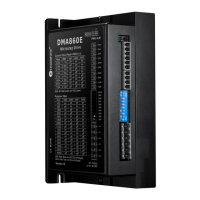
Important Technical Specifications:

  • Output Current: The drive can output a current range from 2.4A to 7.2A (peak). This can be configured via DIP switches in 8 settings (2.4A to 7.2A) or through software with a finer resolution (1.0A to 7.2A, increasing by 0.1A).
  • Supply Voltage: It operates with an input voltage of 18-80VAC or 24-110VDC. The recommended range is 20-70VAC or 30-90VDC.
  • Logic Signal Current: The logic signal current is typically 10mA, with a minimum of 7mA and a maximum of 16mA.
  • Pulse Input Frequency: The maximum pulse input frequency supported is 200 kHz.
  • Minimal Pulse Width: The minimal pulse width required is 2.5µs.
  • Minimal Direction Setup Time: A minimal direction setup time of 5.0µs is specified.
  • Isolation Resistance: The isolation resistance is 500 MΩ.
  • Operating Temperature: The drive is designed to operate in an ambient temperature range of 0°C to 65°C (32°F to 149°F) for the environment and 0°C to 50°C (32°F to 122°F) for the operating temperature.
  • Storage Temperature: The storage temperature range is -20°C to 65°C (-4°F to 149°F).
  • Humidity: It can operate in humidity levels ranging from 40%RH to 90%RH.
  • Vibration: The drive can withstand vibrations of 10-50Hz/0.15mm.
  • Weight: The DMA860E weighs approximately 510g (1.13 lbs).
  • Dimensions: The mechanical dimensions are 151mm (length) x 55mm (width) x 10.5mm (height of mounting tabs) with a mounting hole distance of 139mm.

Usage Features:

  • Control Modes: The DMA860E supports both Step & Direction (PUL/DIR) and CW/CCW (double pulse) control modes. The control mode can be configured via DIP switch SW9.
  • Microstep Resolution: It offers 16 microstep resolutions ranging from 400 to 51,200 steps/revolution via DIP switches. Finer resolutions from 200 to 51,200 can be achieved via software.
  • Idle Current Reduction: The idle current can be reduced to 50% or 90% of the selected output current, configurable via DIP switch SW4. The current automatically reduces to 50% 0.4 seconds after the last pulse when SW4 is OFF.
  • Auto-tuning: The drive features auto-tuning capabilities to match a wide range of NEMA 23, 24, 34, and 42 stepper motors, ensuring optimal performance.
  • Anti-Resonance: It incorporates anti-resonance technology for optimal torque, extra smooth motion, and reduced motor heating and noise.
  • Soft-start: The drive provides a soft-start function, eliminating any "jump" when powered on.
  • Optically Isolated Inputs: Inputs for PUL, DIR, and ENA are optically isolated and compatible with 5V or 24V logic signals. The control signal voltage selector (S2) must be set correctly (5V or 24V) to match the input signal voltage.
  • Fault and Brake Outputs: The drive includes fault (ALM+, ALM-) and brake (BRK+, BRK-) outputs. The fault output is a maximum 30V/100mA output that changes impedance when an error occurs. The brake output can be used to control a motor brake.
  • Control Command Smoothing: Configurable control command smoothing helps reduce motor vibration. This feature, which adds a 12ms acceleration time filter, can be activated via DIP switch SW10.
  • DIP Switch Configuration: Most settings, including microstep resolution, output current, idle current percentage, control mode, and smoothing time, are easily configured using a 10-bit DIP switch.
  • Tuning Port (RS232): An RS232 tuning port (P4) is available for modifying drive parameters. This port is intended for parameter adjustment only and not for equipment control due to insufficient precision or stability.
  • LED Indicators: Two LED lights provide status indication: a GREEN LED for power (always on) and a RED LED for protection (flashes 1-2 times in a 3-second period to indicate different protection types).

Maintenance Features:

  • Heat Dissipation: For optimal performance and longevity, the DMA860E's reliable working temperature should be below 60°C (140°F). Side mounting is recommended to maximize the heat sink area. Vertical mounting is also suggested for better heat dissipation. If necessary, forced cooling methods should be employed.
  • Idle Current Mode: Utilizing the automatic idle-current mode (SW4 set to OFF) is recommended to reduce motor heating.
  • Wiring Guidelines:
    • Twisted pair shielded cables are recommended for control signals (P1) to improve anti-interference performance.
    • Control signal wires (PUL/DIR) and motor wires should be separated by at least 10 cm to prevent interference, which can cause motor position errors or system instability.
    • When multiple DMA860E drives share a power supply, each drive should be connected separately to the power supply rather than daisy-chained to avoid cross-interference.
    • It is crucial not to plug or unplug the P1, P2, and P3 terminal blocks while the drive is powered ON to prevent drive damage or personal injury. Specifically, unplugging connector P2 with power on can cause high back-EMF voltage surges, potentially damaging the drive.
  • Protection Functions: The drive incorporates built-in protection features to enhance reliability:
    • Over-current protection: Activated when the peak current exceeds the limit (RED LED blinks once).
    • Over-voltage protection: Activated when the drive's working voltage exceeds 160VDC (RED LED blinks twice).
    • Upon activation of these protections, the motor shaft will become free, and the RED LED will blink. To reset the drive, the power must be cycled after resolving the underlying problem.
  • Troubleshooting Guide: The manual provides a comprehensive troubleshooting guide listing common symptoms (e.g., motor not rotating, wrong direction, erratic motion, stalling, excessive heating) and their possible causes, aiding in diagnosing and resolving issues. It emphasizes documenting troubleshooting steps for easier technical support.

Leadshine DMA860E Specifications

General IconGeneral
BrandLeadshine
ModelDMA860E
CategoryDC Drives
LanguageEnglish

Related product manuals