EasyManua.ls Logo

Leica DSX - Project Output Export Options; Grid Definition Workflow Steps

Leica DSX
82 pages
Print Icon
To Next Page IconTo Next Page
To Previous Page IconTo Previous Page
Loading...
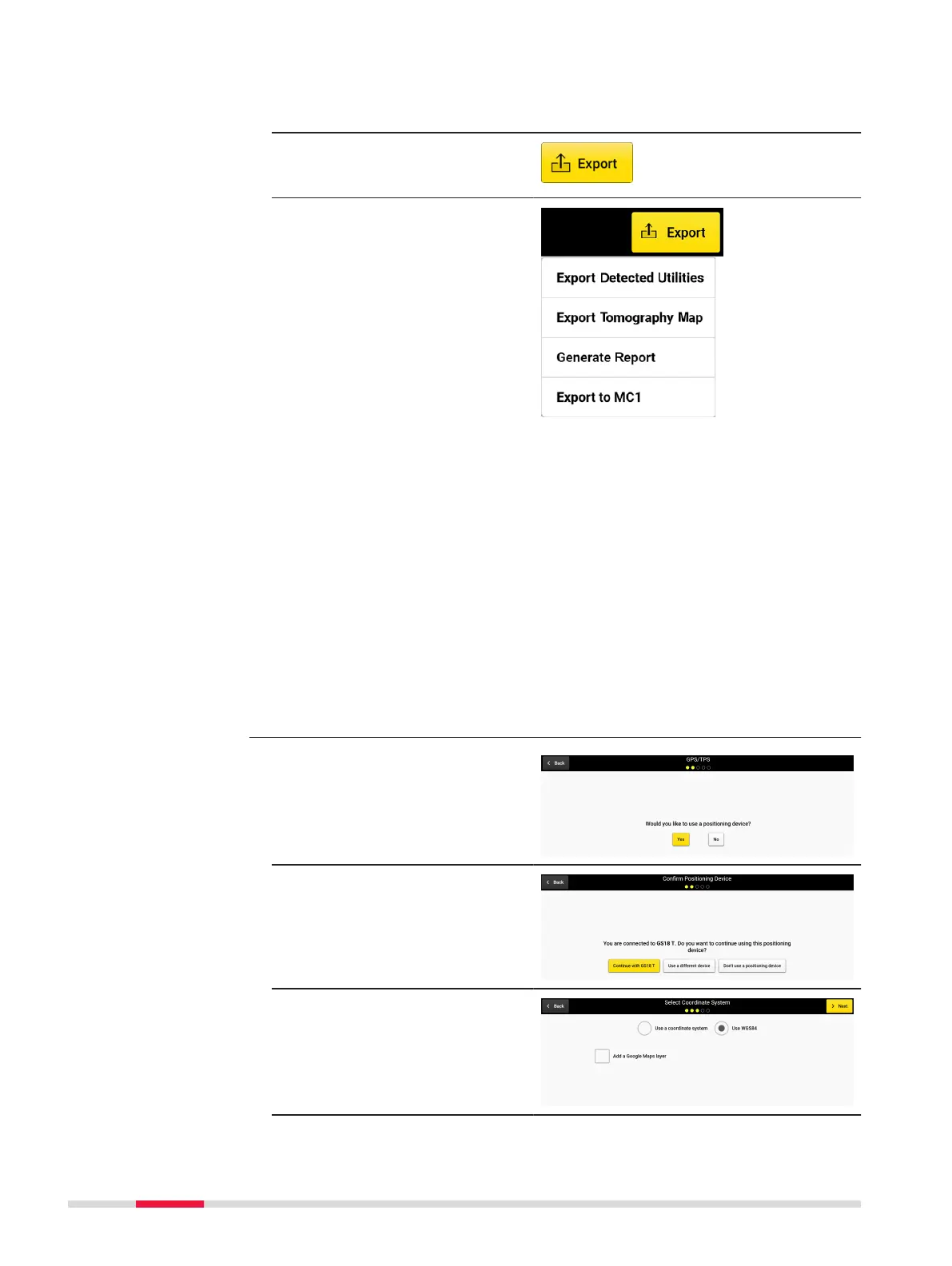
Export the project output
1. Make sure all utilities and POIs are marked.
2. Tap on Export to
export the project out-
put.
Export Detected
Utilities: Utility lines
and POIs in DXF,
DWG and SHP
format. Output in
selected Cartesian
coordinate system.
Export Tomo-
graphy Image: Cur-
rent tomography in
image formats.
Generate Report:
PDF report.
Export to MC1
avoidance zone:
Generates the
detected utilities
and scan area in dxf
format, under the
MC1-compatible
folder structure. This
allows using the
DXplore out-put dir-
ectly on the excav-
ator controlled by
MC1 software by
USB syncing.
1. Select the positioning
device.
2. Proceed with the con-
nected positioning
device or select an
alternative workow.
3. Select the coordinate
system and later
optionally a CAD layer
or proceed with WGS84
and Google Maps layer.
Project setup and grid
denition workow
Step-by-step
54 Procedures for Working with the DSX

Other manuals for Leica DSX