EasyManua.ls Logo

Leica DSX - Project Management Features in DXplore

Leica DSX
82 pages
Print Icon
To Next Page IconTo Next Page
To Previous Page IconTo Previous Page
Loading...
4.5 Project Management
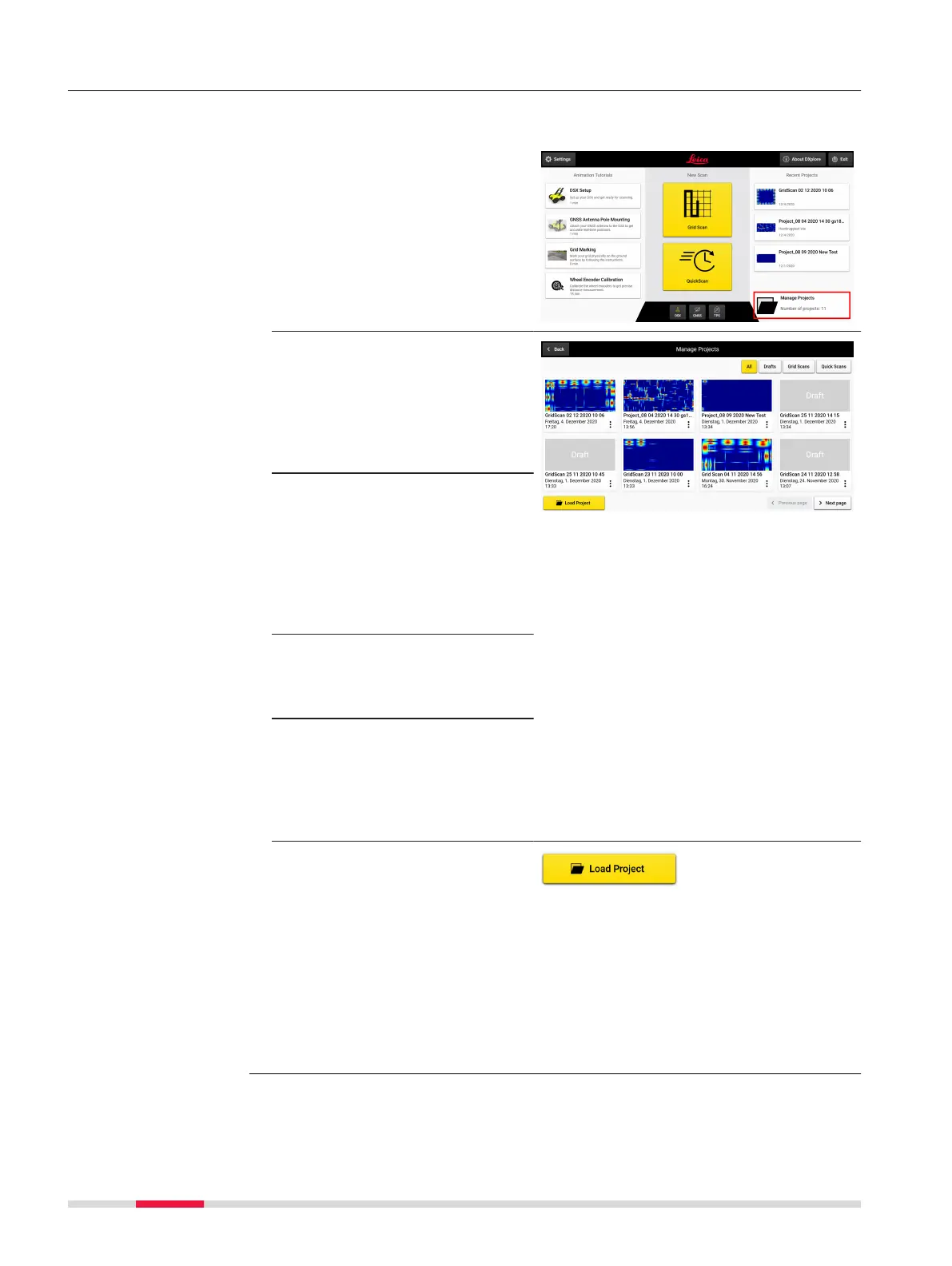
The Project Management feature in DXplore provides users easy access pre-
view, edit and open projects.
1. Select Manage
Projects on the bottom
right of the DXplore
Home screen.
2. The Manage Projects
screen provides a quick
overview of all recently
created or used
DXplore projects along
with their date and
time of creation.
3. Use the lter buttons
on the upper right sec-
tion to select which
projects appear on this
screen.
Select from All, Draft,
Grid Scans or Quick
Scans.
4. Projects can be opened
also by directly touch-
ing or clicking on the
project tiles.
The three dots offer
the option to open the
project, open in le
manager, delete the
project, or rename the
project.
The Load Project but-
ton allows other
projects, that are were
not recently view, to be
opened. This allows
simple navigation to the
location where the
project is stored, for
example from as USB
drive, or other location
on the tablet.
Step-by-step
42 DXplore Software

Other manuals for Leica DSX