Leica IC90 E User Manual The Leica IC90 E 12
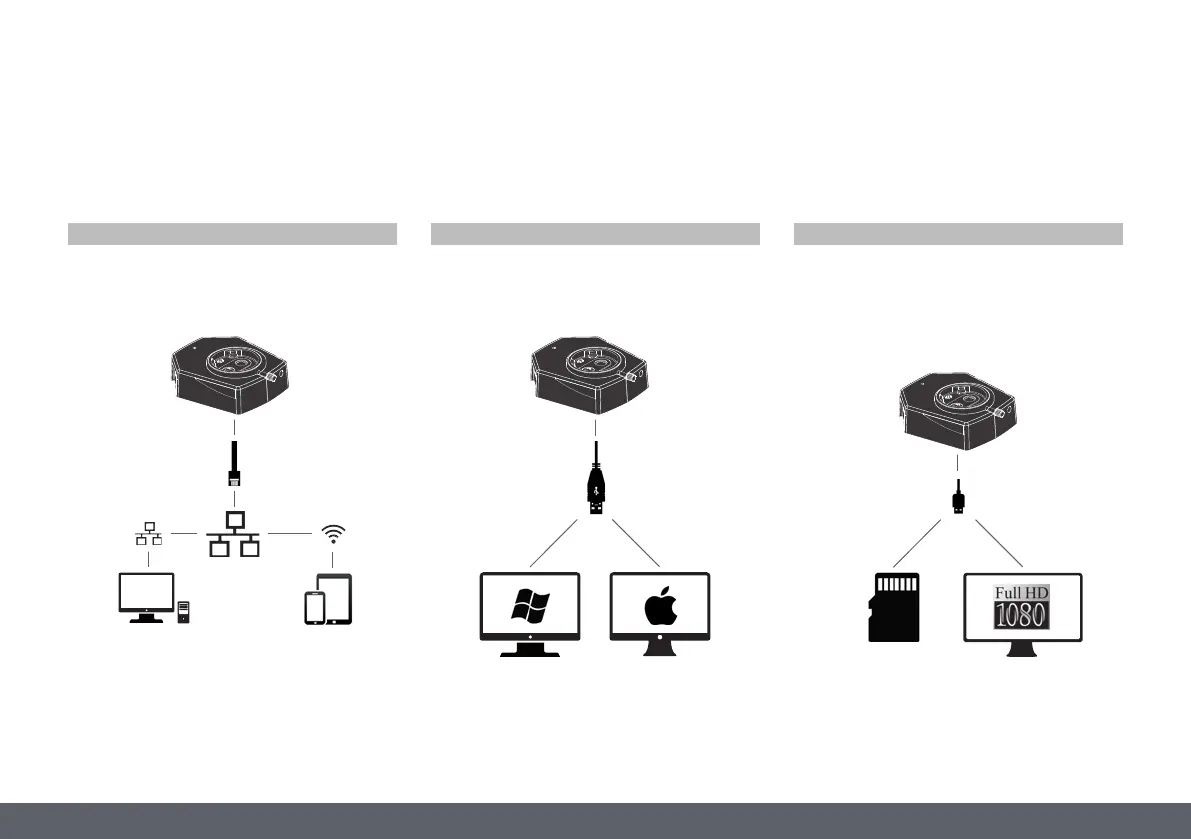
Your Leica IC90 E is a state of the art brightfield camera with 10 megapixel image resolution. The camera can be easily connected to a variety of stereo
microscopes (CMO) without additional components. There are various ways to connect the camera with your viewing devices:
Introduction
Use Ethernet mode to connect the Leica IC90E
with your facilities' network via Ethernet
(RJ45) cable.
For PC use the Leica Application Suite (LAS) Software (LAS 4.9 / LAS X 3.0 or higher) and for MAC use Leica Aquire (version 3.3 or higher)
to capture images. For mobile devices check the Apple App Store or Google Play for the Leica AirLab App from Leica Microsystems.
Use USB mode to connect the Leica IC90 E
directly via USB cable with a PC or MAC.
Use HDMI mode to connect the Leica IC90 E
to a large HD-screen for a standalone solu-
tion without computer. You can save images
directly onto SD card when operating in this
mode.
Capture images from any
remote PC or MAC with access
to your network (LAN).
Even mobile devices can be
used if there is a WLAN-connec-
tion to the same network.
Ethernet mode USB mode HDMI mode


 To Next Page