Leica IC90 E User Manual The Camera Remote Control (Standalone Kit) 34
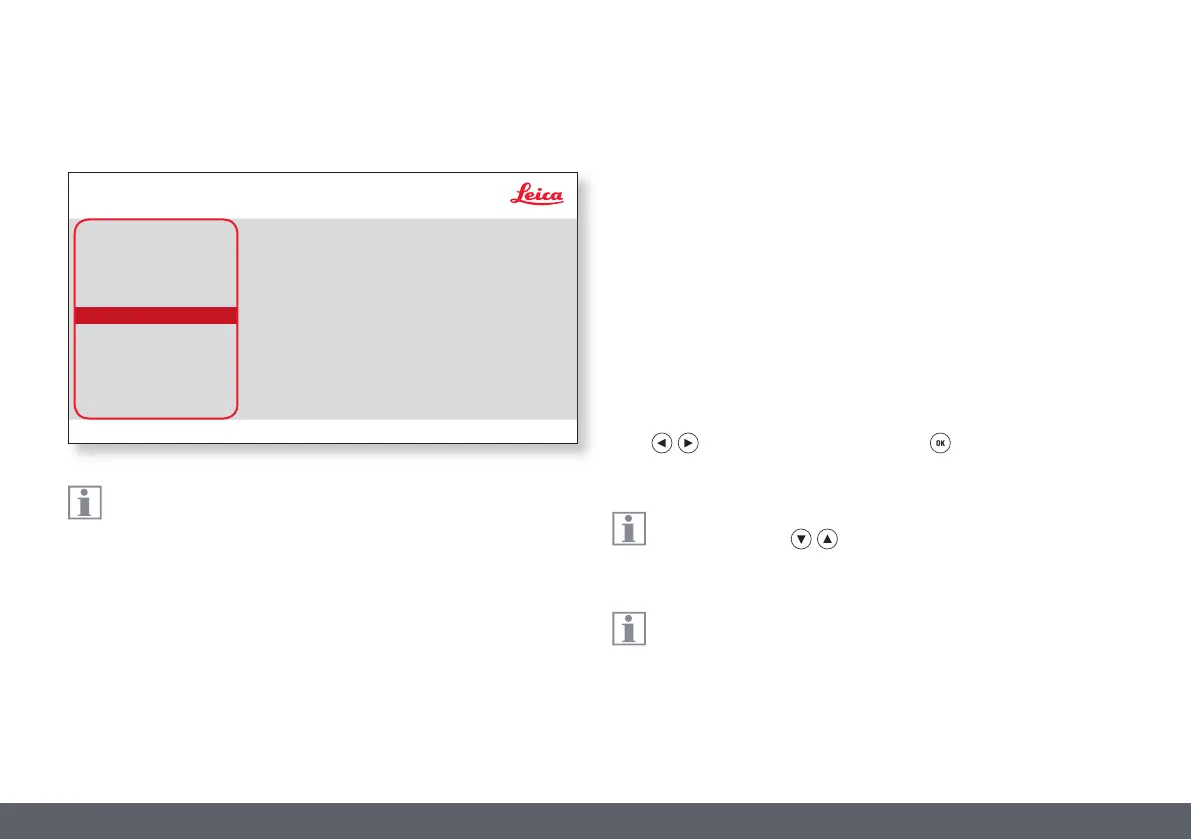
The camera settings enable you to control internal parameters such
as the date or time, reset the camera, etc.
RESET CAMERA
This command resets the camera to the factory settings. All user informa-
tion (such as white balance, resolution etc.) is reset.
SET DATE TIME
This command sets the date and time as well as the format for display-
ing them. The following formats are available for selection: YYMMDD –
DDMMYY – MMDDYY
FLIP IMAGE
Select this to view your images horizontal, vertical, or horizontal and
vertical.
AUDIO/BEEP
You can decide to have a tone from the camera for some functions.
LANGUAGE
Select the language of the On Screen Display.
SELECTING IMAGE OVERLAYS (SELECT OVERLAY)
Press to select another overlay. Press to activate the selected
overlay and leave the menu.
If you want to quickly display other overlays, press when the live
image is displayed to show the next or previous respective
overlay.
The firmware of the camera can updated. For detailed instruc-
tion please consult the download section of this camera on the
webpage of Leica Microsystem.
GREYSCALE
Allows you to remove the color information in the displayed and saved
image.
SETUP CAMERA (Camera Settings)
Leica IC90 E User Manual The Camera Remote Control (Standalone Kit) 34
COLOR
EXPOSURE
RESOLUTION
SETUP CAMERA
SETUP USER
SETUP ETHERNET
RESET CAM
SET DATE/TIME
FLIP IMAGE
AUDIO/BEEP
PRESS OK
PRESS OK
Leica IC90 E
NONE
ENABLE
LANGUAGE
SELECT OVERLAY
ENGLISH
NONE
GREYSCALE DISABLE


 To Next Page