Leica IC90 E User Manual The Camera Remote Control (Standalone Kit) 30
Enabling automatic white balance
1. Press the
button on the remote control.
2. Call up the "COLOR" entry.
3. Set the value for "WB MODE" to "AUTO".
4. Press the
button to exit the menu.
The values for "RED" and "BLUE" cannot be adjusted if the "WB
MODE" setting is set to "AUTO".
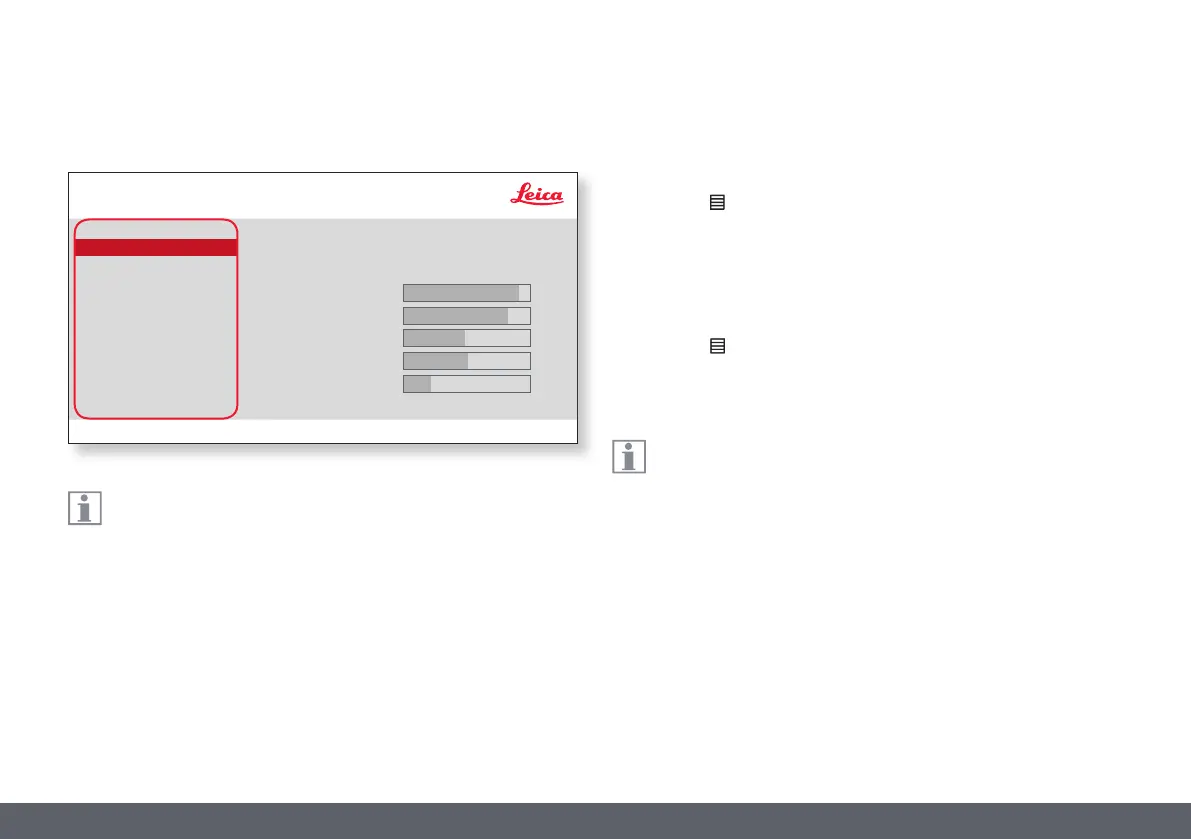
COLOR
COLOR (Automatic White Balance)
EXPOSURE
RESOLUTION
SETUP CAMERA
SETUP USER
SETUP ETHERNET
SET WB
WB MODE
RED LEVEL
BLUE LEVEL
BLACK LEVEL
HUE
PRESS OK
AUTO
SATURATION
The "COLOR" function makes it possible to adapt the camera chip
to the ambient light so that color-neutral images can be acquired.
Leica IC90 E
Leica IC90 E User Manual The Camera Remote Control (Standalone Kit) 30
46
41
0
1
12


 To Next Page