Leica IC90 E User Manual The Leica IC90 E 13
Your Leica HD camera has many possibili-
ties for various applications and condi-
tions of use. Below are some basic concepts to
help you get the most performance for your
application.
In order to keep your camera up to date
and to benefit from newest functions you
should update the camera's firmware from time
to time. Detailed instructions about this topic
can be found in the download section of the
Leica IC90 E on our website. To check out your
camera's firmware version use the information
box in stand-alone mode (see section remote
control) or the "About" section in the software
on the computer.
Power Leica IC90 E
Power can be provided to the camera in the
following ways:
O USB power connector on the microscope
stand
O External USB power supply
O USB connectors on the PC
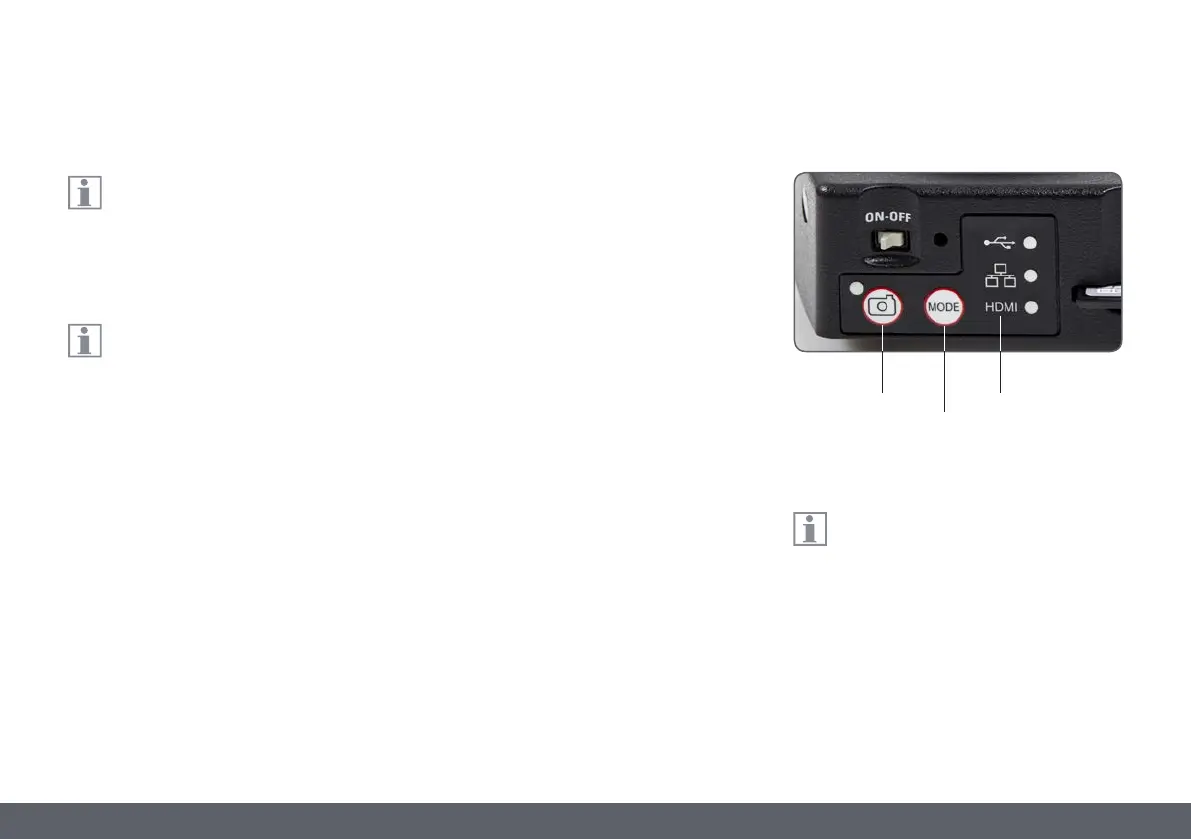
1. Capture button
O Used to capture an image in HDMI mode
2. Mode switch
O Switch into different modes (USB mode,
Ethernet mode, HDMI mode)
3. Mode panel
O The mode panel with the symbols for USB,
Ethernet and HDMI (from top to bottom) indi-
cates in which mode you are.
O The LEDs will flash when you change from
one mode to another.
The Basics
Note direct connection to an HD display
is possible in all modes.
3
2
1


 To Next Page