Fitting
the
bulb
Filters
Starting
up
24
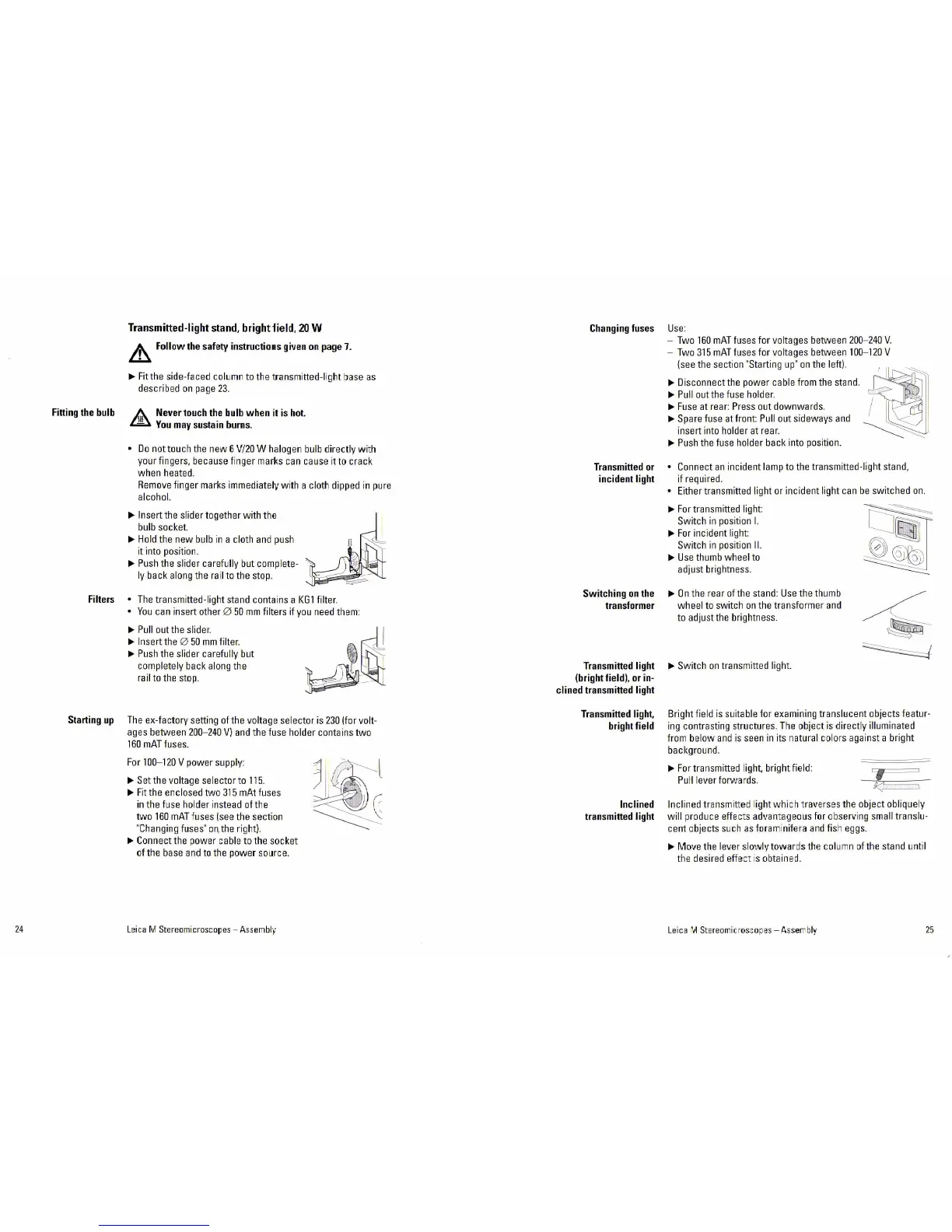
Transmitted-light
stand,
brightiield,
20
W
&,
Follow
the
safety
instructions
given
on
page
7.
~Fit
the side-faced
col~mn
to the transmitted-l
ig
ht base
as
described
on
pa
ge
23
.
&
Never
touch
the
bulb
when
it
is
hot.
Y
.
b
ou
may
sustam
urns.
•
Do
nottouch
the
new
6
V/20
W halogen bulb directly
with
your fingers, because finger marks can cause it to crack
when heated.
Remove finger marks immediately w ith a
cloth dipped
in
pure
alcohol.
~
Insert the slider together
with
the
bulb socket.
~
Hold the new bulb in a cloth
an
d push
it into position.
~Push
the slider
caref~lly
but complete-
ly
back along t
he
ra
il to the stop.
•
The
transmitted-light stand conta i
ns
a
KG1
filter.
•
Yo~
can insert other 0
50
mm
filters if you need them:
~
Pull out the slider.
~
Insert the 0
50
mm
filter.
~
Push
the slid er
caref~lly
but
completely back along t
he
rail to the stop.
The
ex-factory setting of the voltage
se
lector
is
230
!for volt-
ages between
200-240
V)
and
t
he
fuse holder contains
two
160
mAT
fuses.
For
100
-
120
V power supply:
~Se
t
the voltage
se
lec
tor
to
115
.
~
Fit the enclosed two
315
mAt fuses
in the f
us
e holder instead
ofthe
two
160
mAT
fuses !see the section
"Changing fuses" o
n,
the right).
~
Conn
ect the power cable to the socket
ofthe
base
and
to
t
he
power source.
Lei
ca M
St€r
eomicro
sc
op
es
- A
ss
embl
y
Changing
fuses
Transmitted
or
incident
light
Switching
on
the
transformer
Transmitted
light
(bright
field),
or
in-
clined
transmitted
light
Transmitted
light,
bright
field
Inclined
transmitted
light
Use
:
- Two
160
mAT
fuses for voltages between
200
-
240
V.
- Two
315
mAT
fu
s
es
for voltages between
100
-
120
V
!see the section "Starting
up
"
on
the left).
~
-,11~~'
~
~~-·
~Disconnect
the power cable from the stand.
~
~
Pull out the
f~se
holder.
~
Fuse
at rear: Press
o~t
downwards.
~Spare
fuse at
front
Pull out sideways
and
insert into holder at rear.
~
P~sh
the fuse holder back into
po
sition.
• Connect
an
incident lamp to the transmitted-light stand,
if required .
• Either transmitted light or incident light can
be
switched
on.
~
For
transmitted
light
Switch
in
position
I.
~
For
incident
light
Switch
in
position
11.
~
Use thumb wheel to
adjust brightness.
~On
the rear of the stand: Use the thumb
wheel to switch
on
the transformer
and
to adjust the brightness.
~
Switch
on
transmitted light.
Bright field
is
s~
i
table
for examining translucent objects featur-
ing contrasting structures. The obje ct
is
directly illuminated
from
be
low
and
is seen
in
its natural colors against a bright
backgro~nd.
~
For
transmitted light, bright field :
Pu
ll lever forwar
ds.
Inclined
tr
a
nsm
itted light
whi
ch travers
es
the object obliquely
will
p
rod~
c e
effe cts advantageous for observi
ng
small translu-
cent objects such
as
foram inifera
and
fish eg
gs
.
~
Move the lever slowly
towards
the col
um
n of the stand until
the desired effect
1s
obtaine
d.
Lei
ca
VI
St
ere
omi
cros
co
pes
-
Asse
mb
ly
25


 To Next Page