EasyManua.ls Logo

Leica MS5 - Near-Vertical Illuminator

Leica MS5
37 pages
Print Icon
To Next Page IconTo Next Page
To Previous Page IconTo Previous Page
Loading...
48
For
MS5,
MZ6:
For
Leica
MZ75,
MZ95,
MZ125:
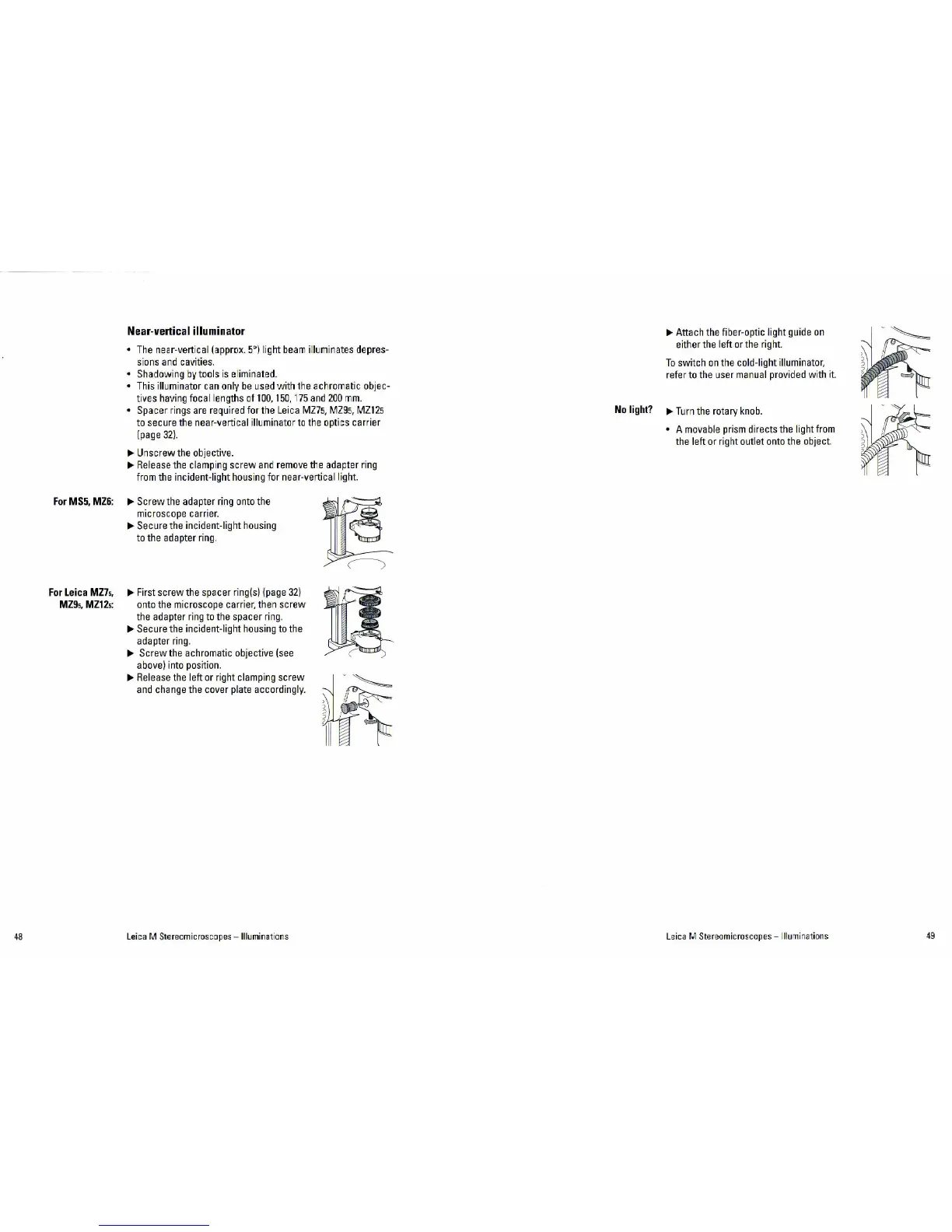
Near-vertical
illuminator
•
The
ne
ar-verti
cal
(approx.
5~
)
light
bea
m il
lum
in
ates
dep
r
es-
sions
a
nd
cavities.
•
Shadowing
by tools
is
eli
minated.
•
This
illumina
t
or
can
only
be
used
with
the
achromatic objec-
tives
having
focal
le
n
gths
of
100,
150,
175
and
200
mm.
• Spacer
rings
are
req
uired
fo
r
the
Leica
MZ75,
MZ95,
MZ
I
25
to
secure t
he
near-ve
rt
ical
illumina
tor
to
the
optics
car
ri
er
(page
32}.
IJJI.
Unscrew
the
objective.
IJJI.
Release
the
clamp
i
ng
screw
and
remove
the
adapter
ri
ng
fro
m t
he
incident-light
ho
u
sing
f
or
near-vertical light.
IJJI.
Screw
the
ad
apt
er
r
ing
onto
the
microscope
car
ri
er.
IJJI.
Sec
u
re
the
incident-light
housing
to
the
adapter
ring.
IJJI.
Fi
r
st
sc
rew
the
spacer
ri
ng(s)
(p
age
32)
onto
the
microscope carrier,
th
en
sc
r
ew
the
adapter
ring
to
t
he
spacer
ri
n
g.
IJJI.
Secure
the incident-light
housing
to
the
adapter r
ing
.
IJJI.
Sc
r
ew
the achromatic objecti
ve
(see
above)
into
posit
i
on
.
IJJI.
Release
the
left
or
right
clamping
screw
and
change
the
cove
r pl
ate
acco
rdingly.
Leica M Steream icroscopes
-Illuminat
ions
IJJI.
Attach
the
fiber-optic light
guide
on
either
the
left
or
the
right.
To
switch
on
the
co
l
d-l
i
gh
t illuminator,
re
f
er
to the
use
r
manual
provided
wi
th
it.
No
li
ght?
1JJ1.
Turn
the
ro
t
ary
knob.
• A
movable
pr
i
sm
directs
the
light
from
the
left or right
out
let
onto
the
object.
Leica M Stereomicroscapes - Illu
mi
na
tions
49