EasyManua.ls Logo

Leica MS5 - Page 28

Leica MS5
37 pages
Print Icon
To Next Page IconTo Next Page
To Previous Page IconTo Previous Page
Loading...
54
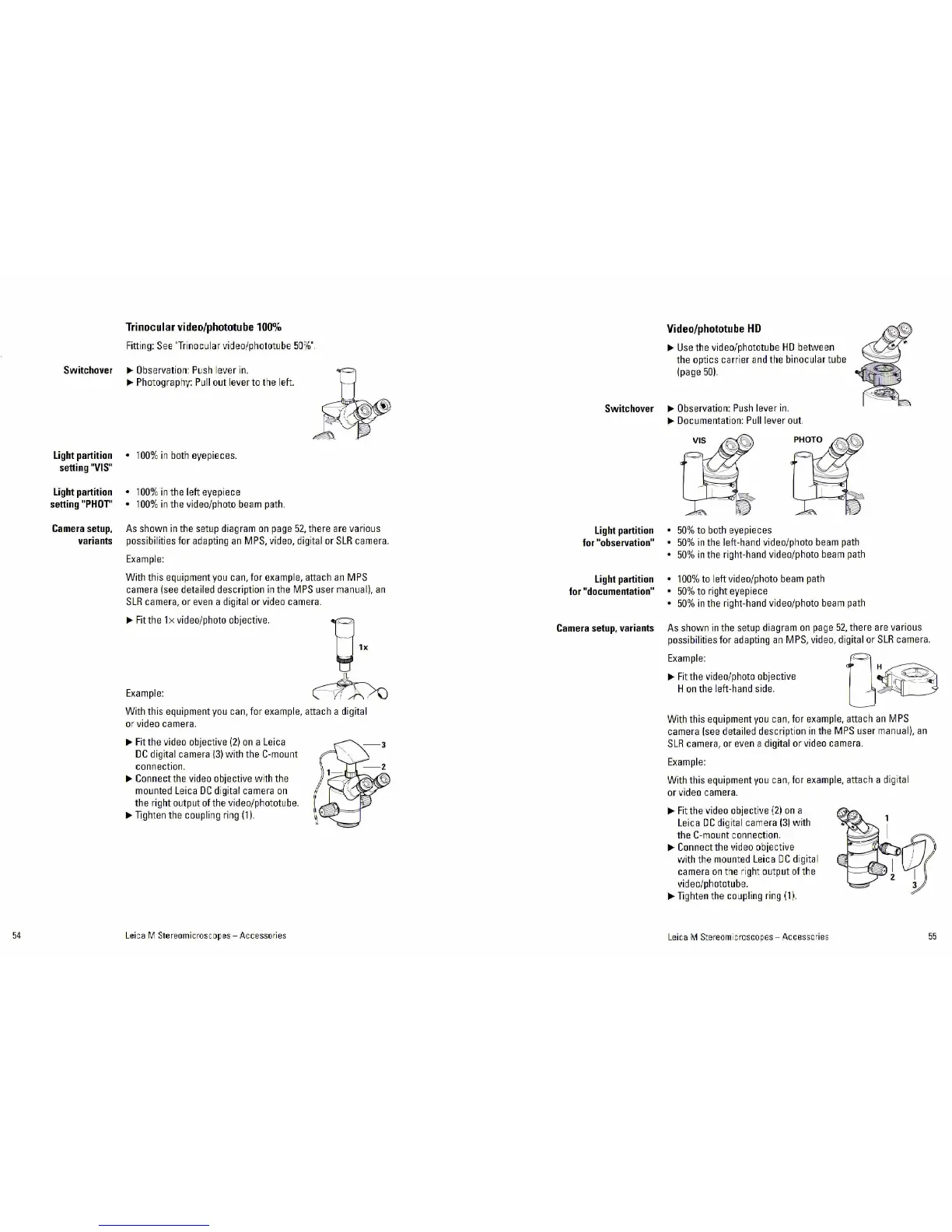
Trinocular
video/phototube
100%
Fitting:
See
'Trinoc:ular
video/pho!Cltube
50%"
Switchover
~
Obse
r
vatior1:
Push
lever
in.
Light
partition
setting
"VIS"
Light
partition
setting
"PHOT"
Camera
setup,
variants
~
Photography:
Pull
out lever
to
the left.
100%
in
both
eyepieces.
100%
in
the left eyepiece
100%
in
the video/photo
beam
path.
As
shown
in
the
setup
diagram
on
page
52,
there
are
various
possibilities for
adapting
an
MPS,
video, digital
or
SLR
camera.
Example:
With this equipment
you
can,
for
example,
attach
an
MPS
camera
(see
detailed description
ir1
the
MPS
user
manual).
an
SLR
camera,
or
even
a
dig
ital
or
video
camera.
~Fit
the
lx
video/photo objective.
Example
:
With this equipment
you
can,
f
or
example,
attach a digital
or
video
camera.
~
Fit
the
video
objective
(2)
on
a
Leica
DC
digital
camera
(3)
with the
C-mount
connection.
~
Connect
the
video
objective wi
th
the
mou
n
ted
Leica
DC
digital
camera
on
the right output
of
the
video/phototube.
~Tighten
the
coupl
i
ng
ring
(1
).
Lei
ca M Stereomicroscopes- Accessor
ies
Video/phototube
HD
~Use
the video/phototube
HO
between
the
optics carrier
and
the
binocular
tube
(page
50).
Switchover
~
Observation:
Push
lever
in
.
Light
partition
for
"observation"
Light
partition
for
"documentation"
Camera
setup,
variants
~
Documentation:
Pull
lever
out.
50%
to
both
eyepieces
50%
ir1
the
left-hand video/photo
beam
path
50%
ir1
the
right-hand video/photo
beam
path
100%
to
left video/photo
beam
path
50%
to right eyepiece
50%
in
the
right-hand video/photo
beam
path
As
shown
in
the
setup
di
agram
on
page
52,
there
are
various
possibilities for
adapting
an
MPS,
video, digital
or
SLR
camera.
Example
:
~
Fit
the
video/photo
ob
jective
H
on
the
left-hand
side.
With this equipment
you
can,
for
example,
attach
an
M
PS
camera
(see
detailed description
in
the
MPS
user
manual).
an
SLR
camera,
or
even
a digital
or
video
camera.
Example:
With this equipment
you
can
, for
example,
attach a
dig
ital
or
video
camera.
~Fit
the
video
objective
(2)
on
a
Leica
DC
dig
it
al
camera
(31
wi
th
the
C-mount
connection.
~Connect
the
video
obje
ct
ive
with the
moun
t
ed
Leica
DC
di
gi
tal
camera
on
the
ri
ght
output
of
the
video/phototube.
~Tighten
the
coupling
ring
(1).
Leica
M
Stereom1
croscopes - Accessories
55

Related product manuals