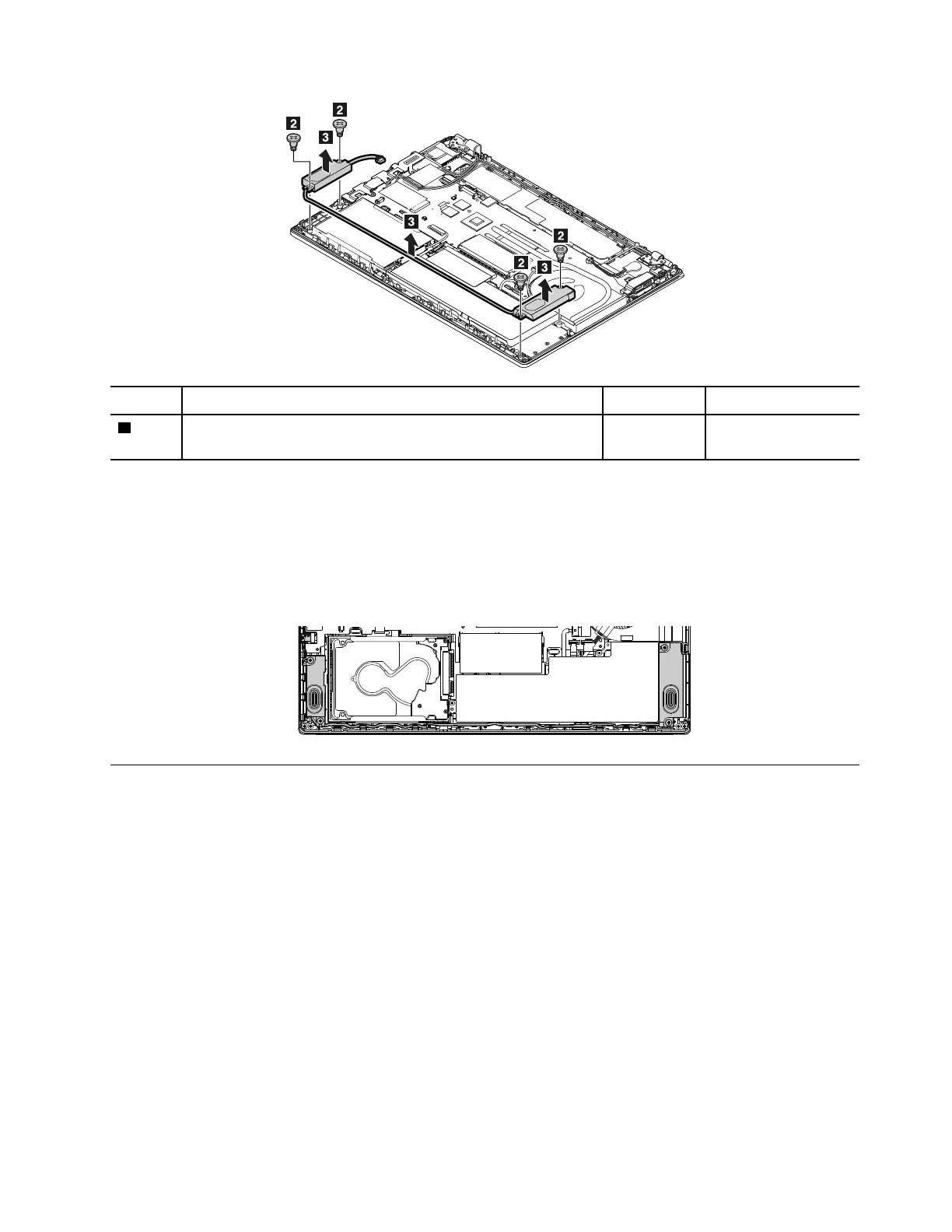
Step Screw (quantity) Color Torque
2
M2 × 4.6 mm, big head, nylon-coated (4) Black 0.181 Nm
(1.85 kgf-cm)
When installing:
• Ensure that the connector of the speaker assembly is attached firmly.
• Route the cables as shown in the following illustration.
Attention: As you route the cables, ensure that they are not subject to any tension. Tension could cause
the cables to be damaged by the cable guides, or a wire to be broken.
1120 Built-in battery
Note: Before you start the servicing, disable the built-in battery. See “Disabling the built-in battery” on page
64.
For access, remove these FRUs in order:
• “1010 Removable battery” on page 64
• “1030 Base cover assembly” on page 65
Important notices for replacing a built-in battery
Attention: Lenovo has no responsibility for the performance or safety of unauthorized batteries, and
provides no warranties for failures or damage arising out of their use.
Lenovo provides a diagnostic program to do an automatic battery diagnostic test, which can determine if the
removable battery is defective. A removable battery FRU should not be replaced unless this diagnostic test
shows that the battery is defective. The only exception to this is if the battery is physically damaged or a
customer is reporting a possible safety issue.
Chapter 9. Removing or replacing a FRU 79



 To Next Page