If no diagnostic program is installed on the computer, the customer should download and install the program
to diagnose the battery, before getting a non-physically damaged battery replaced. Note that the
replacement of a physically damaged battery is not covered by the warranty.
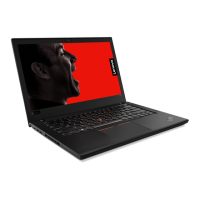
Removal steps of the built-in battery
DANGER
Use only the authorized battery specified for your computer. Any other battery could ignite or
explode.
Step Screw (quantity) Color
Torque
2
M2 × 3 mm, small-head, nylon-coated (2)
Black 0.181 Nm
(1.85 kgf-cm)
1130 Smart-card reader assembly
Note: Before you start the servicing, disable the built-in battery. See “Disabling the built-in battery” on page
64.
For access, remove these FRUs in order:
• “1010 Removable battery” on page 64
80
T480 Hardware Maintenance Manual


 To Next Page