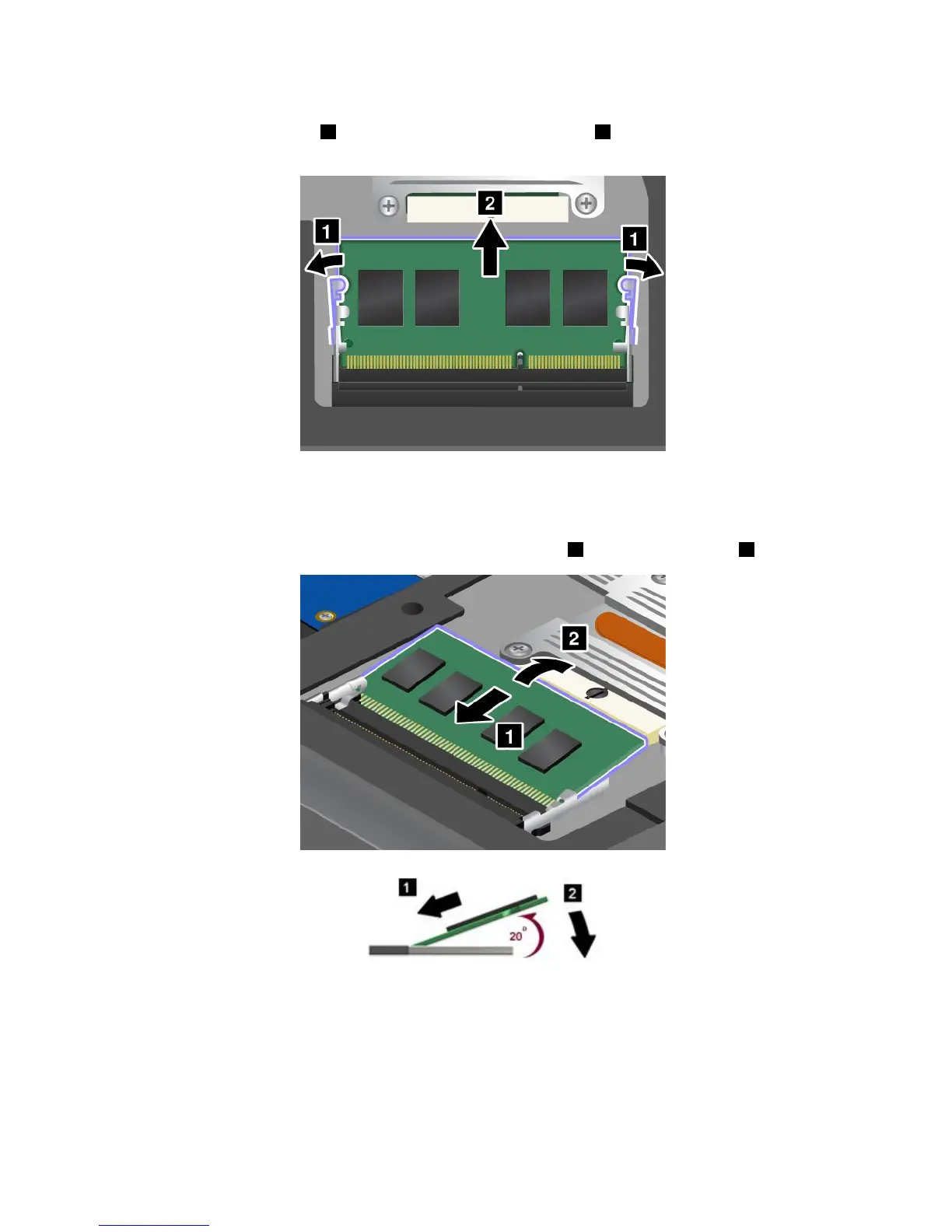
5.Iftwomemorymodulesarealreadyinthememoryslots,pressoutonthelatchesonbothedgesof
thesocketatthesametime1,andthenremoveamemorymodule2tomakeroomforthenewone.
Savetheremovedmemorymoduleforfutureuse.
6.Findthenotchonthecontactedgesideofthememorymoduleyouareinstalling.
Atenção:Toavoiddamagingthememorymodule,donottouchitscontactedge.
7.Withthenotchedendofthememorymoduletowardthecontactedgesideofthesocket,insertthe
memorymoduleintothesocketatanangleofabout20degrees1;thenpressitinrmly2.
Nota:Ifyouinstallamemorymoduleinonlyoneofthetwomemoryslots,installitinthebottomslot.
8.Pivotthememorymoduledownwarduntilitsnapsintoplace.
9.Makesurethatthememorymoduleisrmlyinstalledintheslotandcannotbemovedeasily.
60UserGuide



 To Next Page