Replacinga2.5-inchsolid-statedrivefroma3.5-inchhard-disk-drivebay
Attention:Donotopenyourserverorattemptanyrepairbeforereadingandunderstanding“Safetyinformation”
onpageiiiand“Guidelines”onpage59.
Beforeyoubegin,printalltherelatedinstructionsorensurethatyoucanviewthePDFversiononanother
computerforreference.
Toreplacea2.5-inchsolid-statedrivefroma3.5-inchhard-disk-drivebay,dothefollowing:
1.Locatetheappropriatehard-disk-drivebay.See“Frontviewoftheserver”onpage17.
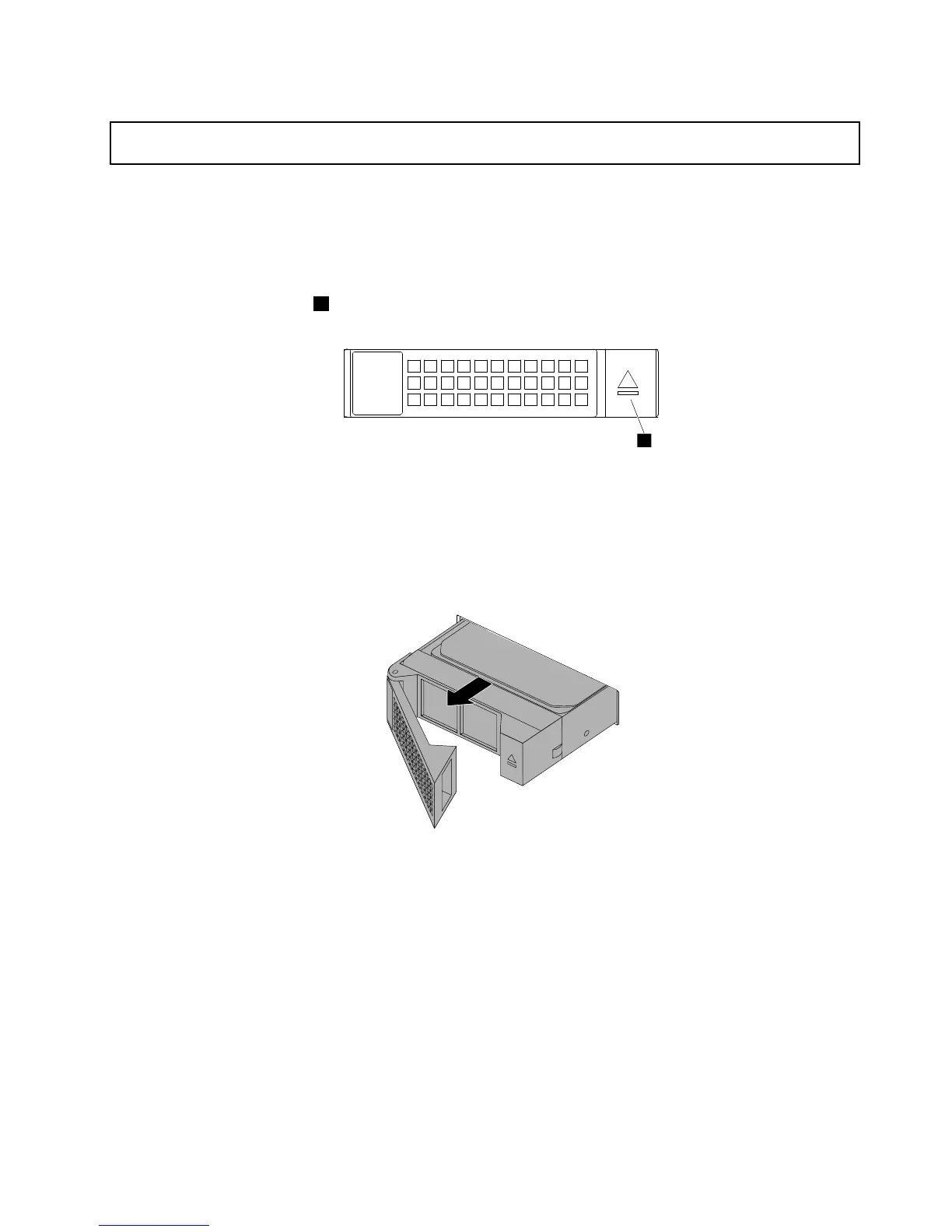
2.Pressthereleasebutton1toopenthehandleofthe3.5-inchdrivebracket.
Figure110.Openingthehandleofthe3.5-inchdrivebracket
3.Pullthehandleandcarefullyslidethebracketwiththesolid-statedriveoutofthefrontofthechassis.
Figure111.Removingthebracketwiththesolid-statedrive
Chapter6.Replacinghardware133











 To Next Page