DeviceNet
14 Appendix
14-9
L BA2175 EN 2.0
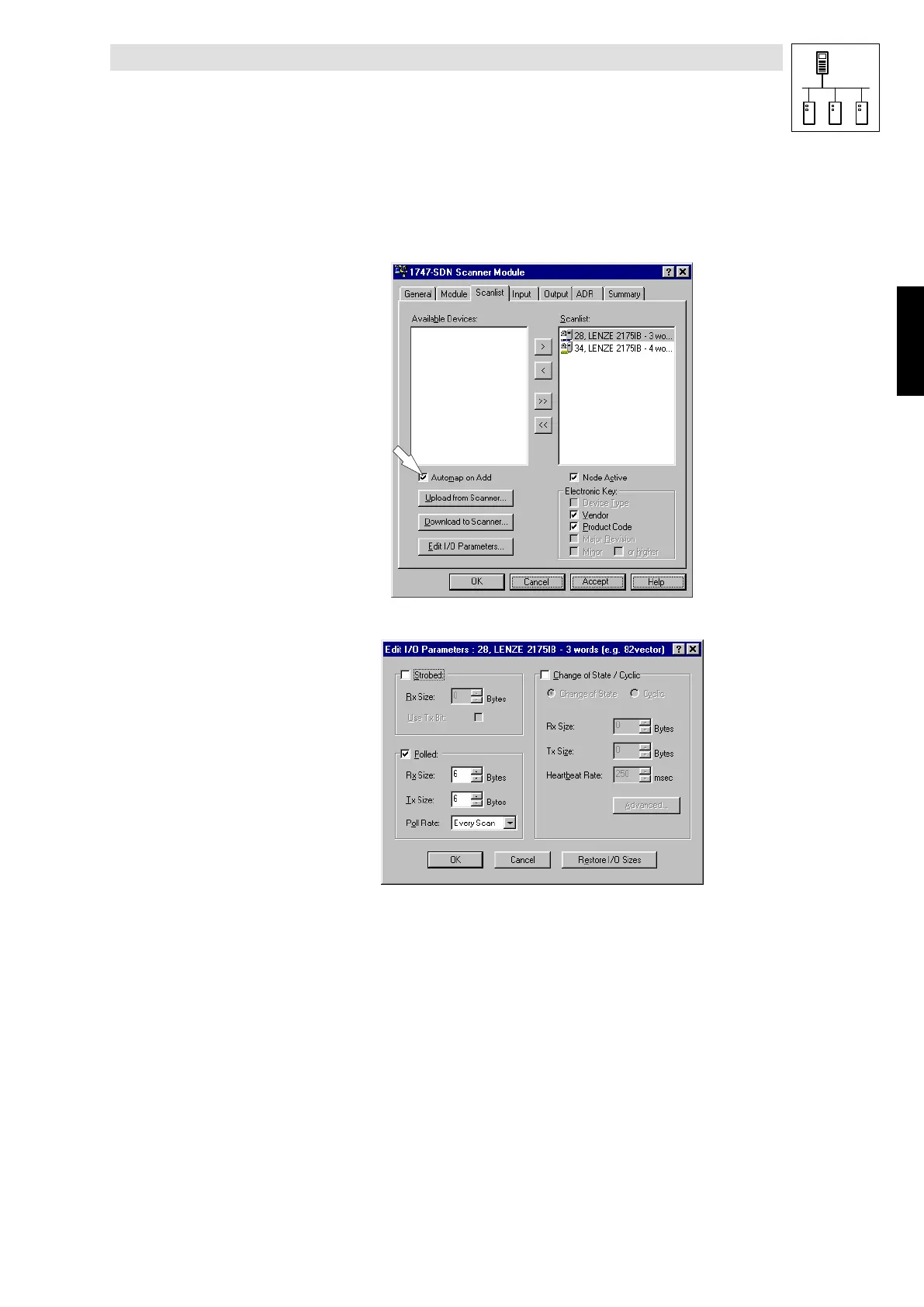
3. Register card Scan list
Under
Available devices
you will find a list of all components which can be shifted into the
Scan list
.
Use Automap on add (arrow) to automatically enter all devices into the
Scan list
. The DeviceNet
devices listed here will be processed by the scanner.
2175DeN072
• The selected module can be configured via Edit I/O Parameters.
2175DeN073
Use Edit I/O Parameters to select the corresponding telegram type for a node address.
The different protocols are described in the chapter about DeviceNet parameter setting.
I/O data of the following message types can be processed:
• Strobed
• Polled
• Change of state
• Cylic
Phone: 800.894.0412 - Fax: 888.723.4773 - Web: www.actechdrives.com - Email: info@actechdrives.com


 To Next Page