Lenze · E84AYCEO communication module (EtherNet/IP™) · Communication Manual · DMS 3.0 EN · 10/2013 · TD17 39
6 Commissioning
6.2 Configuring the host system (scanner)
_ _ _ _ _ _ _ _ _ _ _ _ _ _ _ _ _ _ _ _ _ _ _ _ _ _ _ _ _ _ _ _ _ _ _ _ _ _ _ _ _ _ _ _ _ _ _ _ _ _ _ _ _ _ _ _ _ _ _ _ _ _ _ _
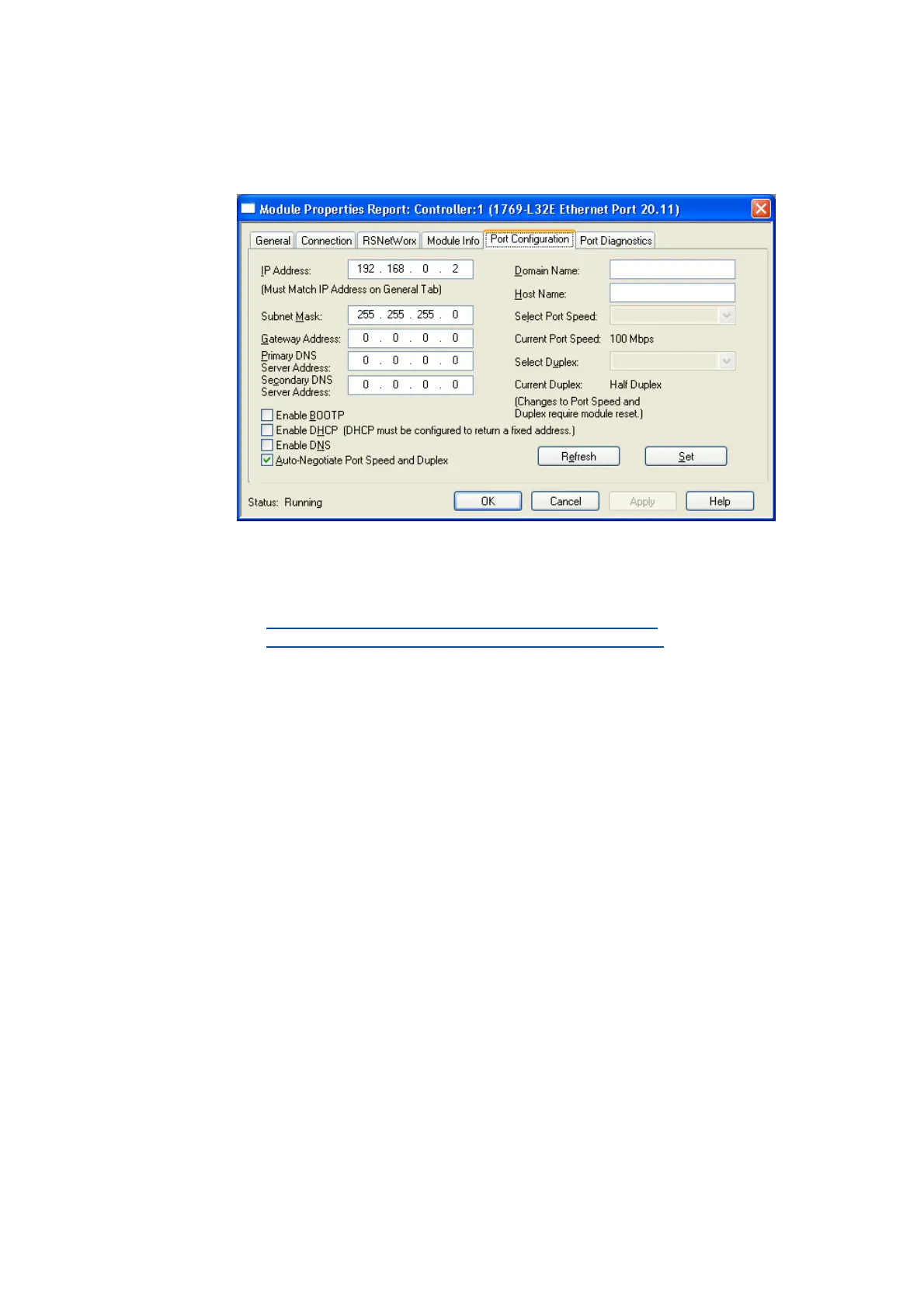
5. Go to the Port Configuration tab and enter the IP configuration, BOOTP setting, Ethernet
baud rate and duplex mode.
6. Then click OK.
• Now, the scanner is configured for the EtherNet/IP network.
• Here you will find information on project planning with the »RSLogix 5000«
programming software from Rockwell:
I/O configuration with »RSLogix 5000« version 19 or lower
( 68)
I/O configuration with »RSLogix 5000« version 20 or higher
( 73)


 To Next Page