Lenze · E84AYCEO communication module (EtherNet/IP™) · Communication Manual · DMS 3.0 EN · 10/2013 · TD17 67
8 I/O data transfer (implicit messages)
8.4 I/O configuration in the »Engineer«
_ _ _ _ _ _ _ _ _ _ _ _ _ _ _ _ _ _ _ _ _ _ _ _ _ _ _ _ _ _ _ _ _ _ _ _ _ _ _ _ _ _ _ _ _ _ _ _ _ _ _ _ _ _ _ _ _ _ _ _ _ _ _ _
8.4.2 Configuring "AC Drive Profile" application
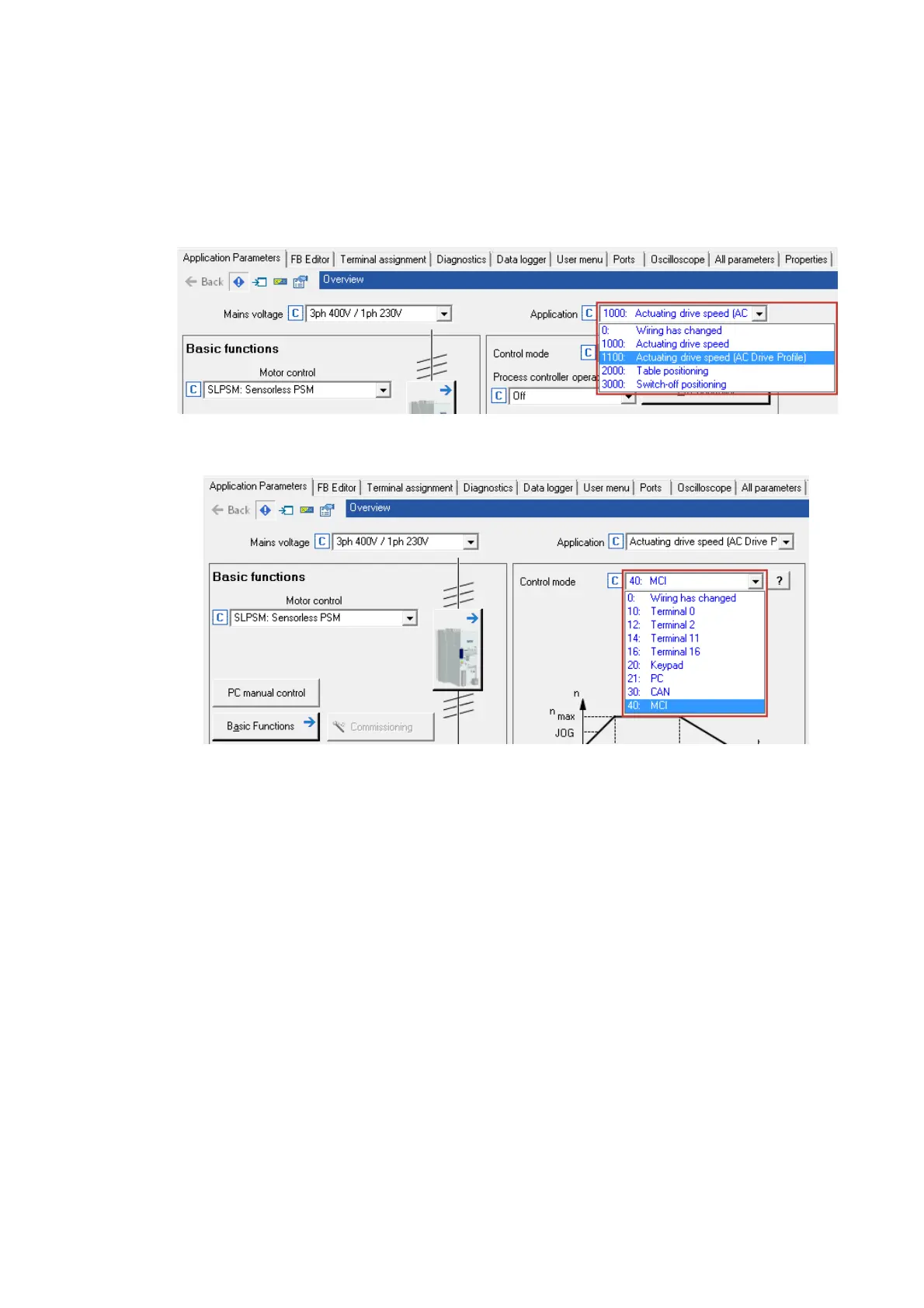
How to configure the "AC Drive Profile" application in the »Engineer«:
1. Select the "AC Drive Profile" application (C00005 = 1100) in the Application parameters tab.
2. Make the default setting of the I/O configuration.
Select "MCI" control mode (C00007 = 40).


 To Next Page