EasyManua.ls Logo

level 1 System 1000 - Page 14

level 1 System 1000
44 pages
Print Icon
To Next Page IconTo Next Page
To Previous Page IconTo Previous Page
Loading...
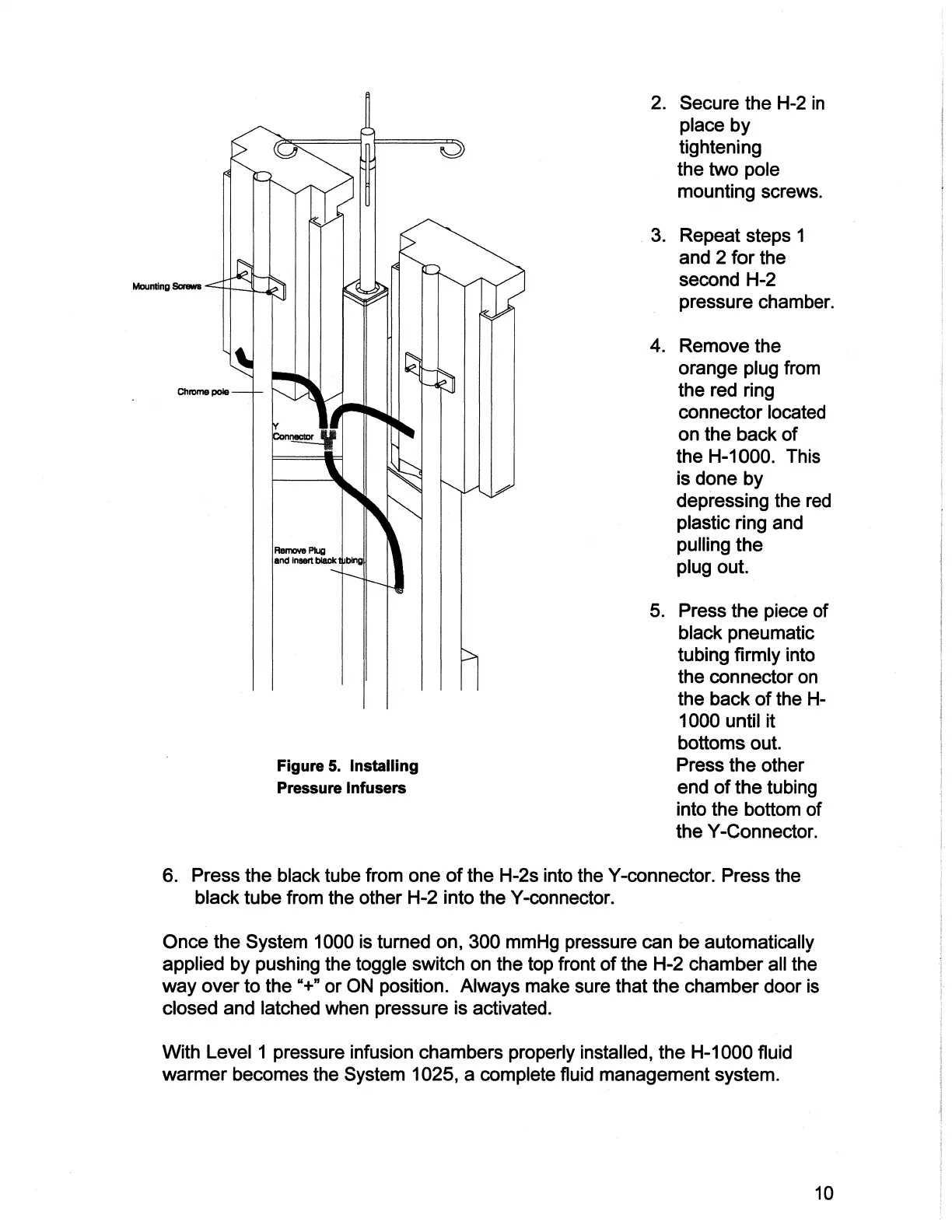
Mounting
Sorews
|
Chrome
pole
Remove
Plug
and
insert
biack
tubing
Figure
5.
Installing
Pressure
Infusers
2.
Secure
the
H-2
in
place
by
tightening
the
two
pole
mounting
screws.
.
Repeat
steps
1
and
2
for
the
second
H-2
pressure
chamber.
.
Remove
the
orange
plug
from
the
red
ring
connector
located
on
the
back
of
the
H-1000.
This
is
done
by
depressing
the
red
plastic
ring
and
pulling
the
plug
out.
.
Press
the
piece
of
black
pneumatic
tubing
firmly
into
the
connector
on
the
back
of
the
H-
1000
until
it
bottoms
out.
Press
the
other
end
of
the
tubing
into
the
bottom
of
the
Y-Connector.
6.
Press
the
black
tube
from
one
of
the
H-2s
into
the
Y-connector.
Press
the
black
tube
from
the
other
H-2
into
the
Y-connector.
Once
the
System
1000
is
turned
on,
300
mmHg
pressure
can
be
automatically
applied
by
pushing
the
toggle
switch
on
the
top
front
of
the
H-2
chamber
all
the
way
over
to
the
“+”
or
ON
position.
Always
make
sure
that
the
chamber
door
is
closed
and
latched
when
pressure
is
activated.
With
Level
1
pressure
infusion
chambers
properly
installed,
the
H-1000
fluid
warmer
becomes
the
System
1025,
a
complete
fluid
management
system.
10

Related product manuals