Allow forwarding port
!
The port that allows communication with the object port, that is,
the port that is not mirrored and isolated from the object port. Except for the forwarding
port, other ports cannot communicate with the object port"
When adding ports, you can press and hold the mouse to drag and select multiple
continuous ports. When selecting non continuous ports, you can press and hold the CTRL
key to select multiple ports or deselect the corresponding ports"
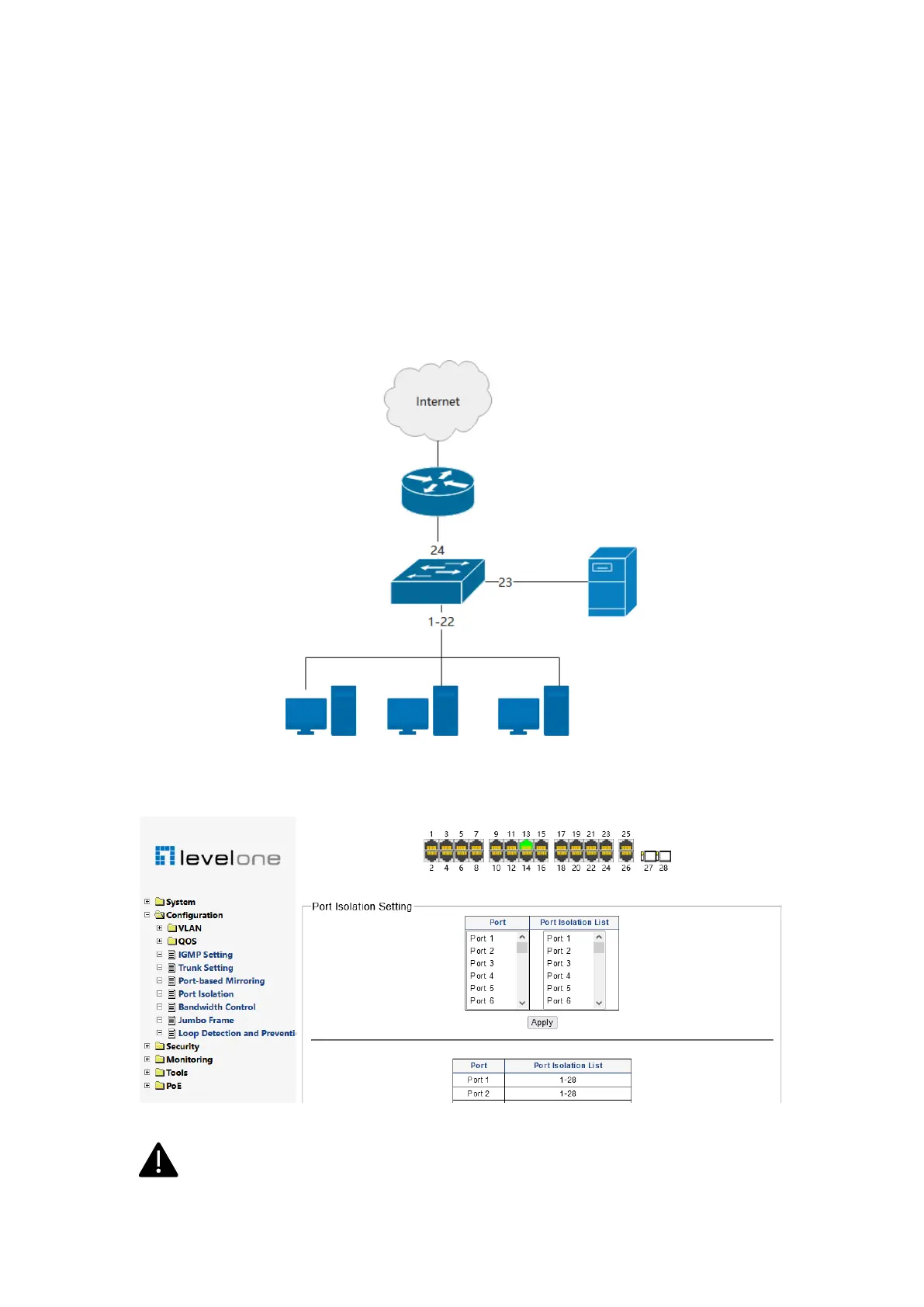
Example: as shown in Figure 3-22, port 24 of the switch is connected to the Internet
through a router, and port 23 is connected to a server. It is required that all terminals of port
1-22 cannot communicate with each other, but are allowed to access the Internet and
server"
Figure 0-21
Select 1-22 ports in the port column, 23 and 24 ports in the forwarding allowed port column,
and click apply. As shown in Figure 3-23!
Figure 0-22
Isolation cannot be set for all SFP ports"
Generally, it is necessary to ensure that the uplink port is in the allowed forwarding














 To Next Page