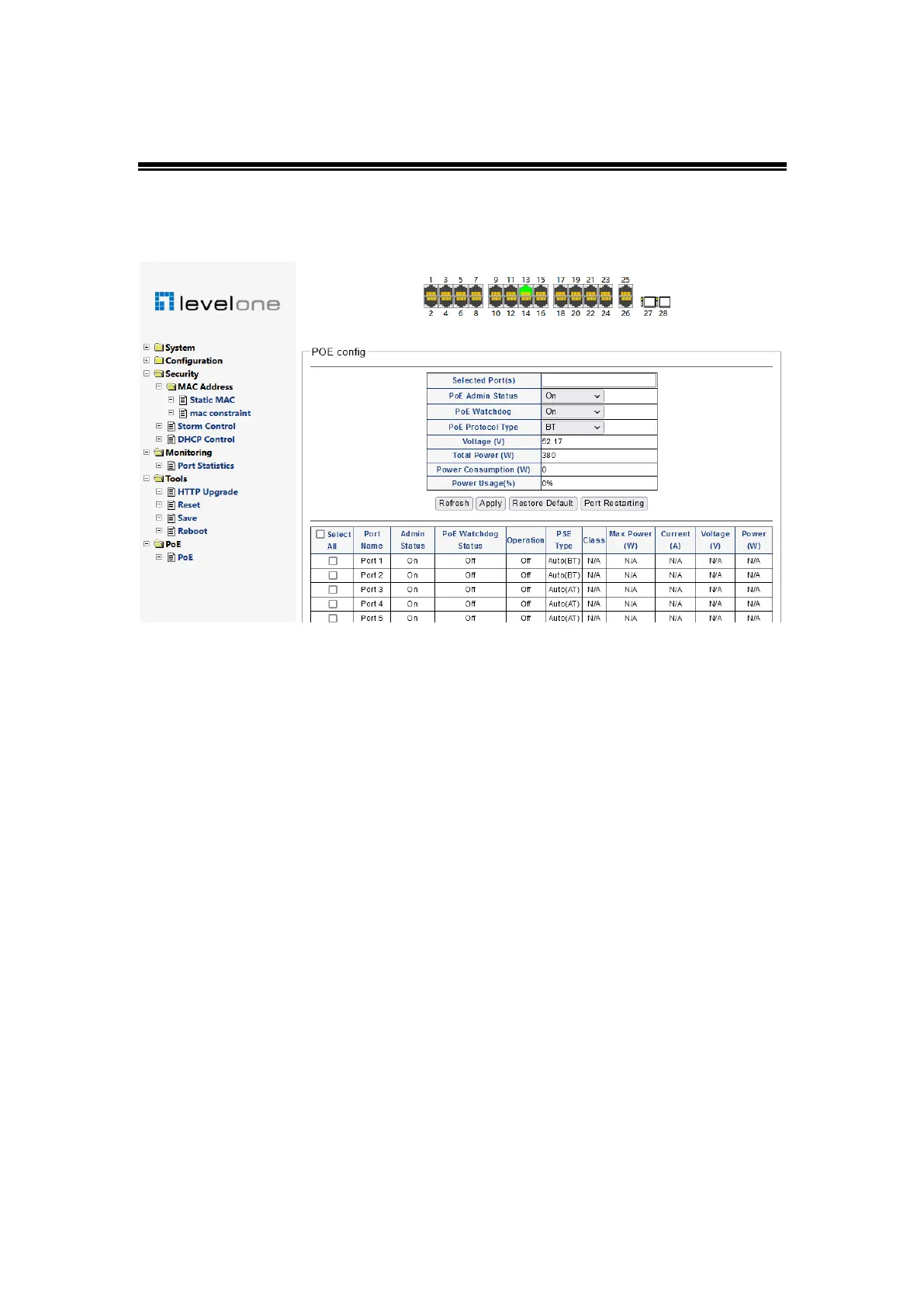
b) PoE
i. PoE
Figure 0-37
This page can configure the POE function of the port and display the POE working status
of the system and port"
Select the port list
!
The port selected below will be displayed in the list and used for
setting the functions below"
PoEManagement status
!
Turns PoE on or off for the selected port"
PoE Watchdog
!
Turns the PoE watchdog function on or off for the selected port. When
this function is enabled, the PoE function of the port will be restarted when it is detected
that the port link is disconnected or the amount of received data is lower than the threshold"
PoE Type
!
Sets the maximum PoE protocol allowed for the selected port. According to the
highest power supply of each protocol, BT (90W) > hipoe (71w) > AF (30W) > at (15.4W).
1-2 ports can support BT, hipoe, AF and at protocols, and 3-24 ports can support AF and
at protocols"
PoE voltage(V)
!
PoE power supply voltage"
Total power(W)
!
Tot a l P o E p ow e r a v ai l ab l e f ro m th e s w i t c h "
Total load power (W)
!
Tot a l po w e r of P o E pow e r su p p l y c u rr e nt l y pr o vi d e d by t h e sw i tc h "
Percentage of power used
!
Proportion of current load power and total power supply
power of the switch"














 To Previous Page