24Fast /2 Gigabit Ethernet combo Web Smart Switch
Delete VLAN Group
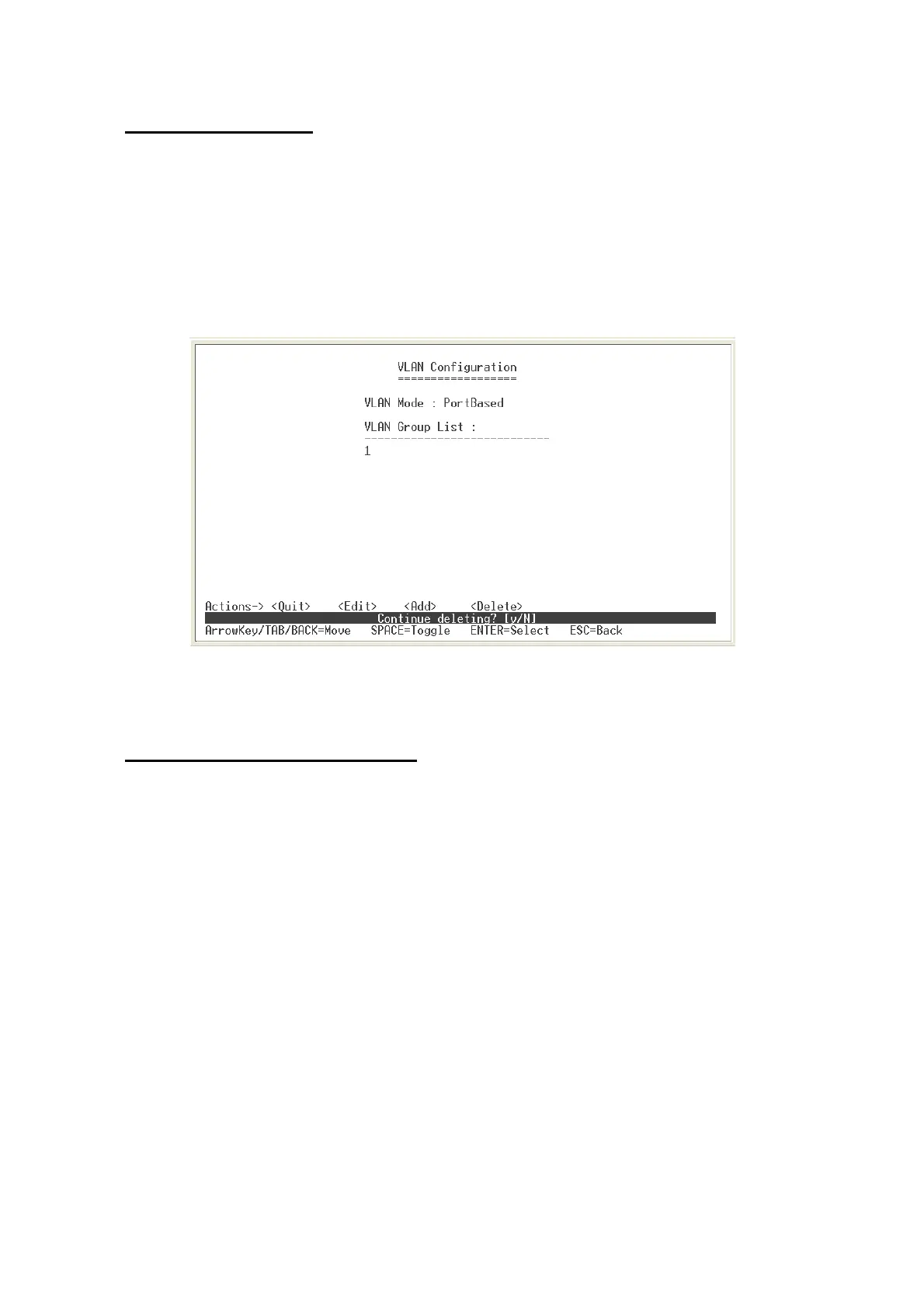
Delete unwanted VLAN group. Deletion is same for PortBase and 802.1Q VLAN mode.
1.
2.
3.
In VLAN Configuration interface, select
<Delete>
.
Select the VLAN group to delete and press enter
The system will ask you to confirm the deletion, enter ”
y
” to complete the deletion.
Delete VLAN group interface – PortBase
Advance 802.1Q VLAN Setting
Configure 802.1Q VLAN ingress filter.
1.
2.
3.
4.
In VLAN Configuration interface, select “
Advance 802.1Q VLAN Setting
” or enter
“
2
”.
Select
<Edit>
.
Use “
Space
” key to change the
Nonmember
and
Untagged
value.
Select
<Save>
.
20











 To Next Page