24Fast /2 Gigabit Ethernet combo Web Smart Switch
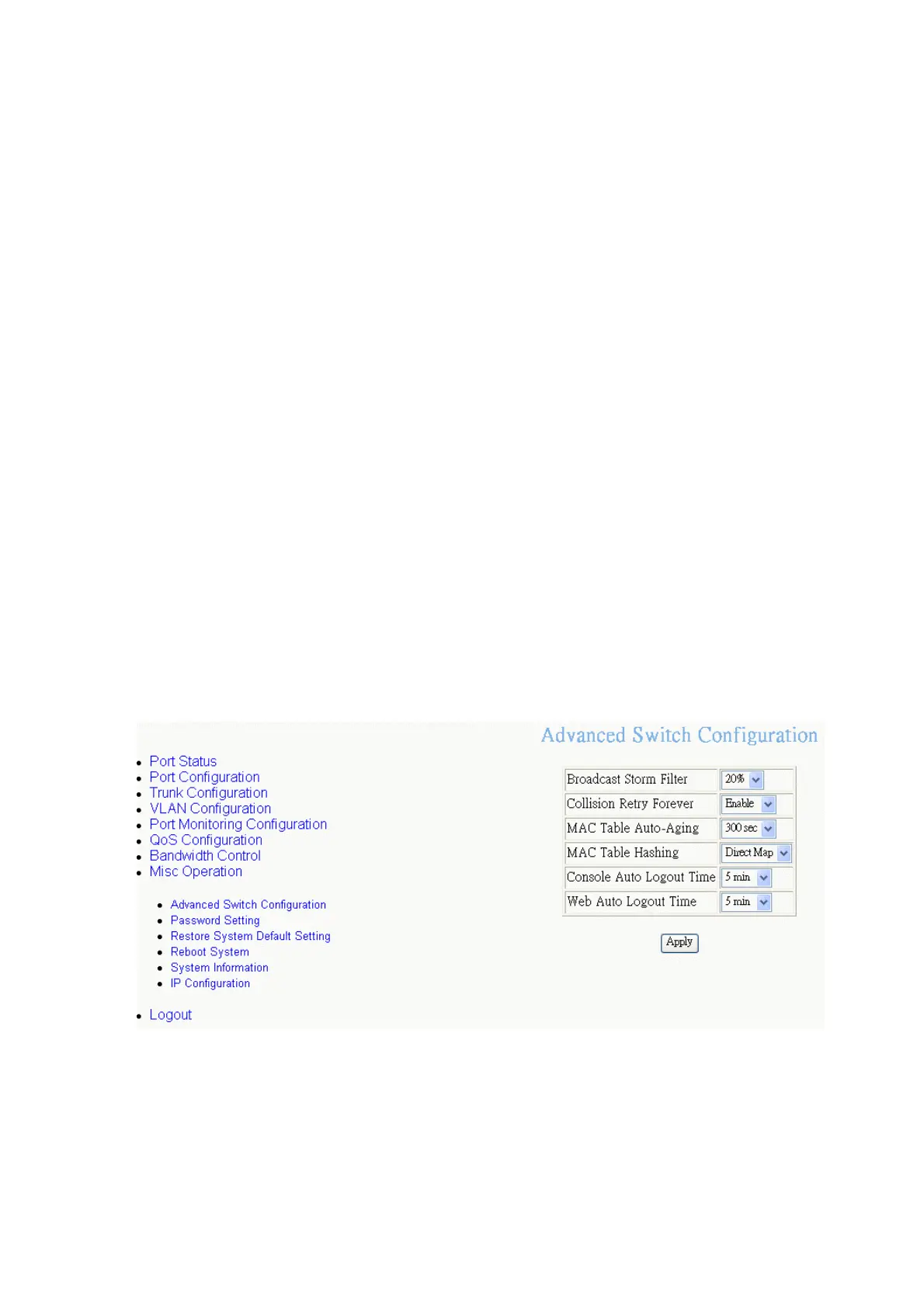
Broadcast Storm Filter:
configure the broadcast storm filter mode. The valid
threshold values are 5%, 10%, 20%, and off. The port will be block cause of
broadcast packet is over the percentage of traffic. The default value is 20%.
Collision Retry Forever:
Disable
– In half duplex, if happen collision will retry 48
times and then drop frame.
Enable
– In half duplex, if happen collision will retry
forever. The default value is “Enable”.
MAC Table Auto-Aging
: MAC address table refresh time setting. Type the
number of seconds that an inactive MAC address remains in the switch’s address
table. The valid range is Disable, 150, 300, and 600 seconds. Default is 300
seconds.
MAC Table Hashing:
Provide CRC or Direct Map. This Hash Algorithm is for
hardware maintain on MAC table calculation. The default value is CRC Hash.
Console Auto Logout Time:
When user doesn’t configure the switch through the
console connection in certain time, the switch will auto logout. The default value is
5 minutes.
Web Auto Logout Time:
When user doesn’t configure the switch through the
Web connection in certain time, the switch will auto logout. The default value is 5
minutes.
Advance Switch Configuration interface
44











 To Next Page