Home
LevelOne
Wireless Access Point
WAP-6110
Page 75 (Configure Wireless ISP + Site Survey)
LevelOne WAP-6110 - Configure Wireless ISP + Site Survey
150 pages
Manual
Save Page as PDF
To Next Page
To Next Page
To Previous Page
To Previous Page
Loading...
75
Co
nf
ig
ure
Wi
re
les
s
IS
P +
S
i
te S
urv
ey
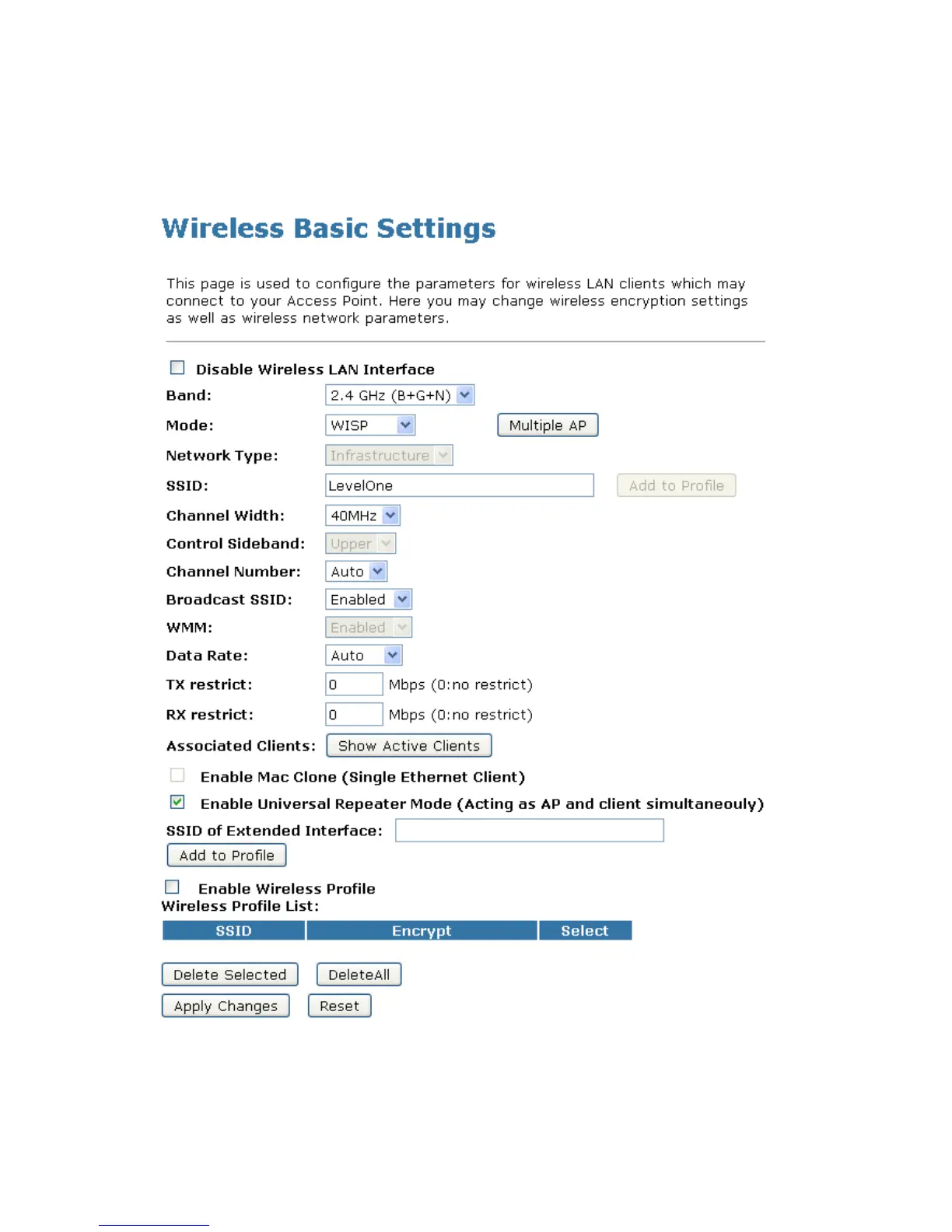
1.
Fr
om
the
l
ef
t-h
an
d
Wi
rel
es
s
me
nu
,
cli
ck o
n
Ba
si
c S
et
ti
ngs
.
2.
Fr
om
the
M
od
e
d
ro
p-d
own
li
st
,
sel
ec
t
WI
SP
.
3.
En
te
r
SSI
D
fo
r e
xa
mpl
e
Lev
el
On
e.
4.
Cl
i
ck
A
ppl
y C
ha
ng
es
but
to
n.
74
76
Table of Contents
Main Page
Default Chapter
2
Table of Contents
2
1 Introduction
5
Features
5
Device Requirements
5
Using this Document
6
Notational Conventions
6
Typographical Conventions
6
Special Messages
6
2 Getting to Know the Device
7
Computer / System Requirements
7
Package Contents
7
LED Meanings & Activations
8
Front Panel
8
Rear and Right Panel and Bottom Side
9
3 Computer Configurations under Different OS, to Obtain IP Address Automatically
11
For Windows 98SE / ME / 2000 / XP
11
For Windows Vista-32/64
14
For Windows 7-32/64
18
For Windows 8-32/64
22
4 Connecting Your Device
27
Connecting the Hardware
27
Using WISP (Wireless ISP)
28
Using Poe (Power over Ethernet)
29
Using AP (Access Point)
30
Wireless Connection
31
5 What the Internet/Wan Access of Your Own Network Now Is
33
Internet/Wan Access Is the DHCP Client
35
Internet/Wan Access Is the Static IP
36
Internet/Wan Access Is the Pppoe Client
38
6 Getting Started with the Web Pages
39
Accessing the Web Pages
39
Testing Your Setup
41
Default Device Settings
41
7 Wireless Network
43
Basic Settings
43
Advanced Settings
45
Security
46
WEP + Encryption Key
49
WEP + Use 802.1X Authentication
51
WPA/WPA2/WPA2 Mixed + Personal (Pre-Shared Key)
53
WPA/WPA2/WPA2 Mixed + Enterprise (RADIUS)
54
Access Control
56
Allow Listed
56
Deny Listed
58
WDS Settings
59
Configure WDS (Wireless Distribution System) Only
60
Configure AP (Access Point) + WDS (Wireless Distribution System)
65
Site Survey
70
Configure Wireless Client + Site Survey
71
Configure Wireless ISP + Site Survey
75
Wps
79
Introduction of WPS
80
Supported WPS Features
81
AP Mode
81
AP as Enrollee
81
AP as Registrar
81
AP as Proxy
81
Infrastructure-Client Mode
82
Instructions of Ap's and Client's Operations
82
Wireless Basic Settings Page
83
Operations of AP - AP Being an Enrollee
84
Operations of AP - AP Being a Registrar
98
AP Mode
98
Push Button Method
102
8 LAN Interface
106
LAN Interface Setup
106
Changing the LAN IP Address and Subnet Mask
108
Show Client
110
9 Status
111
10 Statistics
112
11 Log
113
System Log
113
12 Firmware Update
115
About Firmware Versions
115
Manually Updating Firmware
115
13 Save/Reload Settings
117
Save Settings to File
117
Load Settings from File
119
Resetting to Defaults
121
14 Password
124
Setting Your Username and Password
124
15 Logout
126
Configuring Your Computers
127
Configuring Ethernet Pcs
127
Before You Begin
127
Windows® XP Pcs
127
Windows 2000 Pcs
127
Windows Me Pcs
129
Windows 95, 98 Pcs
129
Windows NT 4.0 Workstations
130
Assigning Static Internet Information to Your Pcs
131
IP Addresses, Network Masks, and Subnets
133
IP Addresses
133
Structure of an IP Address
133
Network Classes
133
Subnet Masks
134
Upnp Control Point Software on Windows ME/XP
136
Upnp Control Point Software on Windows ME
136
Upnp Control Point Software on Windows XP with Firewall
137
SSDP Requirements
137
Troubleshooting
140
Troubleshooting Suggestions
140
Diagnosing Problem Using IP Utilities
142
Ping
142
Nslookup
142
Glossary
144
Other manuals for LevelOne WAP-6110
Quick Installation Guide
22 pages
Related product manuals
LevelOne WAP-6111
5 pages
LevelOne WAP-6117
14 pages
LevelOne WAP-6101
71 pages
LevelOne WAP-6150
49 pages
LevelOne WAP-6103
71 pages
LevelOne WAP-6121
14 pages
LevelOne WAP-6012
105 pages
LevelOne WAP-6011
75 pages
LevelOne WAP-6013
46 pages
LevelOne WAP-6221
34 pages
LevelOne WAP-6017
14 pages
LevelOne WAP-6015
41 pages















 To Next Page