Pictures
View, take, and upload your digital pictures
right from your wireless phone.
1. Take a Picture
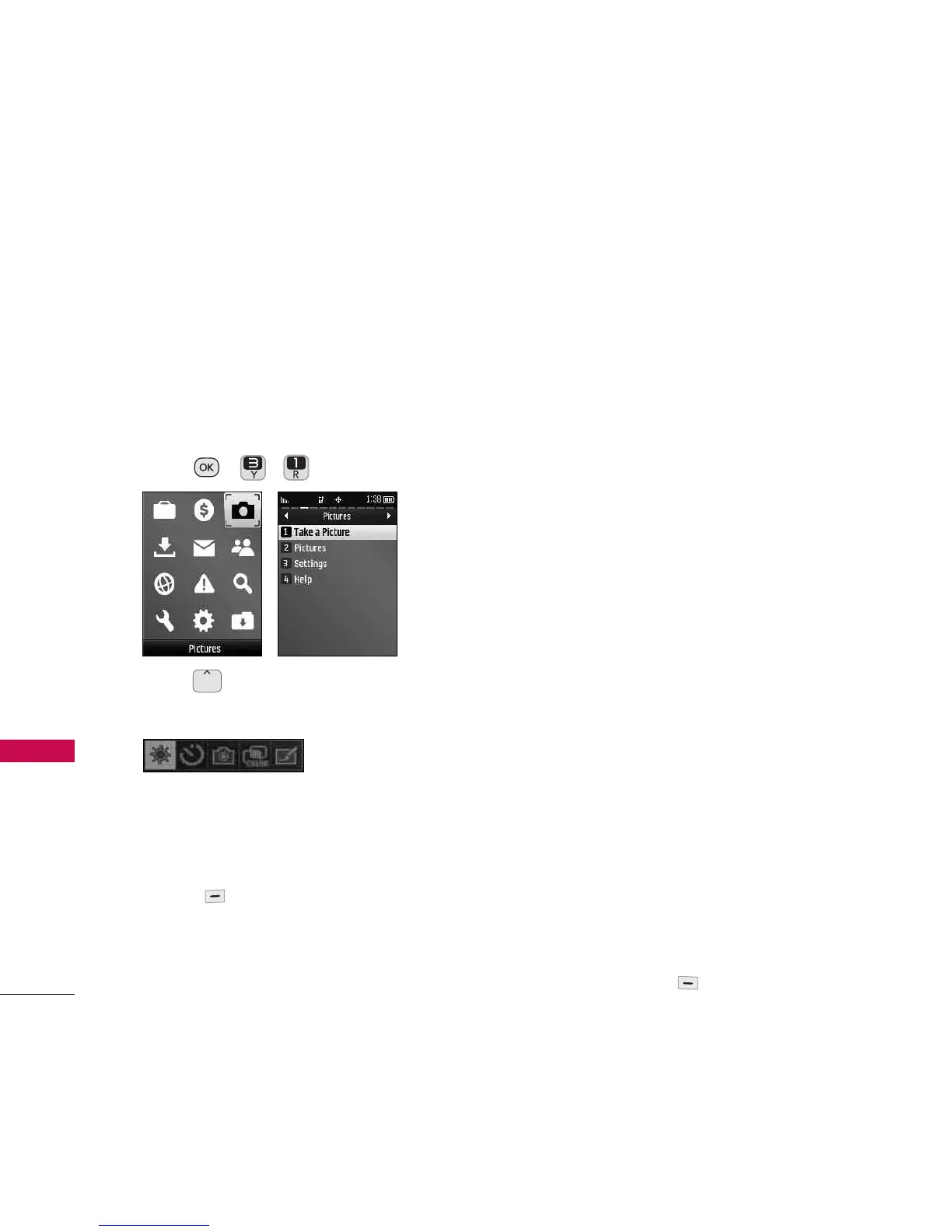
1. Press , , .
2. Press to customize the camera
settings. The following menu pops up:
Brightness/ Self Timer/ Capture/
Color Tone/ Fun Frame
You can also press the Right Option
Button
Options
for the following
options:
Color Tone
Normal/ Black & White/
Negative/ Sepia
Image Controls
Brightness/ White
Balance
Fun Frames Select the desired fun
frame.
Settings:
●
Resolution(480X640/ 240X320/
144X176/ 120X160)
●
Quality(Fine/ Normal/ Economy)
●
Shutter Sound(Shutter/ Say Cheese/
Ready 123/ Smile/ Off )
●
Status Bar(On/ Off)
●
Night Mode(On/ Off)
Self Timer
Off/ 5 seconds/ 10 seconds
Zoom
Allows you to adjust the zoom
level.
Go to Album
Directs you to the My
Pictures album to view your pictures.
3. Take a picture by pressing the Left
Option Button
Capture
.
Pictures
34
Pictures


 To Next Page