EasyManua.ls Logo

LG 32PG6000 - VCR Setup

LG 32PG6000
140 pages
Print Icon
To Next Page IconTo Next Page
To Previous Page IconTo Previous Page
Loading...
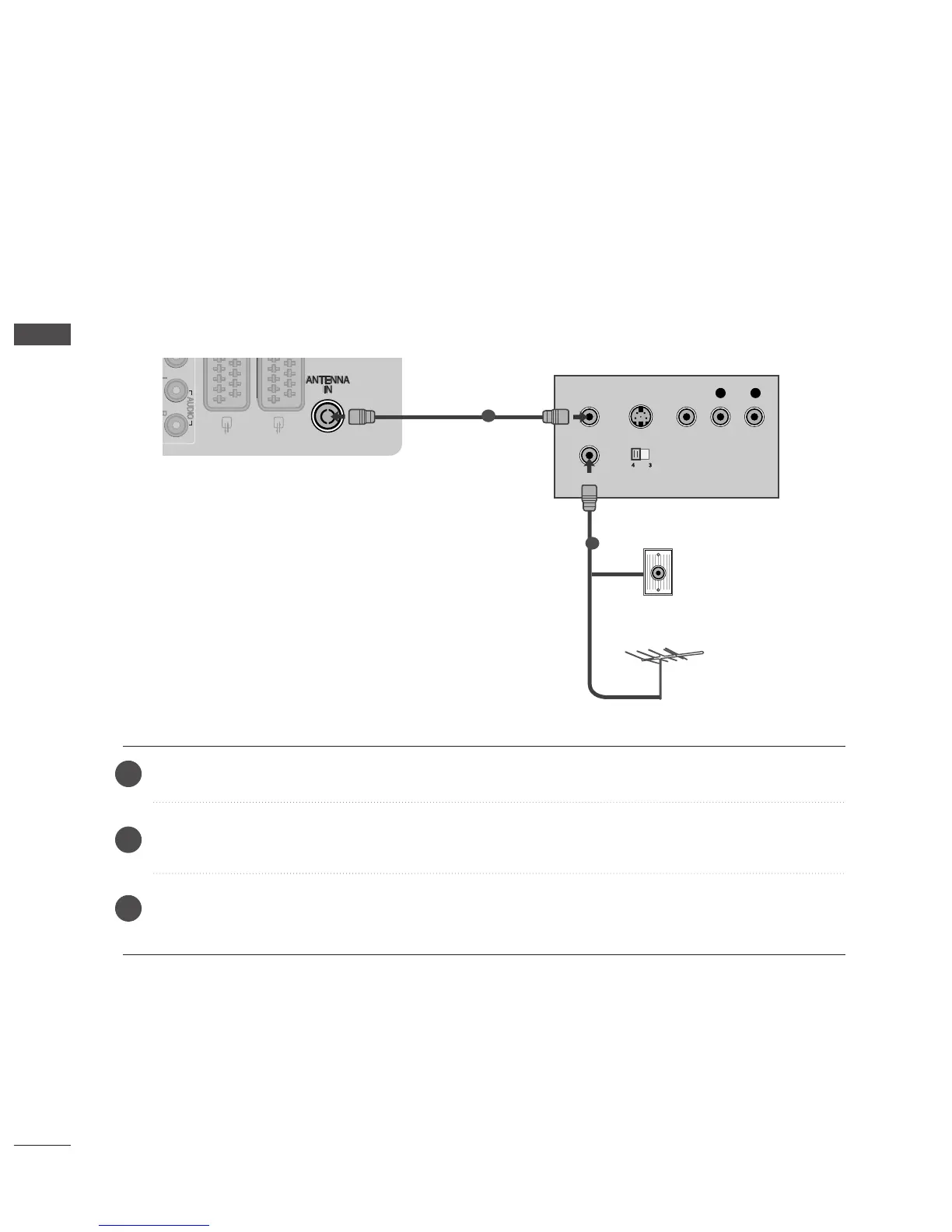
VCR SETUP
To avoid picture noise (interference), allow adequate distance between the VCR and TV.
Typically a frozen still picture from a VCR. If 4:3 picture format is used for an extended period the fixed
images on the sides of the screen may remain visible.
OUTPUT
SWITCH
ANT IN
R
S-VIDEO VIDEO
ANT OUT
L
Wall Jack
Antenna
1
2
Connecting with a RF Cable
20
EXTERNAL EQUIPMENT SETUP
Connect the
AANNTT OOUUTT
socket of the VCR to the
AANNTTEENNNNAA IINN
socket on the TV.
Connect the antenna cable to the
AANNTT IINN
socket of the VCR.
Press the
PPLLAAYY
button on the VCR and match the appropriate channel between the TV and VCR for
viewing.
2
3
1

Table of Contents

Other manuals for LG 32PG6000

Related product manuals