EasyManua.ls Logo

LG 32PG6000 - Booster

LG 32PG6000
140 pages
Print Icon
To Next Page IconTo Next Page
To Previous Page IconTo Previous Page
Loading...
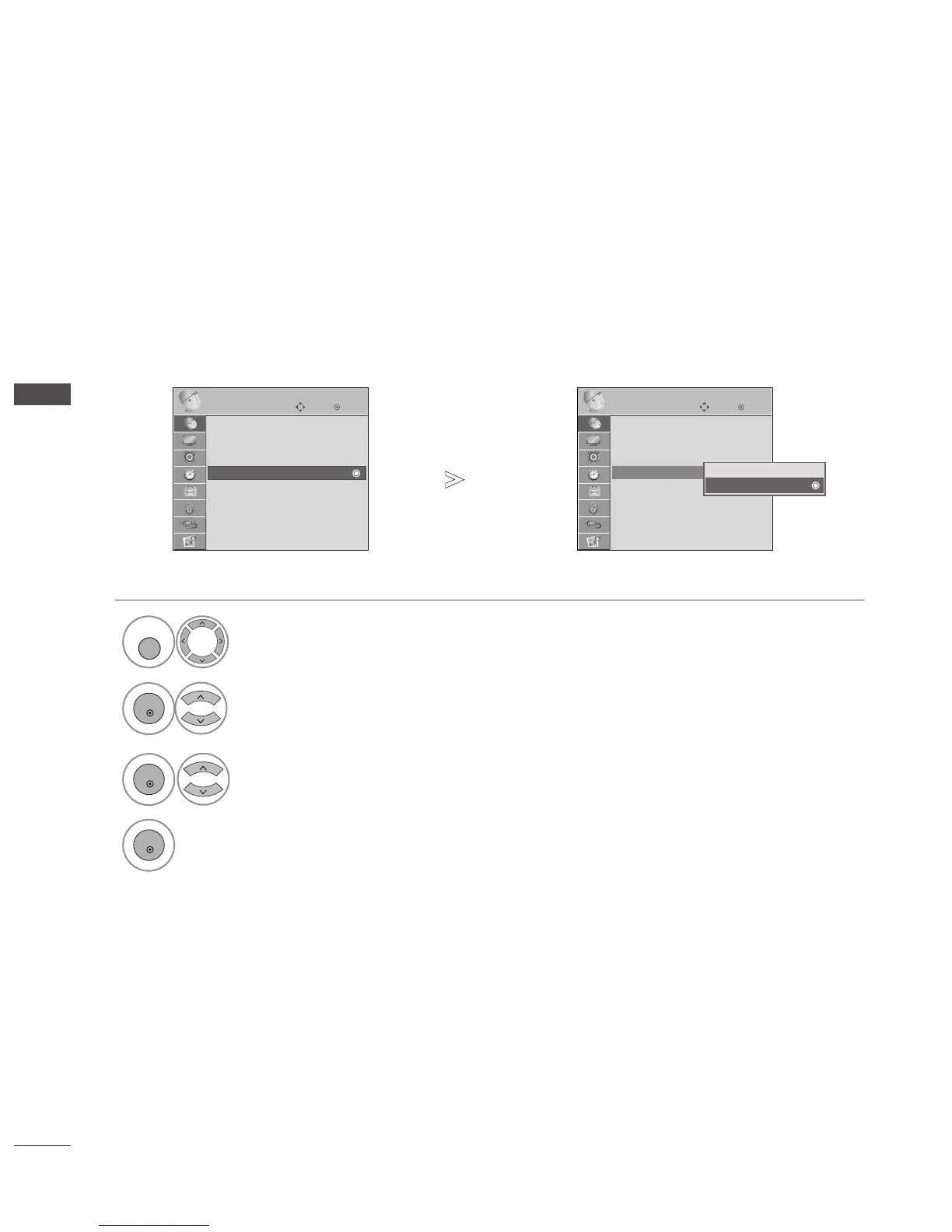
BOOSTER
(IN DIGITAL MODE)
If reception is poor select Booster to On.
When the signal is strong, select "Off".
Select
SSEETTUUPP
.
Select
BBoooosstteerr
.
Select
OO nn
or
OO ffff
.
Save.
OK
Move
Auto Tuning
Manual Tuning
Programme Edit
Booster : On
Software Update : On
Diagnostics
CI Information
SETUP
Booster : On
OK
Move
Auto Tuning
Manual Tuning
Programme Edit
Booster : On
Software Update : On
Diagnostics
CI Information
SETUP
Booster : On
Off
On
On
46
WATCHING TV / PROGRAMME CONTROL
1
MENU
3
2
OK
OK
4
OK
Press the
MMEENNUU
button to return to normal TV viewing.
Press the
RREETTUURRNN
button to move to the previous menu screen.

Table of Contents

Other manuals for LG 32PG6000

Related product manuals