3-25
DIGITAL DISPLAY & MEDIA TRAINING MASTER
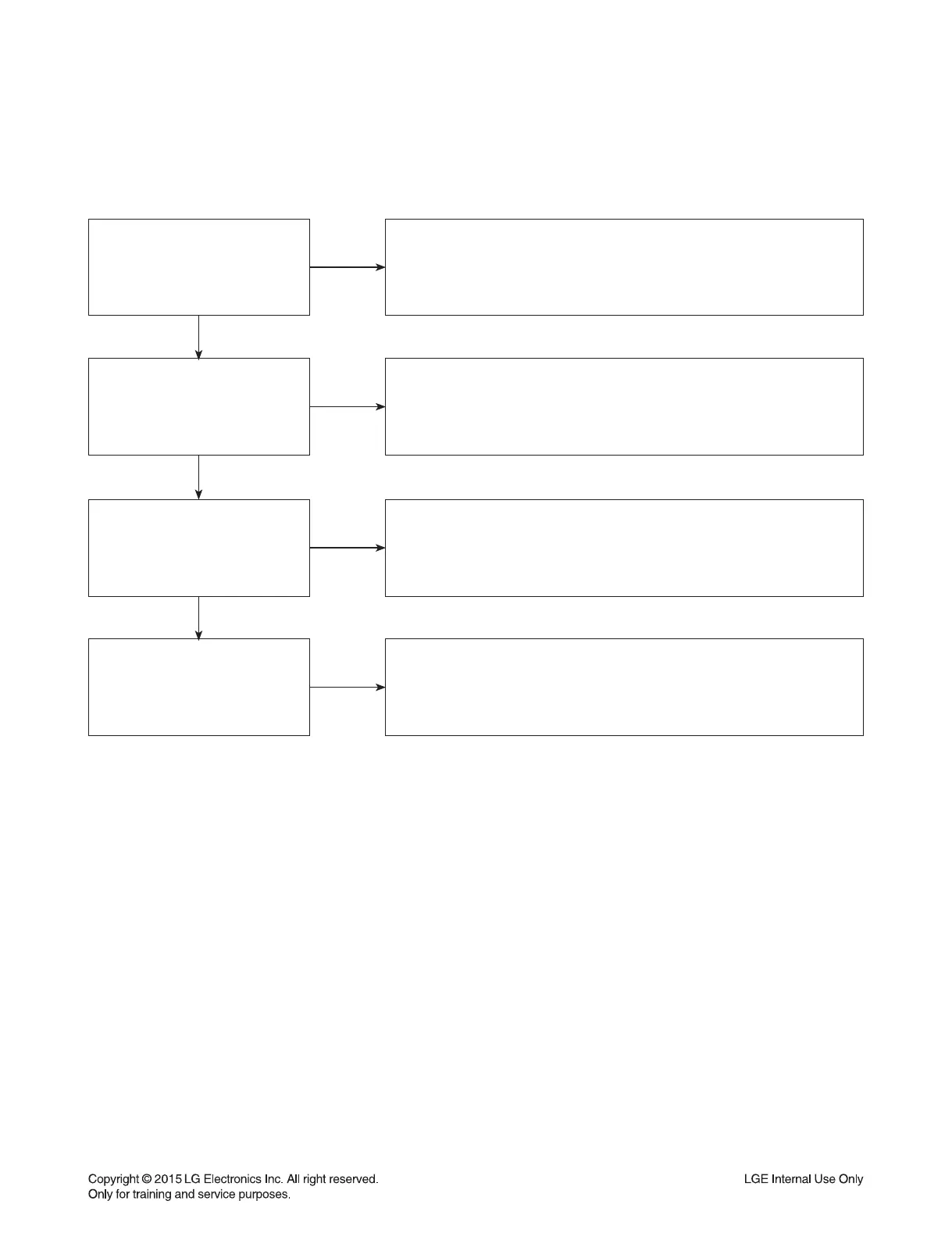
Is the disc
currently playing?
NO
YES
Ask the customer to press stop to stop the disc from playing.
Ask the customer to press the resolution button to change the resolution.
The BD player will not change resolutions while the disc is playing.
Is the customer using
an HDMI or DVI cable?
NO
YES
Regular discs can be converted to 1080p just through the HDMI output.
The TV must have HDCP compliancy on the HDMI input.
The display has to accept the resolution (480i/p, 720i/p, 1080i, or 1080p).
Is the customer using an
HDMI to DVI cable?
NO
YES
Some movie companies will not allow their discs to upconvert
past 480p. If only one disc poses a problem, then the issue is the disc.
The customer will need to try multiple discs.
Has the customer tried
multiple discs?
NO
One disc not upconverting means the disc may not upconvert.
Some movie companies will not allow their discs to upconvert.
If multiple discs display the issue, remove the disc and change
the resolution with no disc in the unit.
If resolution will not change, the unit needs service.
5-11. My Unit Won’t be up-converted
The customer has a problem with getting the unit to change resolutions to 480i/p, 720i/p, 1080i, or 1080p.


 To Next Page