The picture and sound of a nearby TV, VCR, or radio may be distorted
during playback. If this occurs, position the player away from the TV,
VCR, or radio, or turn off the unit after removing the disc.
DVD Player Connections
Depending on your TV and other equipment there are various ways you
can connect the player. Please refer to the manuals of your TV, stereo
system or other devices as necessary for additional connection
information.
Video and Audio Connections to Your TV
Make sure the DVD player is connected directly to the TV and not to a
VCR, otherwise the DVD image could be distorted by the copy protec-
tion system.
Video:
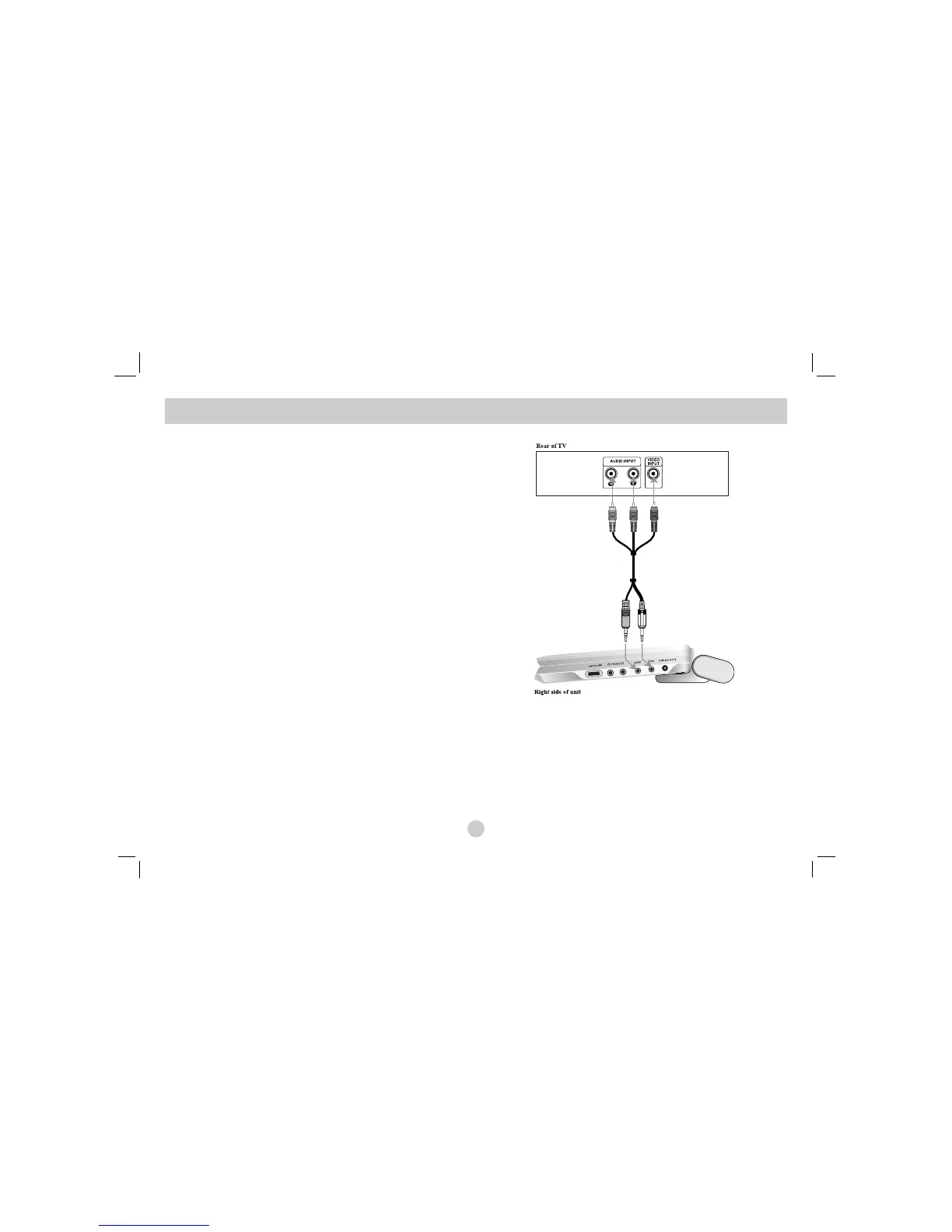
Connect the VIDEO OUT jack on the DVD player to the video in jack on
the TV using the video cable.
Audio Connection to Your TV:
Connect the AUDIO OUT jacks of the DVD Player to the audio left and
right IN jacks on the TV using the audio cables. Do not connect the DVD
Player’s AUDIO OUT jack to the phone in jack (record deck) of your
audio system.
You must set the A/V IN/OUT switch to the “A/V OUT” mode
Setting up the Player
40
Audio/ Video cable
(Supplied)
(Yellow)
(Black)



 To Next Page