55
ENGLISH
Enjoying Internet
Using the [Web Browser]
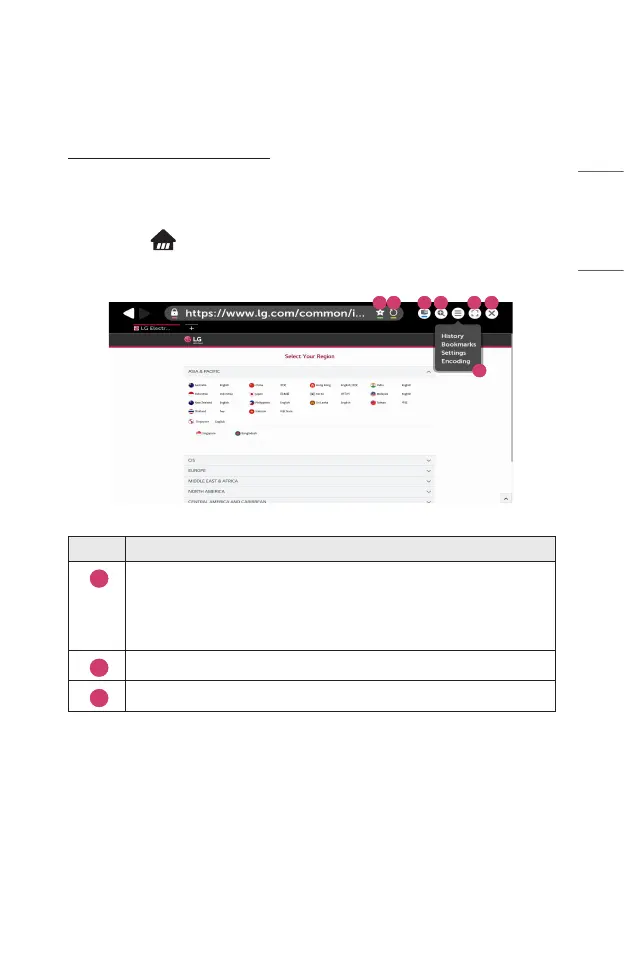
You can enter the website when you input the web address on the URL bar. If you
input the search word, it will nd the information about search word base on the
search engine.
1 Press the button on the remote control.
2 Launch the [Web Browser] application.
1 2 3 4
5
6 7
Description
1
You can add the current page to the Home screen, or add or delete
the current page in [Bookmarks].
(A page added to the home screen can only be deleted on the home
screen. In this case, it is not deleted from [Bookmarks].)
2
Reloads the current page.
3
You can turn on/off Mini TV.



 To Next Page