53
ENGLISH
BENEFITS OF SMART PROJECTOR
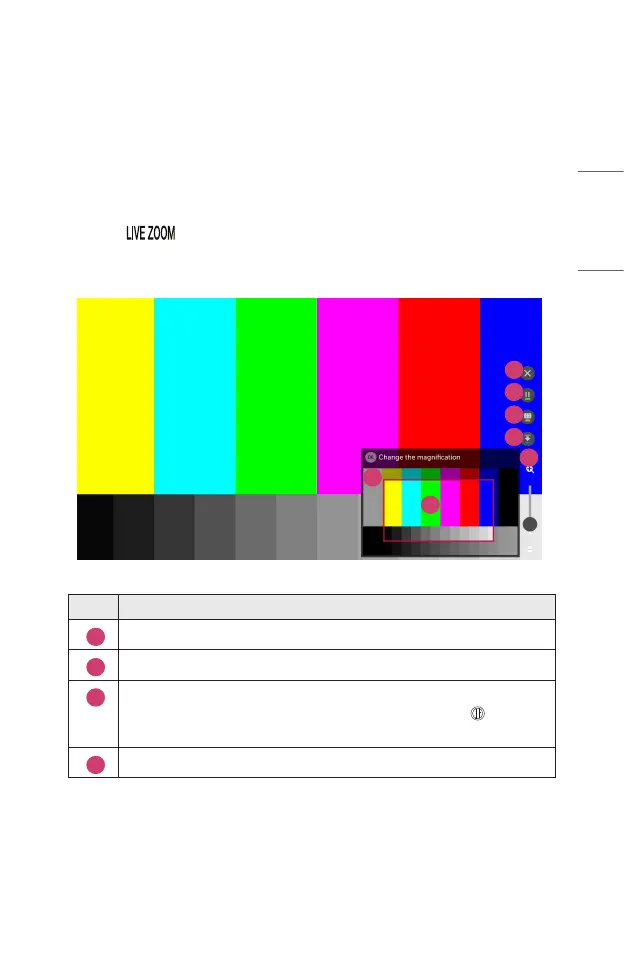
Zooming in the Projector Display
By zooming in the projector screen, you can view images in a larger size than the
originals.
Press the button on your remote control while watching projector or in
video playback. You can also press the [START LIVE ZOOM] button in the lower-
right corner of the screen.
1
2
3
7
6
5
4
Description
1
The original screen before enlargement is displayed on the subscreen.
2
This indicates the enlarged area that is displayed on the main screen.
3
You can zoom in and out on the main screen using the magnication
bar. You can adjust the magnication by scrolling with the Wheel
(OK) button on the Magic Remote.
4
You can hide the sub screen.



 To Next Page