71
ENGLISH
Conguringdigitalsoundoutputsettings
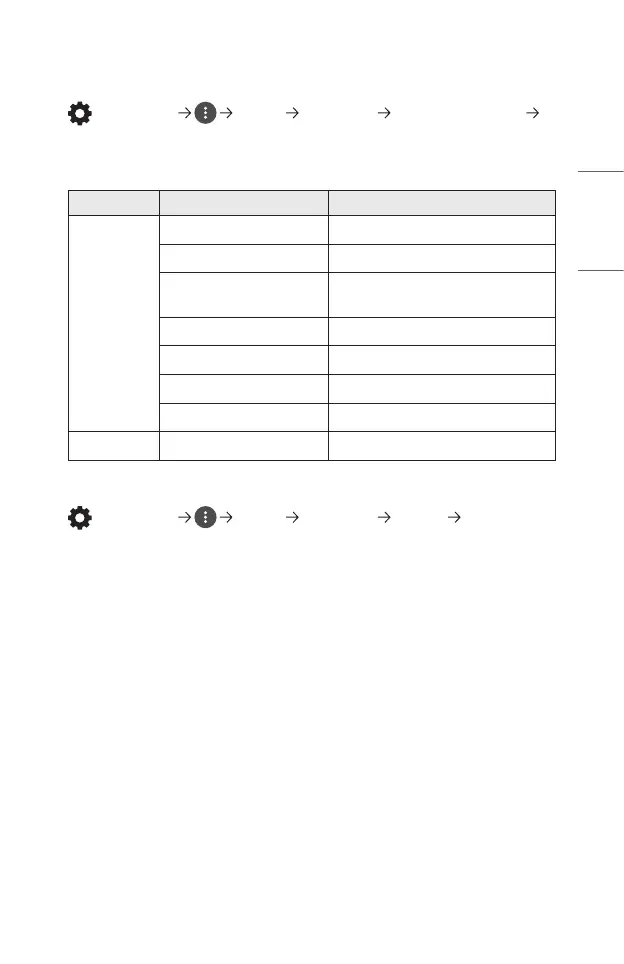
(Q. Settings) [Sound] [Sound Out] [Optical]/[HDMI ARC]
[Digital Sound Out]
You can congure the [Digital Sound Out] settings.
• These settings are available only when an [Optical]/[HDMI ARC] is selected.
Sound Input Digital Sound Output
[Auto]
MPEG PCM
Dolby Digital Dolby Digital
Dolby Digital Plus
(Optical) Dolby Digital
(HDMI ARC) Dolby Digital Plus
HE-AAC Dolby Digital
DTS DTS / PCM
DTS Express DTS / PCM
DTS-HD MA PCM / DTS
[PCM] All PCM
Connecting and Using an Audio Device Supporting LG Sound Sync
(Q. Settings) [Sound] [Sound Out] [Optical] [LG Sound
Sync]
You can connect an audio device that supports [LG Sound Sync] to the optical
digital audio output port to enjoy your projector’s sound in richer quality and
greater convenience.
• Only available for models with an optical digital port.
• You can use the projector remote control to adjust the volume of the connected
device.


 To Next Page
 Loading...