27
ENGLISH
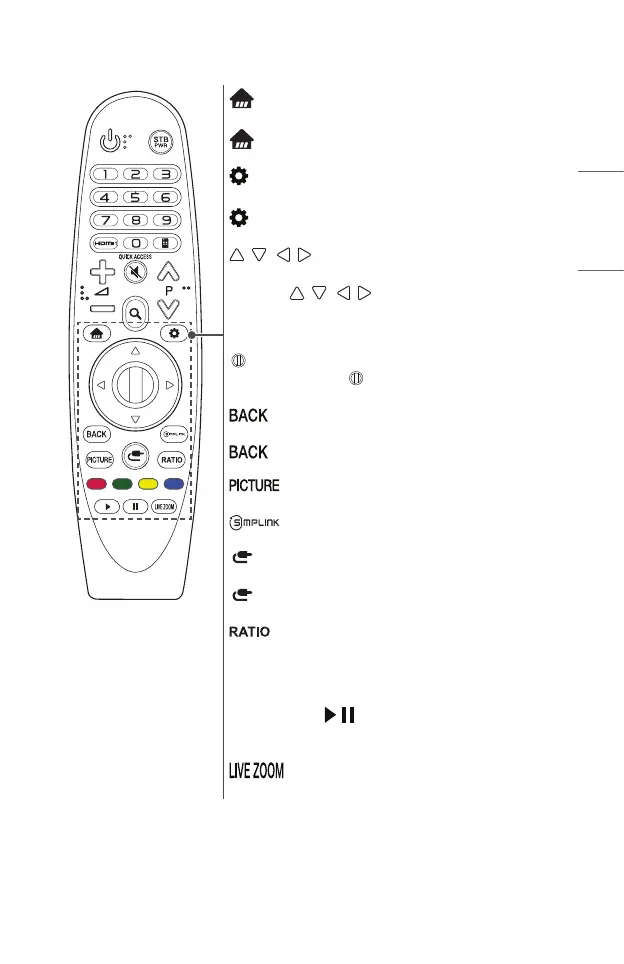
Accesses the Home menu.
*
Displays the list used previously.
(Q. Settings)
Accesses the Quick Settings.
(Q. Settings) *
Displays the [All Settings] menu.
(Up/Down/Left/Right)
Press the up, down, left or right button to scroll the menu.
If you press
buttons while the pointer is in use,
the pointer will disappear from the screen and Magic Remote will
operate like a general remote control. To display the pointer on
the screen again, shake Magic Remote to the left and right.
Wheel (OK)
Press the center of the
Wheel (OK) button to select a
menu. You can change pages by using the Wheel button.
Returns to the previous screen.
*
Clears on-screen displays and returns to last input viewing.
Changes the picture mode.
Allows you to use the SIMPLINK function.
(INPUT)
Changes the input source.
(INPUT) *
Displays all the lists of external inputs.
Changes the aspect ratio of the screen per pressing of the
button.
Coloured buttons
These access special functions in some menus.
Control buttons (
, )
You have access to premium content, video content and devices
that support SIMPLINK.
By zooming in on the selected area, you can view it in full screen.
* : To use the button, press and hold for more than 3 seconds.



 To Next Page