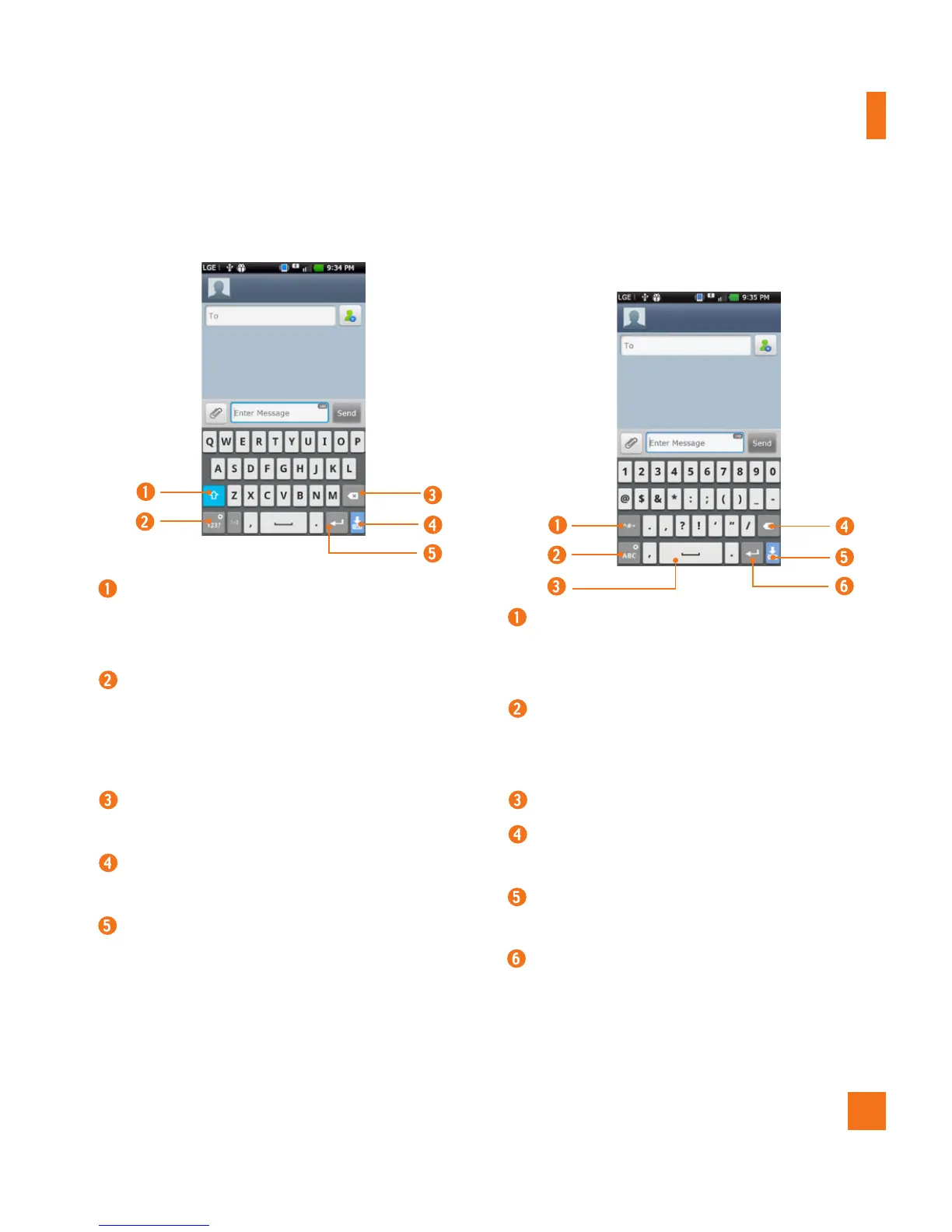
LG keyboard - QWERTY - Letters Entry
Shift Key - Tap once to capitalize the
next letter you type. Double-tap for all
caps.
Number and Symbols/ Settings
Key - Tap to change input to number
and symbol entry. Touch and hold to set
various LG keyboard settings.
Delete Key - Tap to delete characters to
the left of the cursor.
Hide Keyboard Key - Tap to hide the
keyboard.
Enter Key - Tap to move the cursor to
the next line.
LG keyboard - QWERTY
- Numbers and Symbols Entry
Alt Key - Tap to enter additional
symbols. The keyboard will change to
alternate characters.
Letters/ Settings Key - Tap to change
input to letters entry. Touch and hold to
set various LG keyboard settings.
Space Key - Tap to enter space.
Delete Key - Tap to delete characters to
the left of the cursor.
Hide Keyboard Key - Tap to hide the
keyboard.
Enter Key - Tap to move the cursor to
the next line.
On-screen Keyboard



 To Next Page