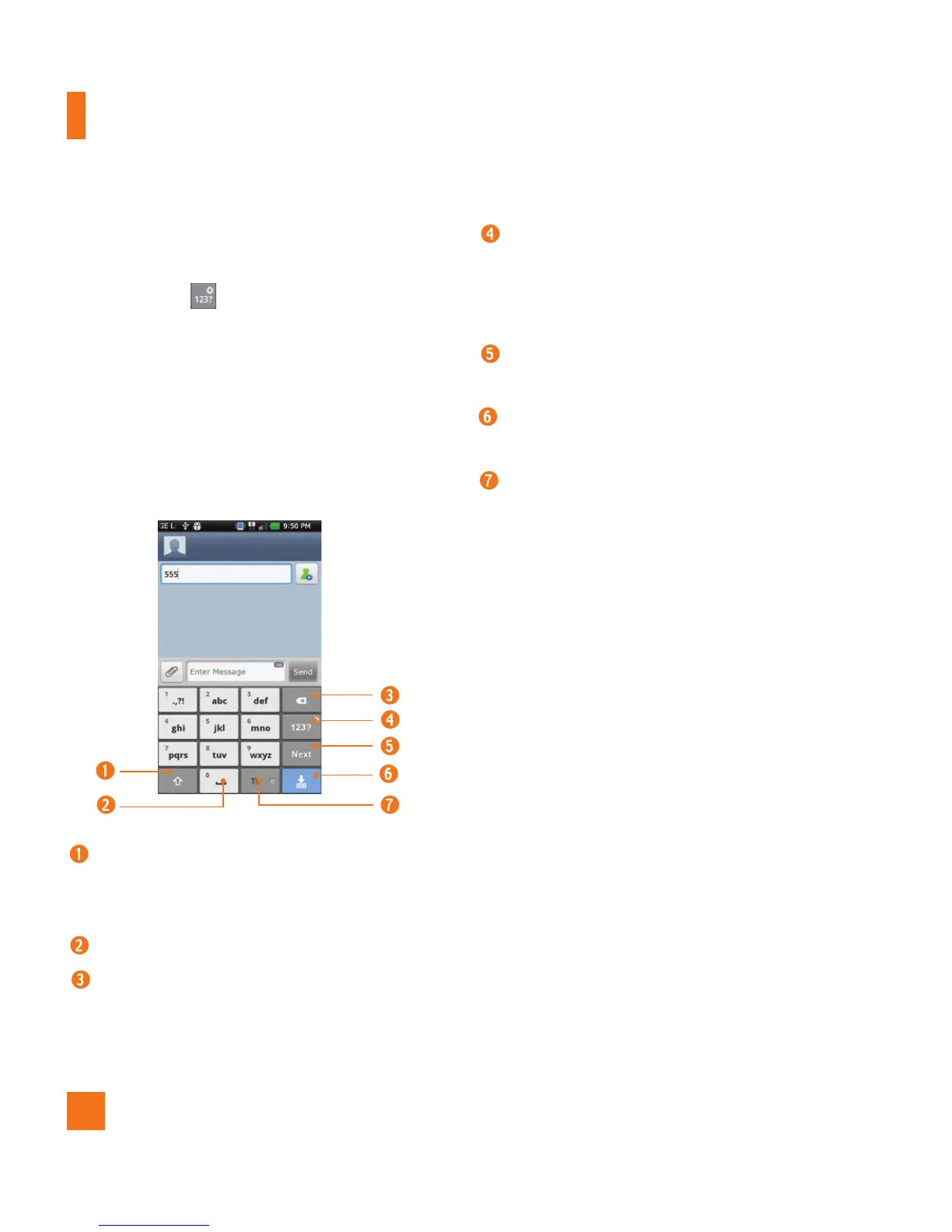
LG keyboard – Phone keypad
To switch to the phone keypad on LG keyboard,
touch and hold . Tap
LG keyboard
settings > Keyboard layout,
then tap
Phone keypad.
The Phone keypad allows
you to enter letters by tapping the key labeled
with the desired letters, similar to how you
would on a traditional 12 key phone. You may
have to tap a key up to four times to type the
desired letter or number.
Shift Key - Tap once to capitalize the
next letter you type. Double-tap for all
caps.
Space Key - Tap to enter space.
Delete Key - Tap to delete characters to
the left of the cursor.
Number and Symbols/ Settings
Key - Tap to change input to number
and symbol entry. Touch and hold to set
various LG keyboard settings.
Enter Key - Tap to move the cursor to
the next line.
Hide Keypad Key - Tap to hide the
keypad.
T9 Key - Tap to turn on the T9 entry
mode.
n
TIP
To switch quickly between the Android
keyboard and LG keyboard, touch and hold
the text entry field. When the
Edit text
menu
pops up, tap
Input method
. Then tap the
keyboard you wish to use.
On-screen Keyboard



 To Next Page