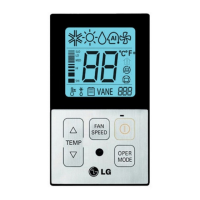
TEMP
FAN
SPEED
OPER
MODE
When pressing the button and
button simultaneously for more than 3
seconds, the system will be entered into
the installer setting mode.
-
After entering into the installer setting
mode, select the ceiling height setting code
value by pressing the oper-mode button.
* Static pressure setting code value : 06
1
Select the desired setting value with the
temperature up(▲), down(▼) button.
2
When pressing button, currently
established static pressure value will be
set up.
3
When pressing the button and
button simultaneously for more than 3
seconds after the setting has been
completed, the setting mode will be released.
- If there isn’t any button input for more than
25 seconds, the installer setting mode will
also be released.
4
OPER
MODE
Code value
*Setting value
01:V-H
02:F-H
03:V-L
04:F-L
OPER
MODE
Value
Installer Setting -Static Pressure Setting
This function is applied to only duct type. Setting this in other cases will cause malfunction.
Pressure selection
Function
Zone state ESP standard value
01 V-H Variable High
02 F-H Fixed High
03 V-L Variable Low
04 F-L Fixed Low
<Static Pressure Setting Table>


 To Next Page
 Loading...