TEMP
FAN
SPEED
OPER
MODE
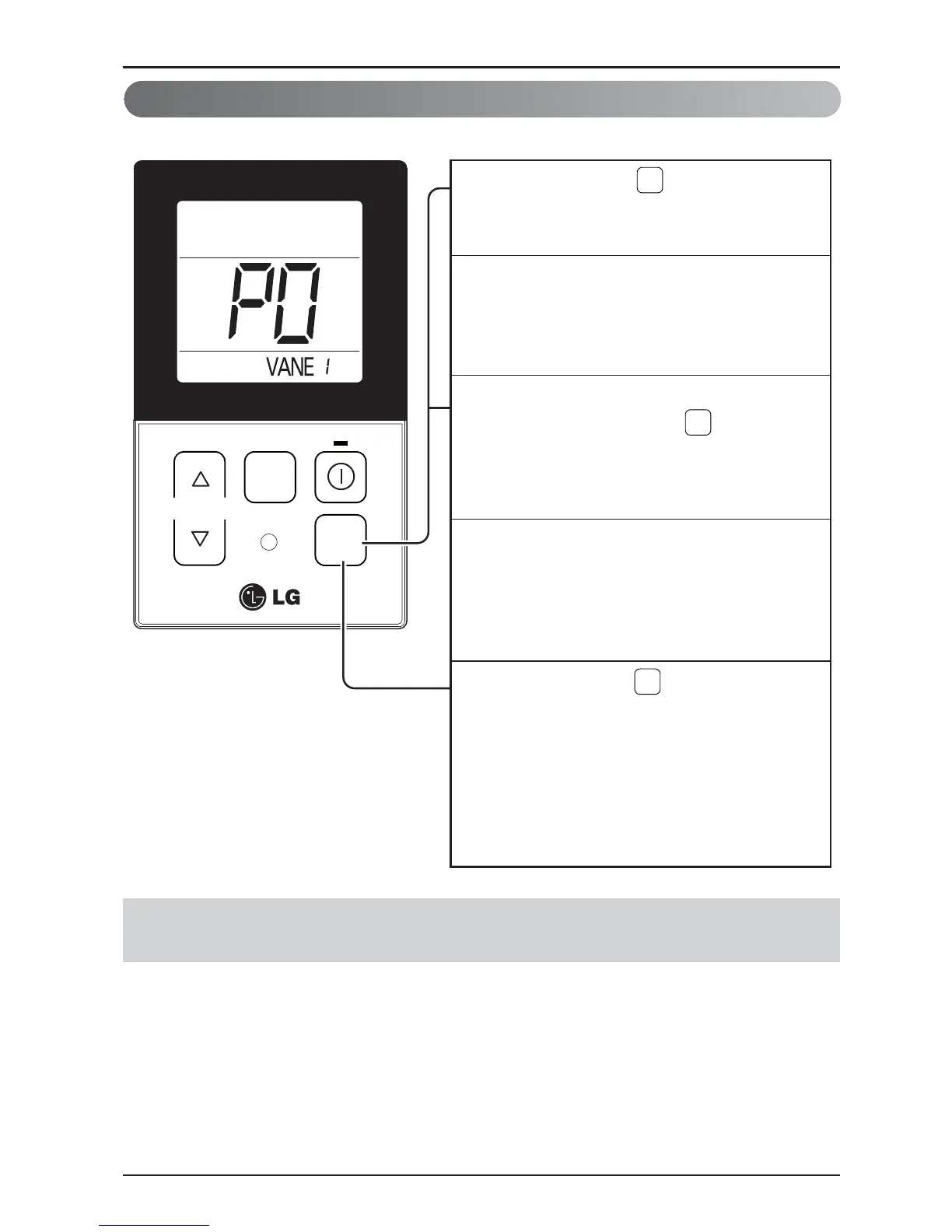
When pressing the button for approx. 3
seconds during the operation, the vane angle
control setting function can be used.
1
Initial ‘vane1’ is indicated at the window
panel upper section and the system
becomes the setting mode as ‘P0’ is
indicated at the temperature display section.
2
Select the vane angle number from ‘vane1’
to ‘vane4’ by pressing the button.
- When selecting the vane number, the vane
which is corresponded to the number will be
opened and closed.
3
Select the vane angle from ‘P0’ to ‘P6’ with
the temp up/down button.
- In the case of the wind flowing out angle,
(Minimum angle)…………….(Max angle)
‘ P0 < P1 < P2 < P3 < P4 < P5 < P6 ’
4
When pressing the button for 3 seconds,
the setting is finished and the vane angle
control setting is completed.
- If there isn’t any button input for approx. 60
seconds after the setting, the system will
be coming out of the vane angle control
setting mode automatically.
5
OPER
MODE
OPER
MODE
OPER
MODE


 To Next Page
 Loading...