Hinet UPS User Manual
Page 18 (12/01)
4.2.4 EVENT HISTORY MENU
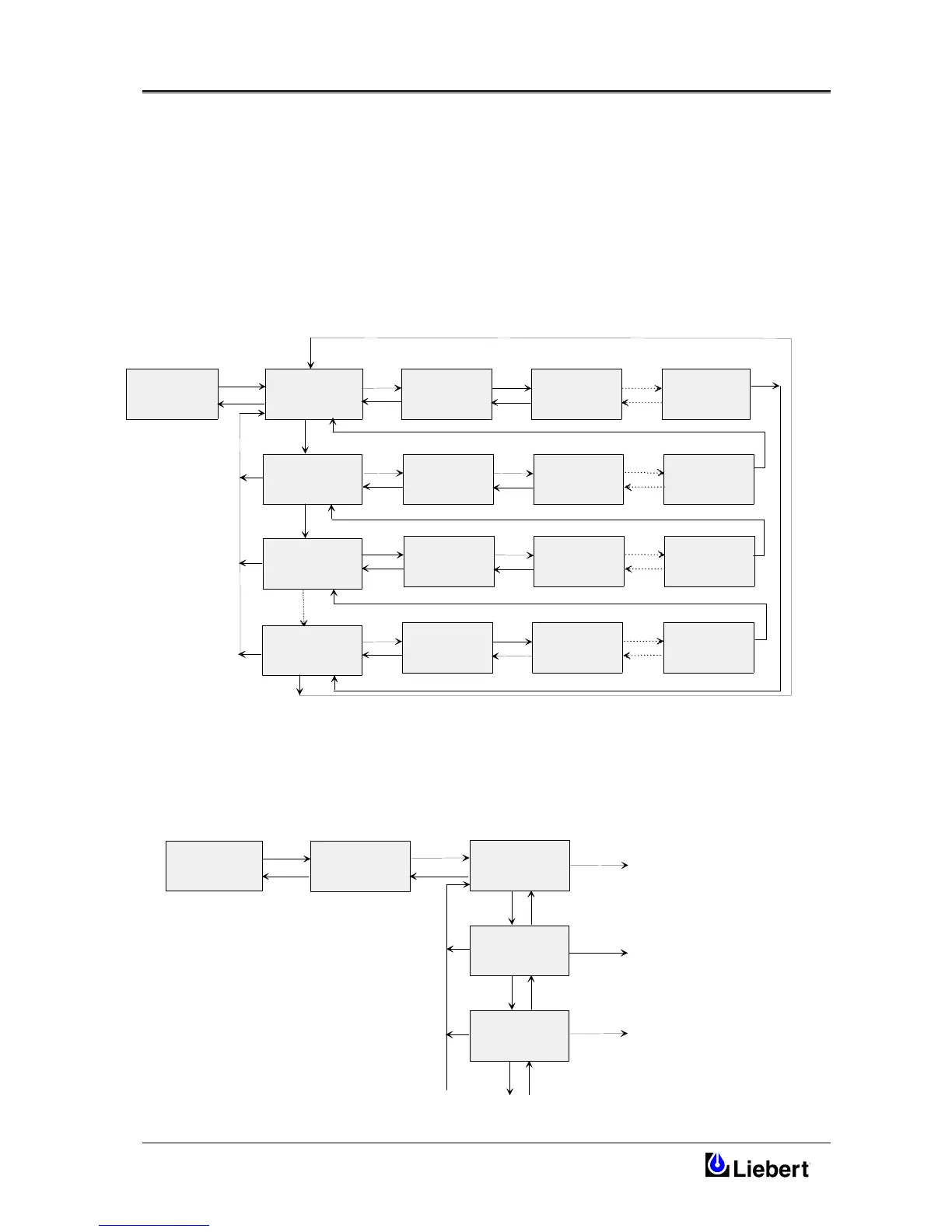
In this menu the user may scroll through the Hinet past n°512 Alarm occurrences in chronological order.
The Event Log display can be opened from the menu EVENT HISTORY by pressing ENTER twice. The Log screen
will display Date and Time of the last EVENT occurred. The Back push button will be used to scroll Date and Time of
the previous EVENTS and the Next push button will be used to scroll other statements and Alarm Messages connected
to the same EVENT.
In any position of the EVENT List by pressing Menu the Display Screen will go back in the last EVENT occurred.
To delete all unwanted EVENT first move in the DELETE EVENTS display, then press ENTER.
EVENT HISTORY
DELETE EVENTS
ENTER
CLEAR
ENTER
CLEAR
DATE & TIME
LAST EVENT
EVENT
CANCELLED
BACK CLEAR
DATE & TIME
PREVIOUS EVENT
N-1
BACK CLEAR
DATE & TIME
PREVIOUS EVENT
N-2
MENU
MENU
ENTER
EVENT
CANCELLED
ENTER
EVENT
CANCELLED
ENTER
DISPLAY EVENTS
DATE & TIME
LAST EVENT
NEXT
ALARM & STATE
LAST EVENT
MESSAGE 1
BACK
DATE & TIME
PREVIOUS EVENT
LAST-1
BACK
BACK
DATE & TIME
PREVIOUS EVENT
LAST-2
MENU
MENU
ALARM & STATE
LAST EVENT
MESSAGE 2
NEXT
BACK
ALARM & STATE
LAST EVENT
MESSAGE M
NEXT
BACK
NEXT
ALARM & STATE
PREV. EVENT N-1
MESSAGE 1
BACK
ALARM & STATE
PREV. EVENT N-1
MESSAGE 2
NEXT
BACK
ALARM & STATE
PREV.EVENT N-1
MESSAGE M
NEXT
BACK
ENTER
CLEAR
NEXT
NEXT
ALARM & STATE
PREV. EVENT N-2
MESSAGE 1
BACK
ALARM & STATE
PREV. EVENT N-2
MESSAGE 2
NEXT
BACK
ALARM & STATE
PREV.EVENT N-2
MESSAGE M
NEXT
BACK
NEXT
BACK
DATE & TIME
FIRST EVENT
NEXT
ALARM & STATE
FIRST EVENT
MESSAGE 1
BACK
ALARM & STATE
FIRST EVENT
MESSAGE 2
NEXT
BACK
ALARM & STATE
FIRST EVENT
MESSAGE M
NEXT
BACK
NEXT
MENU
BACK
NEXT
NEXT




 To Next Page