LifeSize Icon Video System Guide 13
Managing Your Video System In a Call
By default, you must manually answer or ignore incoming calls. Administrators can set the Auto Answer
and Auto Answer Mute preferences.
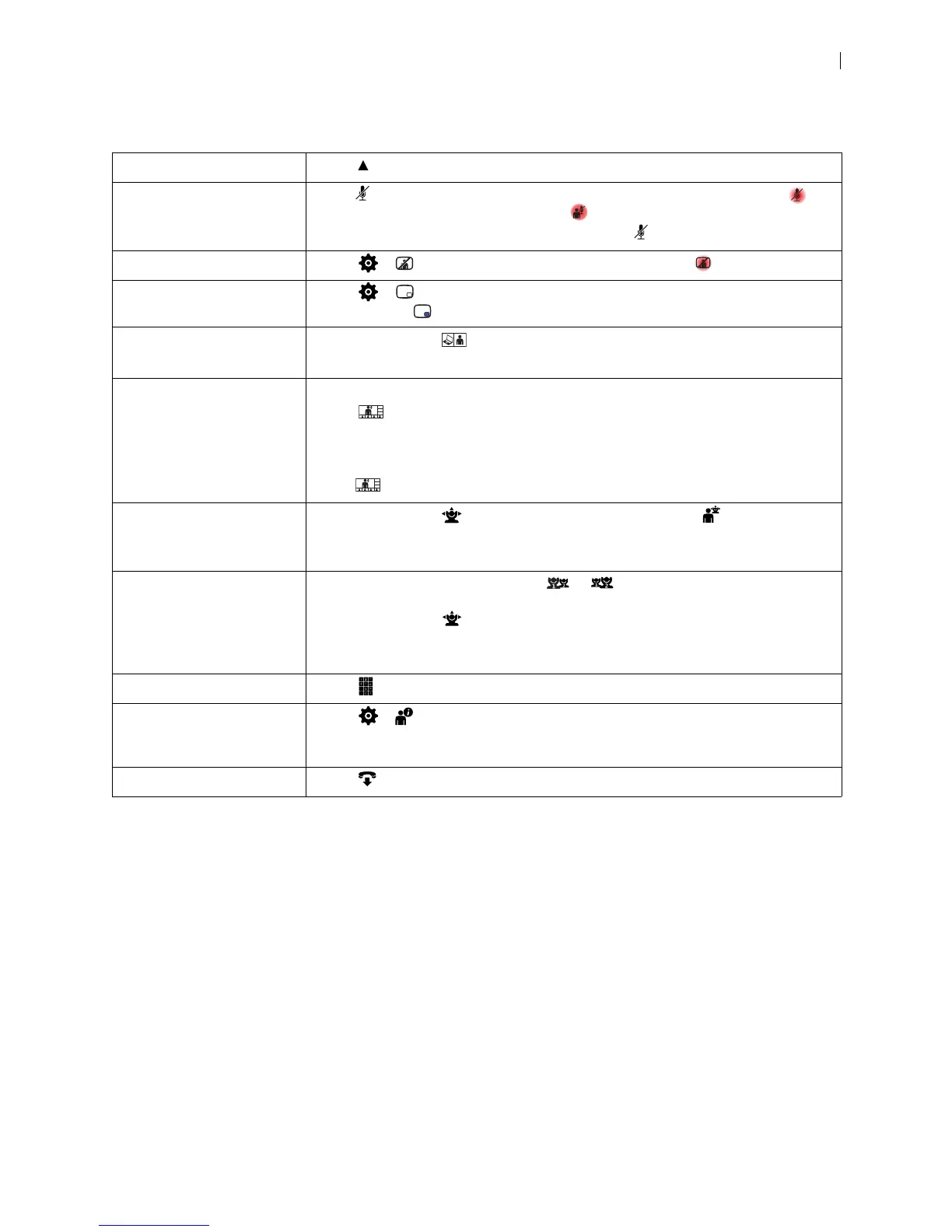
Hide onscreen text Select Hide.
Mute audio Press on the remote control to mute audio to the far end. When enabled,
appears. If audio at the far end is muted, appears.
You can also mute audio to the far end by pressing on your audio device.
Mute video Select > to mute video to the far end. When enabled, appears.
Show picture in picture Select > to show picture in picture video when the video system is in a call.
When enabled, appears.
Change the presentation
layout
During a call, select and navigate to the desired layout.
Read more at Initiating a Presentation.
Change the call layout Available in LifeSize Bridge calls only:
Select and navigate to the desired layout. If your video system is integrated
with a LifeSize Bridge, available layouts for the call appear. If your video system is a
participant in a call hosted by LifeSize Bridge but is not integrated with the bridge,
navigate to the desired layout by selecting Next or Previous.
NOTE: is not available if the call has only one available layout.
Move the cameras During a call, select to adjust the near end camera. Select
to adjust the far
end camera.
Read more at Camera Control.
Swap camera input If two cameras are connected, select or to swap the primary camera input.
By default, the HD camera is the primary input, camera 1, and the DVI camera is
camera 2. Selecting
adjusts camera 1.
NOTE: Presentations are not available with two cameras connected to the video
system.
Use the keypad Select to show a keypad to enter tones if required by the far end.
Show caller information Select > to show details about the caller, including the system name and
number. Call statistics also appear and include the call type and protocol,
connection time, and direction of the call.
End the call Select .


 To Next Page