41
How to measure the surface loss:
• Enter the nominal power of the burner.
• Press "Proceed"
• Enter the surface temperature TS of the single areas and
their dimensions (width x height).
• Measure the average surface temperatures with the Special
Wall Temperature Probe connected to the Lindab PC 410
and accept it by pressing the “Accept” key.
• Proceed the same way for each partial surface.
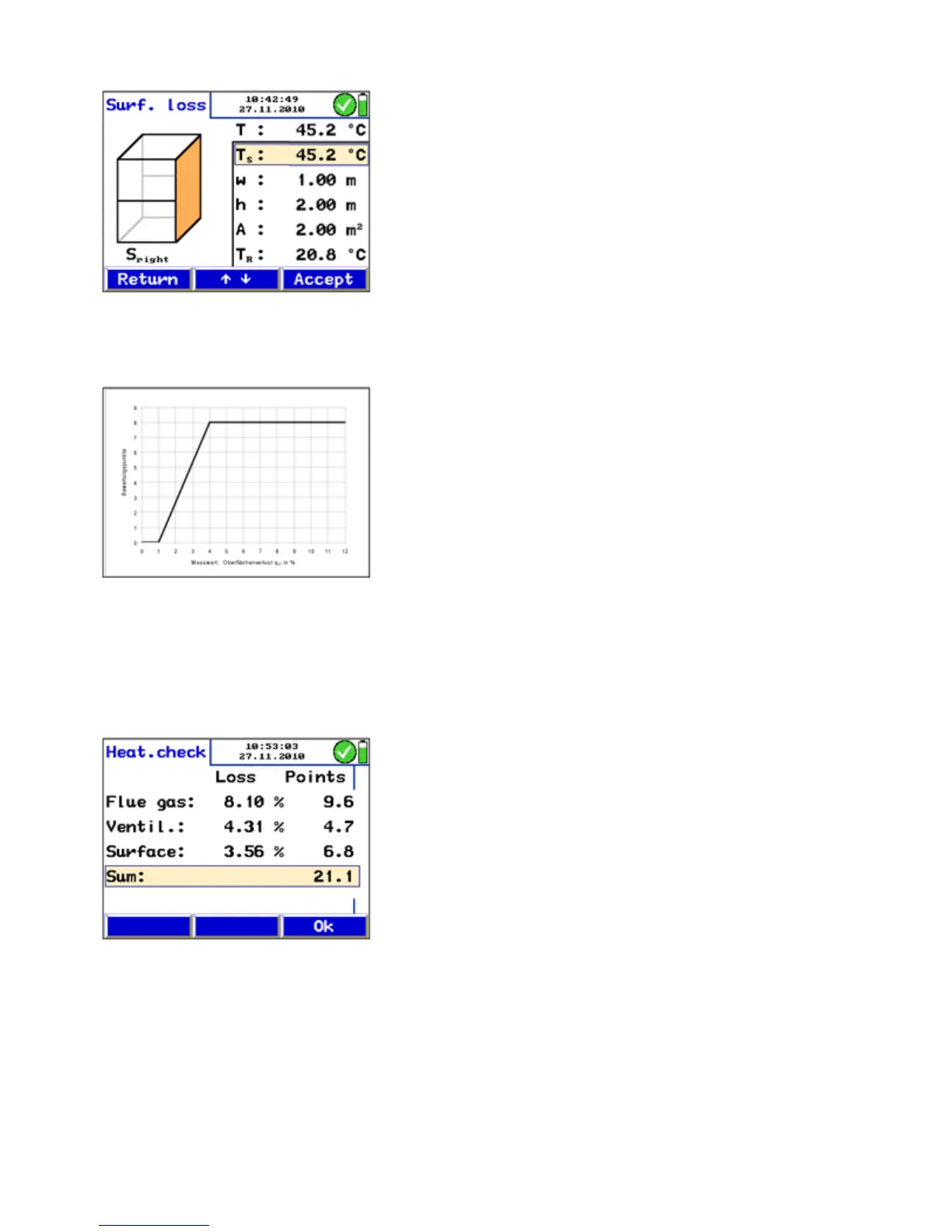
The meter will calculate the surface loss qr (r: radiation).
The surface loss will be referred to the heat emission and
then converted into improvement potential points accord-
ing to the DIN EN 15378, national appendix. The conversion
into improvement potential points is done according to the
graphic in Fig. 51: Converting the surface loss in potential
improvement points.
After the measurement of the surface loss has been com-
pleted, "Surface loss" will be marked by a tick mark in the
"Heating check" screen.
Evaluation The menu item "Evaluation" presents all results and the corre-
sponding improvement potential points according to DIN EN
15378. These have to be registered in the Energy Utilization
Check certificate.
Fig. 51: Converting the surface loss in
potential improvement points
Fig. 52: Evaluation of the heating check
Fig. 50: Measuring the surface loss



 To Next Page