Rev: 09.19.23 Page 27 CCD-0007153
Syncing the System to a Mobile Phone
1. On your preferred app store, enter "Lippert Titan Leveling" in the search bar.
NOTE: The Lippert Titan Leveling App is available for Apple® and Android™ devices.
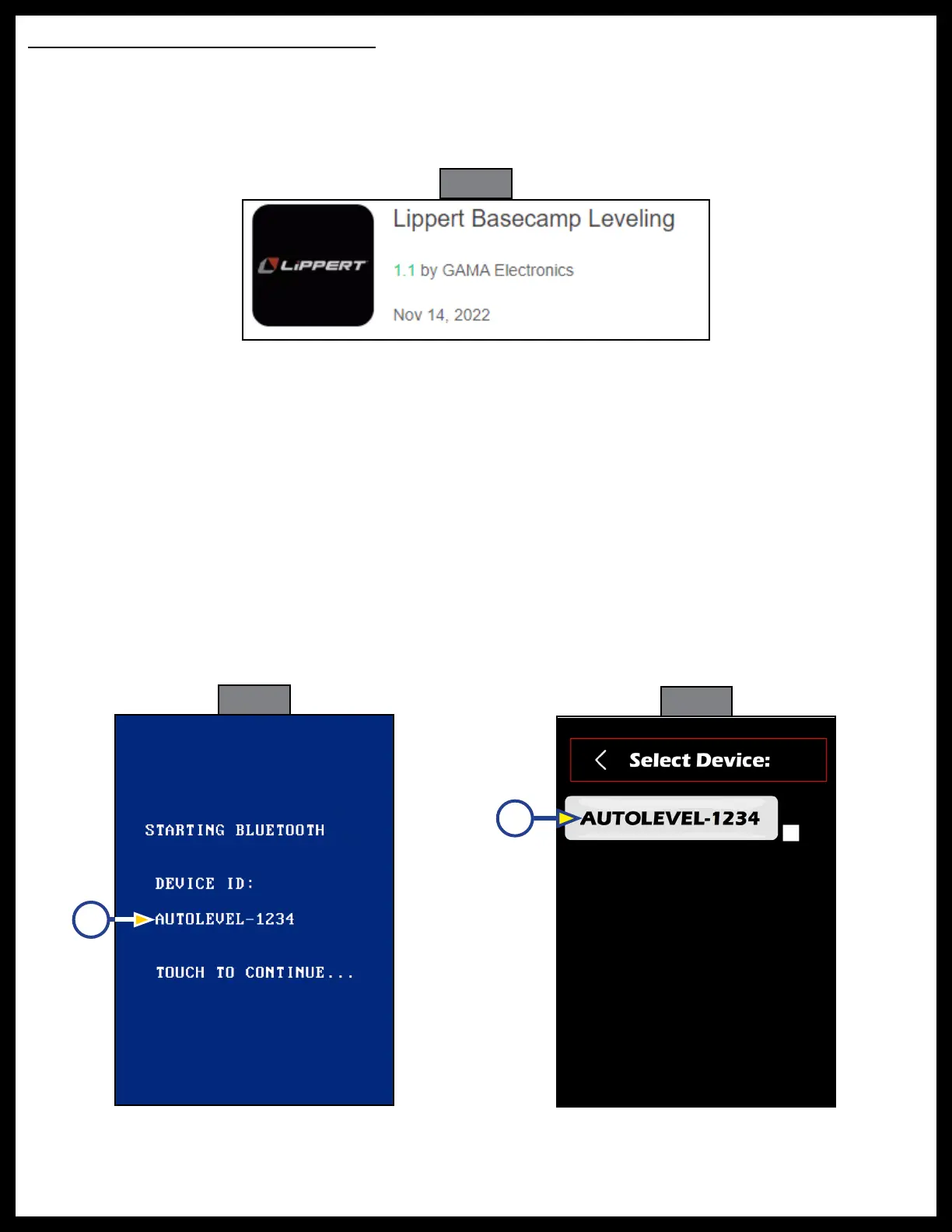
2. Select the Lippert Titan Leveling app by GAMA Electronics (Fig. 59), download and install it.
3. Make sure the system (touchpad, controller) is awake and the vehicle ignition is off.
Fig. 59
Fig. 60
Fig. 61
NOTE: Bluetooth is disabled while ignition is ON.
4. On the touchpad, select the menu button (Fig. 49D) from the home screen (Fig. 49).
5. Select "Connect App" (Fig. 50C) on the Menu screen (Fig. 50). The touchpad will now display the
pairing screen (Fig. 60).
6. The pairing screen will display the Device ID (Figure 60A). Note this Device ID for later.
7. Launch the Lippert Titan Leveling app on the mobile phone.
8. The home screen (Fig. 49) will display on the mobile phone.
9. Select the menu icon (Fig. 49D) on the mobile phone's home screen.
10. On the mobile phone, select "Connect App" (Fig. 50C) on the menu screen (Fig. 50). The select device's
screen (Fig. 61) will now be displayed on the mobile phone with a list of available devices.
11. Select the device that matches the Device ID listed on the touchpad's paring screen (Fig. 61A) from the
those listed to connect the mobile phone to the system.
12. Once connected, the phone and touchpad will return to the home screen.
A
A



 To Next Page